| View previous topic :: View next topic |
| Author |
Message |
phoenon
Joined: 22 May 2008
Posts: 23
|
 Posted: Thu Jun 05, 2008 5:21 am Post subject: Posted: Thu Jun 05, 2008 5:21 am Post subject: |
 |
|
| bnimp wrote: | Ok, I've got everything taken care of...
- the Free BT driver is installed (without the MS driver trying to be installed),
- 1.10.1 of the libusb driver is installed,
- PPJOY is installed (with 4 controllers created),
I start BtSix (I have 14a) and it shows a MAC address there and i click it and click ok, ok. I unplug the controller from usb, press the PS button, and BtSix says ".: Sixaxis is connected! :." on the top. LED1 is lit up on the controller, but i get no response from any of the buttons whatsoever. Anyone got anything I could try?
also, the test program that comes with freebt doesn't find anything when i click Inquiry. Hrmmm |
Some BT dongles doesn't support BtSix, if you are able to test an other...I'm sure that's the reason.
x64
| mib45 wrote: |
I am new to this forum, so
Hi @ all
Concerning 64bit: I searched the internet and found a libusb for 64bit. I cannot test it because I don't have a ps3 controller.
Please answer if it is working for you.
Link to libusb64
- mib45 |
This is very interesting, but there are two problems added.
1 - FreeBT doesn't work under x64 systems
2 - ppjoy same thing
perhaps someone could recompile FreeBT for x64, but there seem to be no solve for ppjoy under x64.Isn it?
wtf!! |
|
| Back to top |
|
 |
bnimp
Joined: 04 Jun 2008
Posts: 3
|
| Posted: Thu Jun 05, 2008 6:18 am Post subject: |
|
|
I have the DLink BT-120... it's at least supported by FreeBT :-\.
The light on the controller will even turn off when I click Disconnect on the bottom of the BtSix window. |
|
| Back to top |
|
|
phoenon
Joined: 22 May 2008
Posts: 23
|
| Posted: Thu Jun 05, 2008 7:40 am Post subject: |
|
|
| uncompatible bt dongles conect but doesn't respond to controls |
|
| Back to top |
|
|
xpir
Joined: 17 May 2008
Posts: 2
|
| Posted: Thu Jun 05, 2008 8:01 am Post subject: |
|
|
| Is there a way to do this without having BT on the windows host and use the USB instead? or sixaxis uses the USB cable just to register the host and all the pad signals mast go via BT? |
|
| Back to top |
|
|
amasokin
Joined: 05 Jun 2008
Posts: 1
|
| Posted: Thu Jun 05, 2008 8:53 am Post subject: |
|
|
Do BT Dongles which are not 2.0 are compatible with BTSix ?
If not, I'm gonna buy one just to connect my PS3 Pad to my Mac, but I have no idea which one to chose.
Do you think the last Belkin BT dongle will be okay ?
Does anybody own it and have tested it with BTSix ?
Thanks, and congrats to 89ron for his work. |
|
| Back to top |
|
|
bnimp
Joined: 04 Jun 2008
Posts: 3
|
| Posted: Thu Jun 05, 2008 9:11 am Post subject: |
|
|
| phoenon wrote: | | uncompatible bt dongles conect but doesn't respond to controls |
Ah, ok. So which ones do work? What do you recommend? |
|
| Back to top |
|
|
Tindytim
Joined: 03 May 2008
Posts: 18
|
| Posted: Thu Jun 05, 2008 5:59 pm Post subject: |
|
|
| amasokin wrote: | Do BT Dongles which are not 2.0 are compatible with BTSix ?
If not, I'm gonna buy one just to connect my PS3 Pad to my Mac, but I have no idea which one to chose.
Do you think the last Belkin BT dongle will be okay ?
Does anybody own it and have tested it with BTSix ?
Thanks, and congrats to 89ron for his work. |
........and how are you going to use it with your Mac? BtSix is a Windows executable......... |
|
| Back to top |
|
|
ntran89
Joined: 05 Jun 2008
Posts: 5
|
| Posted: Thu Jun 05, 2008 9:39 pm Post subject: |
|
|
Freebt won't install because I'm using my bluetooth card that came with the laptop, any help?
edit
and there is no "bluetooth radio" or anything similar in the device manager, I've tried installing/uninstalling the bluetooth stack that is the default manager that coems with this laptop, but still no luck
I can't get the freeBT drivers to install no matter what i try, and btsix refuses to work without it (i believe, it says "no bt detected or already in use"
edit
upon further reading, this is all for use with external USB dongles
any support for internal laptop bluetooth? |
|
| Back to top |
|
|
phoenon
Joined: 22 May 2008
Posts: 23
|
| Posted: Fri Jun 06, 2008 1:21 am Post subject: |
|
|
| bnimp wrote: | | Ah, ok. So which ones do work? What do you recommend? |
| ntran89 wrote: | Freebt won't install because I'm using my bluetooth card that came with the laptop, any help?
edit
and there is no "bluetooth radio" or anything similar in the device manager, I've tried installing/uninstalling the bluetooth stack that is the default manager that coems with this laptop, but still no luck
I can't get the freeBT drivers to install no matter what i try, and btsix refuses to work without it (i believe, it says "no bt detected or already in use"
edit
upon further reading, this is all for use with external USB dongles
any support for internal laptop bluetooth? |
My internallaptop BlueTooth stack works, but you must find it in device manager. This steep is required.
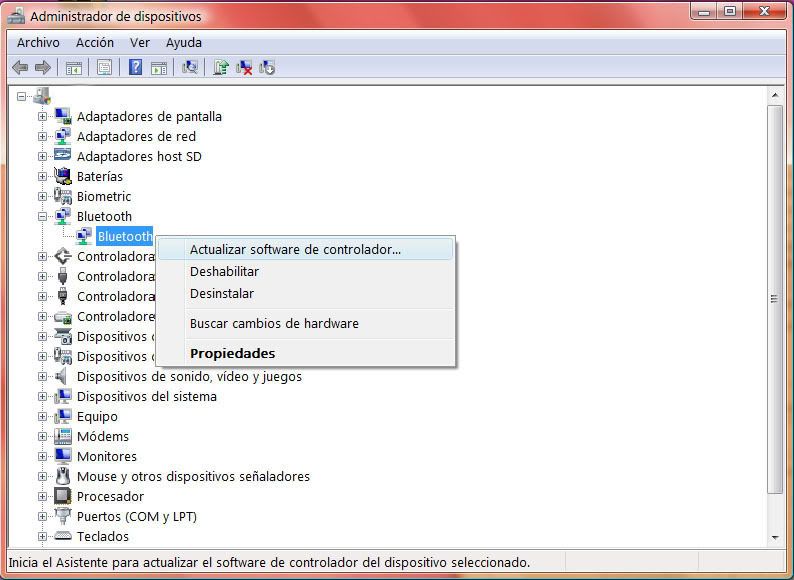
My laptop Bt device is Toshiba, tested one Vivanco and other creative, all three working perfect.
Asus c90s |
|
| Back to top |
|
|
ntran89
Joined: 05 Jun 2008
Posts: 5
|
| Posted: Fri Jun 06, 2008 9:22 am Post subject: |
|
|
The only "bluetooth" i'm getting under device managers is this
 |
|
| Back to top |
|
|
ntran89
Joined: 05 Jun 2008
Posts: 5
|
| Posted: Fri Jun 06, 2008 11:43 am Post subject: |
|
|
| phoenon wrote: | | bnimp wrote: | | Ah, ok. So which ones do work? What do you recommend? |
| ntran89 wrote: | Freebt won't install because I'm using my bluetooth card that came with the laptop, any help?
edit
and there is no "bluetooth radio" or anything similar in the device manager, I've tried installing/uninstalling the bluetooth stack that is the default manager that coems with this laptop, but still no luck
I can't get the freeBT drivers to install no matter what i try, and btsix refuses to work without it (i believe, it says "no bt detected or already in use"
edit
upon further reading, this is all for use with external USB dongles
any support for internal laptop bluetooth? |
My internallaptop BlueTooth stack works, but you must find it in device manager. This steep is required.
My laptop Bt device is Toshiba, tested one Vivanco and other creative, all three working perfect.
Asus c90s |
Also, can you post a guide on how to do this with an internal laptop card? I can't get XP to ask for driver because I can't just "plug in" an internal card. Even if I could, freebt is for dongles only, si it not? please help, thanks! |
|
| Back to top |
|
|
phoenon
Joined: 22 May 2008
Posts: 23
|
| Posted: Fri Jun 06, 2008 7:16 pm Post subject: |
|
|
| ntran89 wrote: | The only "bluetooth" i'm getting under device managers is this
|
perhaps you should list the device manager by conection...
view menu > devices by conection.
if you have a working bluetooth device and you are able to use it, it must be somewere in device manager...
perhaps is listed as Universal Serial Bus, as FreeBT do:
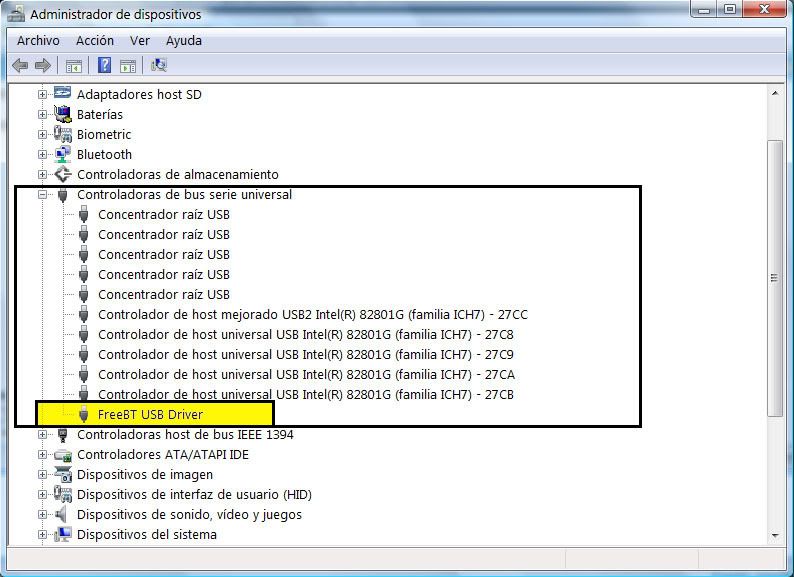
take a look!
------------>>>
| ntran89 wrote: | | Also, can you post a guide on how to do this with an internal laptop card? I can't get XP to ask for driver because I can't just "plug in" an internal card. Even if I could, freebt is for dongles only, si it not? please help, thanks! |
For install FreeBT, you must use "have disk" method...
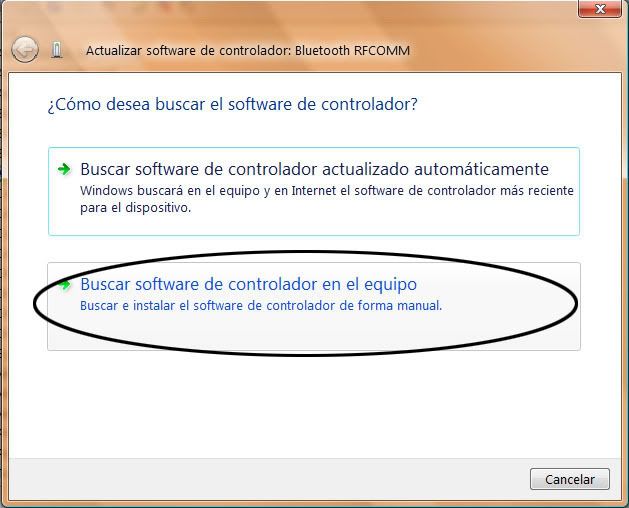
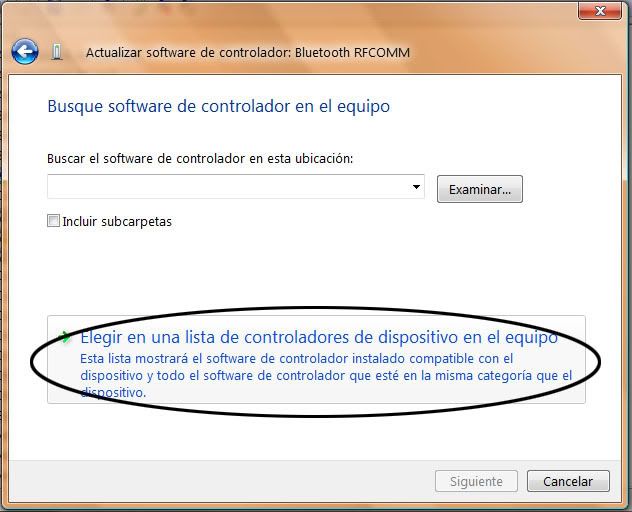
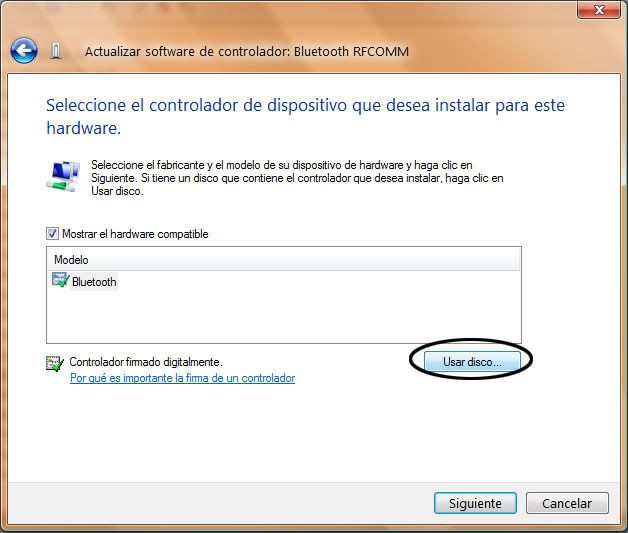
search the FreeBT driver folder...
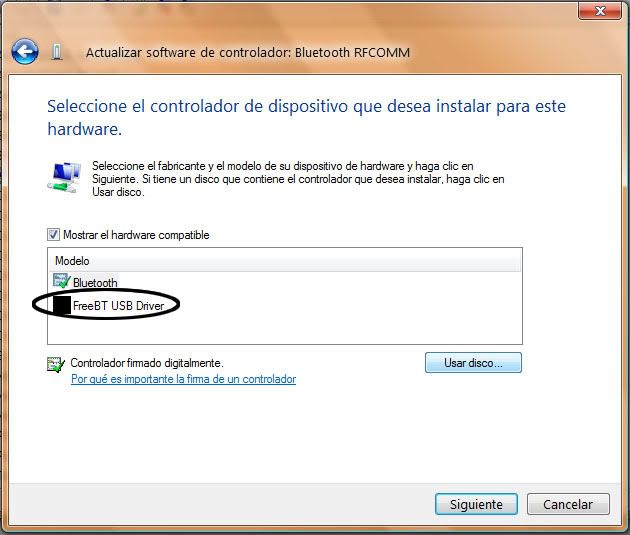
Test this way...
I'm sorry, images are in spanish...In XP it's almost the same... |
|
| Back to top |
|
|
ntran89
Joined: 05 Jun 2008
Posts: 5
|
| Posted: Sat Jun 07, 2008 12:24 am Post subject: |
|
|
thank you, everything up until using the game pad works
i got it paired, i see the pitch and roll bars, i mapped it all in ppjoy, but the "scan" buttons do nothing, and windows game controller does not recognize any of the buttons doing anything. any help?
edit nevermind works almost flawlessly, one question
how do you get the L2 and R2 to work as triggers? i tried setting them as axis, but that doesn't work, I also tried to set them as analog (both min and max) but also no good. anyone have a clue?
setting them as axes is messed up because windows sees each trigger as "midway" or half depressed when it is fully un-depressed. is there a simple work-around? |
|
| Back to top |
|
|
phoenon
Joined: 22 May 2008
Posts: 23
|
| Posted: Sat Jun 07, 2008 3:36 am Post subject: |
|
|
| ntran89 wrote: | thank you, everything up until using the game pad works
i got it paired, i see the pitch and roll bars, i mapped it all in ppjoy, but the "scan" buttons do nothing, and windows game controller does not recognize any of the buttons doing anything. any help?
edit nevermind works almost flawlessly, one question
how do you get the L2 and R2 to work as triggers? i tried setting them as axis, but that doesn't work, I also tried to set them as analog (both min and max) but also no good. anyone have a clue?
setting them as axes is messed up because windows sees each trigger as "midway" or half depressed when it is fully un-depressed. is there a simple work-around? |
Test this mapping:
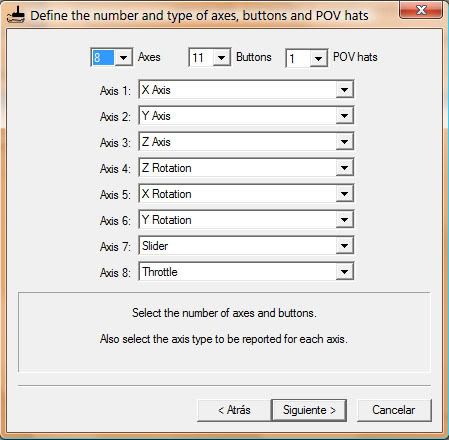
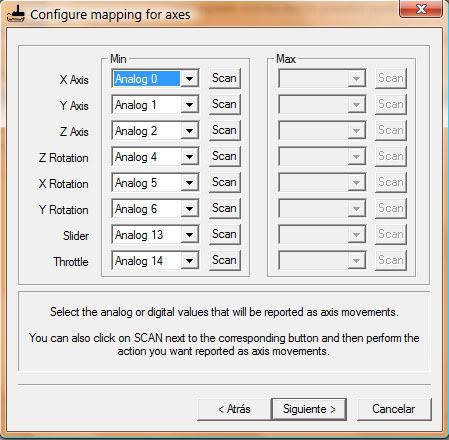
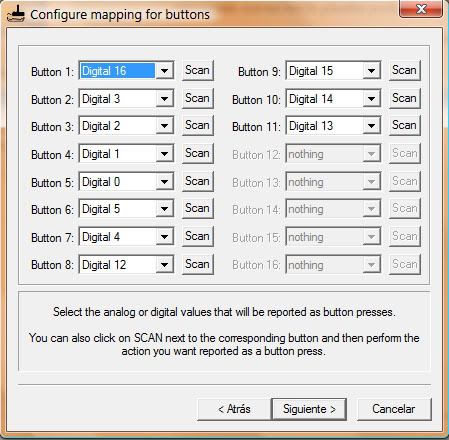
Take care to map them as analogue no digital... |
|
| Back to top |
|
|
mohbana
Joined: 08 Jun 2008
Posts: 13
|
| Posted: Sun Jun 08, 2008 7:20 am Post subject: |
|
|
hi,
I'm new to this forum, I was hoping someone could tell me how to get my PS3 controller working on the Windows Vista 64bit so i can play Dirt, Assassins creed and a few other games. What's really strange is that the controller works on Ubuntu Gusty 64bit!!! I think the last time i tried was with the 32bit drivers (thought i could be absolutely wrong).
I'd really appreciate the help, thanks in advance. I forgot to mention i simply want cable support, i have no need for bluetooth. |
|
| Back to top |
|
|
edaciousx
Joined: 08 Jun 2008
Posts: 4
|
| Posted: Sun Jun 08, 2008 8:31 pm Post subject: |
|
|
| Hey there, I'm also very interested in getting my PS3 six axis controller to work with 64 bit Vista's USB. I want to play grid :/. I'm not a coder but I'm assuming it shouldn't be too had to modify the bluetooth 64 bit drivers for USB? |
|
| Back to top |
|
|
mohbana
Joined: 08 Jun 2008
Posts: 13
|
| Posted: Sun Jun 08, 2008 11:20 pm Post subject: |
|
|
hi,
how did you get the ps3 sixaxis controller working on vista (business) 64bit. before i installed the drivers the controller would appear under Game Controllers in the control panel and it didn't respond to buttons presses etc, basically nothing worked other than it showing up in the Game Controllers section, but it wouldn't register with the testlibusb.exe or testlibusb-win.exe i.e., the corresponding programs would no produce any output. After installing the drivers by manually updating the drivers for USB Human Interface Device where the controllers was plugged in then restarting - i think i also used DISABLE DRIVER ENFORCEMENT via the F8 when starting windows, the output of testlibusb-win.exe became as follows
| Code: | DLL version: 0.1.12.1
Driver version: 0.1.12.1
bus/device idVendor/idProduct
bus-0/\\.\libusb0-0001--0x054c-0x0268 054C/0268
- Manufacturer : Sony
- Product : PLAYSTATION(R)3 Controller
wTotalLength: 41
bNumInterfaces: 1
bConfigurationValue: 1
iConfiguration: 0
bmAttributes: 80h
MaxPower: 250
bInterfaceNumber: 0
bAlternateSetting: 0
bNumEndpoints: 2
bInterfaceClass: 3
bInterfaceSubClass: 0
bInterfaceProtocol: 0
iInterface: 0
bEndpointAddress: 02h
bmAttributes: 03h
wMaxPacketSize: 64
bInterval: 1
bRefresh: 0
bSynchAddress: 0
bEndpointAddress: 81h
bmAttributes: 03h
wMaxPacketSize: 64
bInterval: 1
bRefresh: 0
bSynchAddress: 0 |
After installing the drivers, the controller no longer appears in Game Controllers. I tried running the ps3sixaxis_en.exe but that freezes almost immediately after i run it, it produces the following;
| Code: | $ ps3sixaxis_en
PLAYSTATION(R)3 SIXAXIS initiator for windows
by Keiichi AOKI (k1@padc.cs.tsukuba.ac.jp), 2006 |
| Code: | $ testlibusb.exe
Dev #0: 0000 - 0000
Dev #1: Sony - PLAYSTATION(R)3 Controller |
Thanks in advance, i've been looking for the drivers for ages. I run Ubuntu hardy mainly for development purposes and I use vista business 64bit for gaming, it's strange that the controller works perfectly on it. I found the 64bit drivers at http://www.4shared.com/file/41034572/1c815fbc/SIXAXIS_libusb-win64.html |
|
| Back to top |
|
|
edaciousx
Joined: 08 Jun 2008
Posts: 4
|
| Posted: Mon Jun 09, 2008 4:11 am Post subject: |
|
|
| wait im sorry im a bit confused. there's 64bit drivers out for vista? but the drivers don't work for 64 bit vista??? People have been using the bluetooth version to work with vista, not the USB. are those drivers for USB?? Sorry, kind of confused. thanks |
|
| Back to top |
|
|
mohbana
Joined: 08 Jun 2008
Posts: 13
|
| Posted: Tue Jun 10, 2008 3:54 am Post subject: |
|
|
I'm using the 64bit drivers for the libusb supplied some where earlier in this thread here are the current status of things;

http://img78.imageshack.us/img78/7042/sixaxisco9.jpg
Notice that the controller isn't being detected anyone by Vista!!! ... how strange! |
|
| Back to top |
|
|
ntran89
Joined: 05 Jun 2008
Posts: 5
|
| Posted: Tue Jun 10, 2008 10:46 am Post subject: |
|
|
| One more question, installing freeBT and the like completely destroyed functionality of my "bluetooth stack", how do i transfer files to my phone/vice versa now? |
|
| Back to top |
|
|
andyjmacross
Joined: 17 Mar 2008
Posts: 2
|
| Posted: Thu Jun 12, 2008 6:38 pm Post subject: |
|
|
as we run this program "BtSix"
could it be able to "min" when it start ?
or...
can create a QuicklyLunch connect or disconnect Controller ? |
|
| Back to top |
|
|
sman26
Joined: 13 Jun 2008
Posts: 7
|
| Posted: Fri Jun 13, 2008 4:04 am Post subject: |
|
|
Just a little help please.
I have the D-Link DBT-120 compatible adapter. My problem is when I install it into my XP Pro SP2 PC it automatically installs "Bluetooth Radios --> Generic Bluetooth Radio & Microsoft Bluetooth Enumerator" drivers. How do i get it to NOT install this crap when i plug in. I want the "MS can not find drivers...show me where to look" message to pop up first but stupid MS thinks it knows what i want and installs it. I want to be able to point it at the FreeBT stuff.
Sorry if this was answered before...looked pretty hard thru the 6 pages of post but couldn't find anything.
Thanks. |
|
| Back to top |
|
|
phoenon
Joined: 22 May 2008
Posts: 23
|
| Posted: Fri Jun 13, 2008 5:07 am Post subject: |
|
|
use have disk install method...
I posted abobe how to do this.take a look.
good luck |
|
| Back to top |
|
|
sman26
Joined: 13 Jun 2008
Posts: 7
|
| Posted: Fri Jun 13, 2008 6:01 am Post subject: |
|
|
Thank for replying Phoenon.
By "disk install method" if you are refering to point to drivers that I have on disk or the desktop and not Windows I know how to do this but it never give me the chance. As soon as i plug my DBT-120 adapter into the USB port Windows detects the device and installs its own drivers without ever giving me the option to point to my drivers.
Any other ideas.
Thanks a bunch. |
|
| Back to top |
|
|
phoenon
Joined: 22 May 2008
Posts: 23
|
| Posted: Fri Jun 13, 2008 7:06 am Post subject: |
|
|
| phoenon wrote: |
For install FreeBT, you must use "have disk" method...
search the FreeBT driver folder...
Test this way...
I'm sorry, images are in spanish...In XP it's almost the same... |
all BT devices install windows own driver...you must say what driver use, please follow the intructions on the images, by doing this, you'll force windows to use this driver...
test it
Last edited by phoenon on Fri Jun 13, 2008 7:11 am; edited 1 time in total |
|
| Back to top |
|
|
phoenon
Joined: 22 May 2008
Posts: 23
|
| Posted: Fri Jun 13, 2008 7:07 am Post subject: |
|
|
sorry duplicated post :S
see images abobe |
|
| Back to top |
|
|
sman26
Joined: 13 Jun 2008
Posts: 7
|
| Posted: Fri Jun 13, 2008 7:37 am Post subject: |
|
|
phoenon
thanks for bearing with me man.
i see the picts. it must be a tad diff with xp pro...don't have vista (i know they are essentially the same in parts but just follow my flow here)
plug in bt adapter
windows bt drivers install automatically
i go to device mgr
there are two subheadings under BLUETOOTH RADIOS --> Generic BT Radio and MS BT Enumerator
On either Generic BT Radio or MS BT Enumerator i can right click and go to "update driver"
(i try this on both)
can windows connect to windows update --> NO
what do you want the wizard to do --> install from specific location
search for best driver in this location --> browse to ...\freebt\src\driver\fbtusb
it spits back --> CANNOT CONTINUE THE HARDWARE UPDATE WIZARD...the wizard could not find a better match for your hardware than the software you currently have installed.
please don't flame me too bad. how do i get to the screens you are referring to to fix this? |
|
| Back to top |
|
|
phoenon
Joined: 22 May 2008
Posts: 23
|
| Posted: Fri Jun 13, 2008 5:09 pm Post subject: |
|
|
here is an example of have disk installation on xp...keep in mind it's for a graphics card, but it's exactly what you have to do with your BT device.
good luck |
|
| Back to top |
|
|
mohbana
Joined: 08 Jun 2008
Posts: 13
|
| Posted: Sat Jun 14, 2008 5:01 am Post subject: |
|
|
| hey guys please help us getting the 64bit working. |
|
| Back to top |
|
|
Devastator
Joined: 15 Jun 2008
Posts: 1
|
| Posted: Sun Jun 15, 2008 9:58 pm Post subject: |
|
|
Hello, I tried to install sie btsix driver. But I have a little problem.
After I disconnected the usb cable and pressed sie sixaxis home button, BtSix
identified my controller, an if I press any button, under "Buttons and Joysticks" I can see switching 0 to 1.
But if I press a button ingame or at PPJoy it doesn't work. Can someone help me?? ( My english isn't the best, I hope everbody can unterstand ) |
|
| Back to top |
|
|
|

 FAQ
FAQ Search
 Memberlist
 Usergroups
 Register
 Profile
 Log in to check your private messages
 Log in


