pegasus
Joined: 17 Jan 2006
Posts: 61
|
 Posted: Wed Apr 19, 2006 3:51 am Post subject: Guide:Direct DVDtoPMP using PMPSimpleCnvertr with exact crop Posted: Wed Apr 19, 2006 3:51 am Post subject: Guide:Direct DVDtoPMP using PMPSimpleCnvertr with exact crop |
 |
|
Hello everyone i know this guide will be helpful to others...
I use PMP Simple Converter because it's fast yet so simple.
Here's a link to my hexed edit PMP SImple Converter.exe with 720:576 res instead of 480:272 then we just scale it down to 480:272 (we can't crop if it already set to 480:272)
http://rapidshare.de/files/18314692/PMP_Simple__Hexedit_.exe.html
This method requires basic math and also THIS GUIDE SHOULD BE USED ONLY FOR WIDESCREEN DVD's.As you already know DVD isnt in native 16:9 so we should crop from both sides to get the exact aspect without distorting video.
first we add dvd://1 to the inputbox (1 is variable it may be dvd://2 or 3 and so on if you have episode divided DVD)
On the General Video Option add "-ofps 25 -dvd-device "x:" -chapter x-y"
-ofps 25 is the number of the frames, you can change it as you wish
-dvd-device "x:" where x is your dvd drive
-chapter x-y where x is the starting chapter and ending chapter to convert
optional:
you can add the "-slang en" or -sid 0,-sid 1 and so on to overlay english sub
On the Extra Video Filter add ",crop=xxx:xxx,scale=480:272,unsharp=l3x3:1:c3x3:1,harddup"
Now this is the hardest part (it's simple when you get used to it)
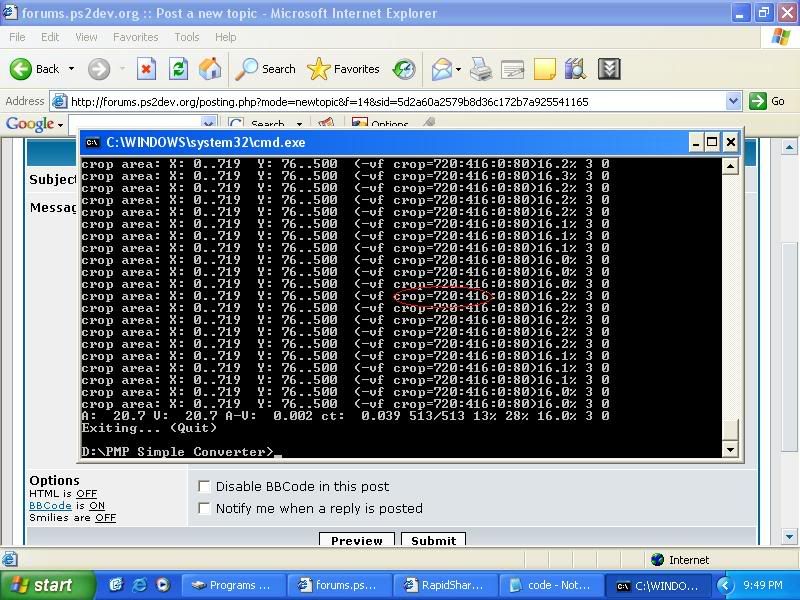
time to crop.. use command prompt, go to mplayer.exe directory then type "mplayer dvd://1 -dvd-device "x:" -vf cropdetect" to get the video res without black bars.. just wait for the display to be stable then stop the video.. get the number as shown in this picture
now well do the math
on my National Treasure DVD, originally 720x576 res is now 720:416
so we'll divide it to 16
720/16=45
416/16=26
45-26=19 take note of that..
now believe me it's not 16:9 video because it's not 13
the psps res:
480/16=30
272/16=17
30-17=13 this is a matter of ratio'ing
what we'll do to get the exact crop is to subtract 19 to 13
19-13=6
we'll take 6, subtract it to the orig 45
45-6=39
we'll take 39 and multiply it to 16 to get the cropped res.. (x axis)
39*16=624
see..
624/16=39
416/16=26
39-26=13
thus, we get the perfect 16:9 video res (624x416) in higher res than the psp so we just scale it down to 480:272 (scale=480:272) and we'll just replace crop=xxx:xxx
to "crop=624:416"
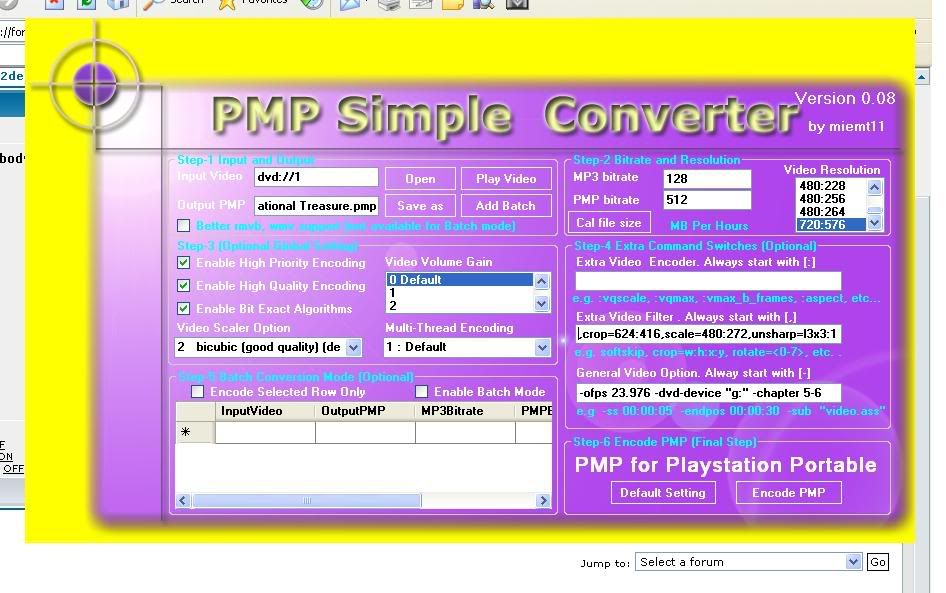
there you go, i hope someone might find it usefull..
remember that the numbers above are variable, it depends on your source DVD, it's just an example
for your reference. |
|

 FAQ
FAQ Search
 Memberlist
 Usergroups
 Register
 Profile
 Log in to check your private messages
 Log in


