 |
forums.ps2dev.org
Homebrew PS2, PSP & PS3 Development Discussions
|
| View previous topic :: View next topic |
| Author |
Message |
DiabloTerrorGF
Joined: 15 Jul 2005
Posts: 64
|
 Posted: Wed Jul 27, 2005 7:37 am Post subject: Posted: Wed Jul 27, 2005 7:37 am Post subject: |
 |
|
| BTW, is there any program to edit txt files on the PSP? some progs open them but all you can do is read... |
|
| Back to top |
|
 |
Shine
Joined: 03 Dec 2004
Posts: 728
Location: Germany
|
| Posted: Sat Jul 30, 2005 11:19 am Post subject: |
|
|
 Download Lua Player 0.3 Download Lua Player 0.3
First I've done some measures, to see if it is too slow. This is the code for the old version:
| Code: |
t1 = os.clock()
count = 200
for i=0,count do
fillBackground(0, 0, 480, 272)
end
t2 = os.clock()
print("t1: ", t1)
print("t2: ", t2)
print("Fill rate: ", count / (t2 - t1) * 1000)
|
The old version fills the background with 29.4 frames per second (fps). blitImage is 27.4 frame per second fast for fullscreen blits. You can use for a 16x16 image with alpha channel information with a speed of 10200 frames per second, which means that there is very low overhead in function calling with Lua, because 16x16 images fits 510 times into a whole screen, which means 27,4*510=13974 frames per second in theory without function overhead.
Of course, this is too slow for parallax scrolling and other nice effects, which needs multiple times updating the whole screen at VSync rate (60 frames per second). But thanks to chp we know now the signature of sceGuCopyImage and the 16 bit format 5551 for the color is sufficient. I've changed this in the Lua Player and some other functions, so this code tests the speed in the new player:
| Code: |
background = loadImage("background.png")
t1 = os.clock()
count = 200
for i=0,count do
blitImage(0, 0, background)
end
t2 = os.clock()
io.write("t1: " .. t1 .. "\n")
io.write("t2: " .. t2 .. "\n")
io.write("Fill rate: " .. (count / (t2 - t1) * 1000) .. "\n")
io.flush()
|
The result is 556 fps for blitting an image, ignoring the alpha-channel. When blitting an image with alpha channel, it looks like sceGuCopyImage can't be used, so I've implemented this sort of blits with texture blitting, like in the blit sample in the PSPSDK. Full screen blits can be done with this method with 204 fps.
It can be faster, if the texture is used from VRAM, but I want to make the usage as easy as possible, which means you don't have to remember, if you have a VRAM texture or an image, just anything is an image and can be used orthogonal with every operation.
For multilayer offscreen images you can blit from one image into another image, too. This is the slowest function with 58 fps currently. I hope the loop can be optimized or DMA transfer could be used later, when discovered how to do it, then it should be > 100 fps at least.
The new API for the Lua Player is documented in the doc.txt file. I've added some functions for blitting only parts of an image, so you can pack multiple tiles into one image (see the tiles.png in the snake sample application). The Lua library functions are not documented, you can find them at http://www.lua.org. For every function which writes to stdout or stderr, like io.write or if an error occured in your script, the graphics output is disabled and the text is printed on the screen. All functions should work or should return an error text. If you find any function which causes a crash, let me know and I'll fix it.
The source code is now more clean than the last version and I can implement the rest, like sound output, analog pad functions etc. But I don't want to do it all alone, if you have a fix or perhaps a speed optimization, send me a PM and I'll integrate it. If you want to add some functions, ask me before implementing it (you can talk to me sometimes at #pspdev at freenode.net) and if I think it is in the spirit of the simple concept I have in mind for the Lua player, you can implement it and I'll integrate it.
A nicer documentation would be fine, too, perhaps in HTML, with some example graphics to illustrate how the functions work. Just announce it in this forum before you start with it, to avoid duplicate work. |
|
| Back to top |
|
|
VgSlag
Joined: 30 Jun 2005
Posts: 43
|
| Posted: Sat Jul 30, 2005 8:39 pm Post subject: |
|
|
Thanks for your brilliant work so far Shine, I'll be changing my program slightly then I'll show you the tile engine I've been working on.
Thanks again! |
|
| Back to top |
|
|
DiabloTerrorGF
Joined: 15 Jul 2005
Posts: 64
|
| Posted: Sat Jul 30, 2005 10:26 pm Post subject: |
|
|
| Hallejuah! Although my game is still kinda slow, atleast putting it to screen seems to not make much of a difference. |
|
| Back to top |
|
|
Shine
Joined: 03 Dec 2004
Posts: 728
Location: Germany
|
| Posted: Sun Jul 31, 2005 12:52 am Post subject: |
|
|
| VgSlag wrote: | Thanks for your brilliant work so far Shine, I'll be changing my program slightly then I'll show you the tile engine I've been working on.
|
I don't know what do you mean with tile engine, in Lua Player 0.3 is already a function included to blit tiles from one image to another image or to screen, but I'm looking forward to see your game.
| DiabloTerrorGF wrote: |
Although my game is still kinda slow, atleast putting it to screen seems to not make much of a difference.
|
Do you have an example where it is slow? If it is not the drawing, do you have some complicated AI computer opponent or other complicated calculations?
BTW: The Lua Player source code is now in the subversion repository. If you want to help me with the C program, you can checkout it with "svn co svn://svn.pspdev.org/pspware/trunk/LuaPlayer" (or browse at svn.pspdev.org), but you have to built the current PSP toolchain with GCC 4.0.1 from svn.pspdev.org/psp/trunk/psptoolchain. |
|
| Back to top |
|
|
VgSlag
Joined: 30 Jun 2005
Posts: 43
|
| Posted: Sun Jul 31, 2005 2:01 am Post subject: |
|
|
Shine, I meant a tile based platform game engine.
G |
|
| Back to top |
|
|
DiabloTerrorGF
Joined: 15 Jul 2005
Posts: 64
|
| Posted: Sun Jul 31, 2005 2:28 pm Post subject: |
|
|
| Shine wrote: |
Do you have an example where it is slow? If it is not the drawing, do you have some complicated AI computer opponent or other complicated calculations?
|
I think I'm doing too many calculations, I'll probably switch it to fixed AI(my AI is semi-dynamic, but I think this lags me the most.). also maybe reducing number of enemies might help(currently 100 max, PSP comes to a crawl with that many, the avg. is 20)
And untill I document and optimize my source, I'm not releasing this big pile of poo yet.
Edit: I also noticed that if you try to draw too many images to the screen some won't show up... |
|
| Back to top |
|
|
nevyn
Joined: 31 Jul 2005
Posts: 136
Location: Sweden
|
| Posted: Sun Jul 31, 2005 5:12 pm Post subject: |
|
|
Nice going there. I was thinking last night of how to add a more high-level interface, though I didn't realize that, of course, porting an interpreter is the way...
However, how about adding an interface for loading lua files from the MS, instead of just reading one default one? Then one could just distribute the lua file (and associated graphics), and not the entire interpreter, if one were to distribute a game. (I suppose you could nick the interface for opening files from one of the emulators)
An interactive interpreter (with a virtual keyboard) when no lua file is loaded would be real nice, too.
[edit: Um. We got an interpreter, no need to write stuff in C... I'll give the file browser a shot, just have to learn Lua first...]
(hmm, makes me want to port Python...) |
|
| Back to top |
|
|
Slopey
Joined: 31 Jul 2005
Posts: 24
|
| Posted: Sun Jul 31, 2005 8:18 pm Post subject: |
|
|
First up - many thanks to Shine for the Lua stuff - i can finally code something on my PSP!! :)
Anyway, could somone tell me if it's possible to use Lua to print text to a specific location? I'm looking for a text equivalent of
void printDecimal(int x, int y, int value, int color)
if that's not currently implemented I could presumably come up with a function based on printDecimal to do the same thing however my c/c++ knowledge is limited and I'd probably not be able to make the necessary changes and compile properly.
Has anyone done something similar or can I do it in Lua? Otherwise I'll need to try and come up with a function or use images for each character and write a function in Lua to convert strings in to the appropriate images and location (I suppose at least with that method I can have custom fonts, but the system font would be ok for the moment).
Cheers,
S. |
|
| Back to top |
|
|
Kinsman
Joined: 18 Jul 2005
Posts: 15
Location: Canada
|
| Posted: Sun Jul 31, 2005 9:50 pm Post subject: |
|
|
| Slopey wrote: | First up - many thanks to Shine for the Lua stuff - i can finally code something on my PSP!! :)
Anyway, could somone tell me if it's possible to use Lua to print text to a specific location? I'm looking for a text equivalent of
void printDecimal(int x, int y, int value, int color)
Cheers,
S. |
Hi, Slopey. Actually, I was fiddling around with something like that just last night. I used a copy of Bitmap Font Builder to make a font and wrote some Lua code to make a 'fontOut' routine.
http://www.kinsmangames.com/files/LuaText.zip
It does word wrapping :)
No coloured text, though. Putting in a blitAlpha..Tinted() routine wouldn't be too hard for the Lua Player, though - if you fiddle with the underlying colour of the square you paste your texture on and set the blending mode to 'Modulate', you can get tinted sprites, and even alpha-faded ones. I think you can find example code in the PSPSDK example that features a torus of billboard sprites. (I'm going to see what I can compile myself in just a sec..) |
|
| Back to top |
|
|
Kinsman
Joined: 18 Jul 2005
Posts: 15
Location: Canada
|
| Posted: Sun Jul 31, 2005 10:37 pm Post subject: |
|
|
Here's a potential LuaPlayer routine..
| Code: | static int lua_getColorNumber(lua_State *L)
{
int argc = lua_gettop(L);
if (argc != 3) return luaL_error(L, "wrong number of arguments");
int r = luaL_checkint(L, 1);
int g = luaL_checkint(L, 2);
int b = luaL_checkint(L, 3);
if (r > 255) r = 255;
if (g > 255) g = 255;
if (b > 255) b = 255;
if (r < 0) r = 0;
if (g < 0) g = 0;
if (b < 0) b = 0;
r=r/8;
g=g/8;
b=b/8;
unsigned long rgb=(b<<10)+(g<<5)+(r<<0)+0x8000;
lua_pushnumber(L, rgb);
return 1;
} |
I can't seem to get the Lua Player to work, though, and test this. Everything compiles without any errors, but when I launch it, I just get an error saying that script.lua can't be read.
It might be the libraries that I've installed. I noticed that I hadn't installed libpng and zlib (the PBP still compiled, though), so I installed them - but I'm still getting the same problem.
EDIT: Yes, all the libraries seem to be there. But, there's a 7K difference between what I compile and what Shine's compiled..
Last edited by Kinsman on Mon Aug 01, 2005 2:19 am; edited 1 time in total |
|
| Back to top |
|
|
Mak0
Joined: 27 Jan 2005
Posts: 36
|
| Posted: Mon Aug 01, 2005 12:06 am Post subject: |
|
|
awesome job on this. major thanks for making pspdev possible for us novice coders :)
BTW: how is that java program to run the scripts on windows/*nix coming? That'll make this excellent utility just that much sweeter. |
|
| Back to top |
|
|
Slopey
Joined: 31 Jul 2005
Posts: 24
|
| Posted: Mon Aug 01, 2005 1:21 am Post subject: |
|
|
| Kinsman wrote: |
Hi, Slopey. Actually, I was fiddling around with something like that just last night. I used a copy of Bitmap Font Builder to make a font and wrote some Lua code to make a 'fontOut' routine.
http://www.kinsmangames.com/files/LuaText.zip
It does word wrapping :)
|
Cool - that's a more elgant example of what I was trying to achive. Any chance you could upload a PSP runnable version? I tried the one in the above file but I guess I'd need to add in the blitAlphaImageRect and fillRect files into the .c and recompile it, which I'm not able to do!
Cheers,
S. |
|
| Back to top |
|
|
Kinsman
Joined: 18 Jul 2005
Posts: 15
Location: Canada
|
| Posted: Mon Aug 01, 2005 1:30 am Post subject: |
|
|
| Slopey wrote: | | Kinsman wrote: |
Hi, Slopey. Actually, I was fiddling around with something like that just last night. I used a copy of Bitmap Font Builder to make a font and wrote some Lua code to make a 'fontOut' routine.
http://www.kinsmangames.com/files/LuaText.zip
It does word wrapping :)
|
Cool - that's a more elgant example of what I was trying to achive. Any chance you could upload a PSP runnable version? I tried the one in the above file but I guess I'd need to add in the blitAlphaImageRect and fillRect files into the .c and recompile it, which I'm not able to do!
Cheers,
S. |
Well, I downloaded the latest player, Version 0.3 - it's just a few posts up, and those functions were newly added in. |
|
| Back to top |
|
|
Slopey
Joined: 31 Jul 2005
Posts: 24
|
| Posted: Mon Aug 01, 2005 1:50 am Post subject: |
|
|
| Doh! I'll go grab it now :) |
|
| Back to top |
|
|
Slopey
Joined: 31 Jul 2005
Posts: 24
|
| Posted: Mon Aug 01, 2005 2:13 am Post subject: |
|
|
| Oh, by the way, does the Lua Player run on the PSP ELF emulator? |
|
| Back to top |
|
|
Shine
Joined: 03 Dec 2004
Posts: 728
Location: Germany
|
| Posted: Mon Aug 01, 2005 6:14 am Post subject: |
|
|
| Kinsman wrote: | Here's a potential LuaPlayer routine..
| Code: | static int lua_getColorNumber(lua_State *L)
|
|
Thanks, this is a nice functions, I've added it.
| Kinsman wrote: |
I can't seem to get the Lua Player to work, though, and test this. Everything compiles without any errors, but when I launch it, I just get an error saying that script.lua can't be read.
|
You need the latest toolchain with GCC 4.0.1, which you can checkout from SVN (psptoolchain).
| Slopey wrote: | Anyway, could somone tell me if it's possible to use Lua to print text to a specific location? I'm looking for a text equivalent of
|
For your own games you might want to use your own PNG as a tile source for your font, but I've added a printText function and I've changed the printDecimal and printText function to add an optional image parameter as the last parameter to draw to an image instead to the screen.
| nevyn wrote: | However, how about adding an interface for loading lua files from the MS, instead of just reading one default one?
|
This is a good idea, but it can be implemented within a Lua script itself, with some new functions, I've implemented: dir, getCurrentDirectory and setCurrentDirectory. Just call "dir", implement some nice GUI for selecting a subdirectory, call "setCurrentDirectory" for the selected directory, so that the called script can use local filenames for loading resources and start the script in the selected directory. Optional: if there is an "icon.png" in the selected directory, show it in the GUI. I don't have the time for it, but feel free to imlement it and I'll integrate it as the standard startup script for the Lua Player.
A sample for the new functions:
| Code: |
x = 0
y = 0
red = 0
green = 255
blue = 0
color = getColorNumber(red, green, blue)
function listDirectory()
printText(x, y, "current directory: " .. getCurrentDirectory(), color)
y = y + 8
files = dir()
for i=1,table.getn(files) do
file = files[i]
name = file.name
if file.directory then
name = "<" .. name .. ">"
end
printText(x, y, file.size .. " " .. name, color)
y = y + 8
end
end
listDirectory()
y = y + 8
setCurrentDirectory("ms0:/")
listDirectory()
flipScreen()
|
Result:
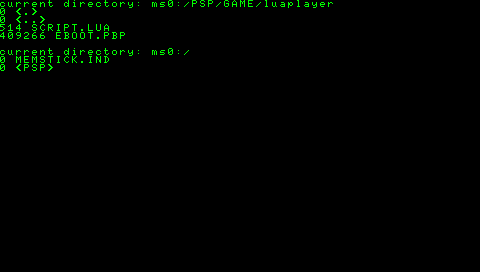
The new version Lua Player 0.4 |
|
| Back to top |
|
|
nevyn
Joined: 31 Jul 2005
Posts: 136
Location: Sweden
|
| Posted: Mon Aug 01, 2005 6:21 am Post subject: |
|
|
| Shine wrote: | This is a good idea, but it can be implemented within a Lua script itself, with some new functions, I've implemented: dir, getCurrentDirectory and setCurrentDirectory. Just call "dir", implement some nice GUI for selecting a subdirectory, call "setCurrentDirectory" for the selected directory, so that the called script can use local filenames for loading resources and start the script in the selected directory. Optional: if there is an "icon.png" in the selected directory, show it in the GUI. I don't have the time for it, but feel free to imlement it and I'll integrate it as the standard startup script for the Lua Player.
|
YAY!!! I was SO not looking forward to learning how to setup the psp toolchain and compiling everything myself, not to mention learning how to write c modules for lua... Kudos!
I'll write a file browser as soon as I get some time over...
[edit: only skimmed your message so I wrote basically what you wrote...] |
|
| Back to top |
|
|
nevyn
Joined: 31 Jul 2005
Posts: 136
Location: Sweden
|
| Posted: Mon Aug 01, 2005 8:19 am Post subject: |
|
|
| nevyn wrote: | | I'll write a file browser as soon as I get some time over... |
I've been trying to write that browser now for a while. Haven't written Lua before, so it's probably not the prettiest code... Problem is, I just can't get anything to draw. Normal print()s work, but fillRect and printText just aren't outputting anything. I've used your example browser as base, and so I'm calling flipScreen, but still nothing...
screenshot: http://ncoder.nevyn.nu/psp-lua/file.tga
source code: http://ncoder.nevyn.nu/psp-lua/Lowser/script.lua
Any ideas?[/url] |
|
| Back to top |
|
|
Shine
Joined: 03 Dec 2004
Posts: 728
Location: Germany
|
| Posted: Mon Aug 01, 2005 8:35 am Post subject: |
|
|
After using "print", the graphics library is disabled, because this was used for debug, only, and for error string output, perhaps I should change this to the new text output function.
But the screenshot looks like the text was printed and then the resolution was changed to 16 bit. And I can't see where the "Loading Lowser..." text came from. There was a bug in an older version, which caused to display some messages from kernel, so I registered a null callback first, and only before starting the script the real debug output, but I can't reproduce this with version 0.4. That said, it should work without any "print" :-) |
|
| Back to top |
|
|
LiquidIce
Joined: 04 Apr 2005
Posts: 55
|
| Posted: Mon Aug 01, 2005 2:11 pm Post subject: |
|
|
Shine, Lua is working better than ever. It took a few tweaks of my code to make it compatible with the new player, bu once it was running everything looked smooth. The alpha stuff works great, and I am making a lot of progress with my game. I will release it here soon, but I am having a problem with my loops causing major slowdowns on the PSP.
Keep in mind, I am new to game programing. I wrote this same game in flash a while ago and have been trying to port it to the PSP with Lua.
In my game i keep adding new enemies to a table called enemies. Then on each 'play' cycle i check to see if any bullets intersect any of the enemies by looping through each enemy and checking coordinates with each bullet. The code works, but as more enemies come on to the screen, or if i shoot really fast, the game comes to a crawl.
What is the best way to loop through each item in my enemies table?
I have tried methods like this:
| Code: |
for i=1,table.getn(enemies) do
enemy = enemies[i]
moveEnemies(enemy)
end
|
but I run into problems when an enemy 'dies'. See, when an enemy in my game is hit with a bullet, i simply say enemy[a] = nil
but my loop still tries to loop through those tables. I've tried clear() and even patched all of my functions so it would ignore anything that was nil, but that just makes it slower.
What is the proper way to clear tables and be able to loop through each record in the table?
I've read through a lot of the Lua Wiki and documentation and also downlaoded some samples. I've gotten it to kinda work with this:
table.foreach(enemies,moveEnemies)
but that's not the solution i was looking for and sometimes loops through nil tables.
Any help is greatly appreciated, and thank you again for providing such a useful tool. |
|
| Back to top |
|
|
nevyn
Joined: 31 Jul 2005
Posts: 136
Location: Sweden
|
| Posted: Mon Aug 01, 2005 5:51 pm Post subject: |
|
|
| LiquidIce wrote: | but that's not the solution i was looking for and sometimes loops through nil tables.
Any help is greatly appreciated, and thank you again for providing such a useful tool. |
From http://www.lua.org/manual/5.0/manual.html
table.remove (table [, pos])
Removes from table the element at position pos, shifting down other elements to close the space, if necessary. Returns the value of the removed element. The default value for pos is n, where n is the size of the table (see 5.4), so that a call table.remove(t) removes the last element of table t. This function also updates the size of the table by calling table.setn(table, n-1).
| Shine wrote: | After using "print", the graphics library is disabled, because this was used for debug, only, and for error string output, perhaps I should change this to the new text output function.
But the screenshot looks like the text was printed and then the resolution was changed to 16 bit. And I can't see where the "Loading Lowser..." text came from. There was a bug in an older version, which caused to display some messages from kernel, so I registered a null callback first, and only before starting the script the real debug output, but I can't reproduce this with version 0.4. That said, it should work without any "print" :-) |
Well, d'oh! I was thinking it was something like that, but I was way too tired to try... It works now :) I'll make it usable, too, and then I'll publish it here.
(The "Loading Lowser..." comes from the script.lua in the luaplayer folder. I made a folder called Applications, in which application directories exist (like bundles in mac os x). You'll see soon...) |
|
| Back to top |
|
|
Shine
Joined: 03 Dec 2004
Posts: 728
Location: Germany
|
| Posted: Mon Aug 01, 2005 7:31 pm Post subject: |
|
|
| LiquidIce wrote: | but I run into problems when an enemy 'dies'. See, when an enemy in my game is hit with a bullet, i simply say enemy[a] = nil
but my loop still tries to loop through those tables. |
table.remove and table.insert might work, but it would be much more fun to develop your own linked list (and a bit faster for large lists, because the elements need not to be copied, like table.remove does) :
| Code: |
-- prototype based class for a linked list
LinkedList = { size = 0 }
function LinkedList:new()
l = {}
setmetatable(l, self)
self.__index = self
return l
end
function LinkedList:add(element)
element.next = self.head
self.head = element
if element.next then
element.next.prev = element
end
self.size = self.size + 1
end
function LinkedList:remove(element)
if element == self.head then
self.head = self.head.next
else
if element.prev then
element.prev.next = element.next
end
if element.next then
element.next.prev = element.prev
end
end
self.size = self.size - 1
end
function LinkedList:startIterate()
self.start = self.head
end
function LinkedList:hasNext()
return self.start
end
function LinkedList:next()
next = self.start
self.start = self.start.next
return next
end
-- test empty list
enemies = LinkedList:new()
assert(enemies.size == 0)
enemies:startIterate()
assert(not enemies:hasNext())
-- test one element
enemy = { x = 1 }
enemies:add(enemy)
assert(enemies.size == 1)
enemies:startIterate()
assert(enemies:hasNext())
assert(enemies:next().x == 1)
assert(not enemies:hasNext())
enemies:remove(enemy)
assert(enemies.size == 0)
enemies:startIterate()
assert(not enemies:hasNext())
-- test two elements
enemies:add({ x = 1 })
enemies:add({ x = 2 })
assert(enemies.size == 2)
enemies:startIterate()
while enemies:hasNext() do
enemy = enemies:next()
if enemy.x == 1 then
enemies:remove(enemy)
end
end
assert(enemies.size == 1)
enemies:startIterate()
assert(enemies:hasNext().x == 2)
assert(enemies.size == 1)
enemies:add({ x = 3 })
assert(enemies.size == 2)
enemies:startIterate()
while enemies:hasNext() do
enemy = enemies:next()
if enemy.x == 3 then
enemies:remove(enemy)
end
end
assert(enemies.size == 1)
enemies:startIterate()
assert(enemies:hasNext().x == 2)
assert(enemies.size == 1)
-- test typical usage
function printCoordinates(list)
list:startIterate()
while list:hasNext() do
item = list:next()
io.write(item.x .. ", " .. item.y .. "\n")
end
end
enemies = LinkedList:new()
bullets = LinkedList:new()
enemies:add({ x = 0, y = 3 })
enemies:add({ x = 1, y = -1 })
enemies:add({ x = 2, y = 0 })
bullets:add({ x = 5, y = 2 })
bullets:add({ x = 1, y = -1 })
io.write("bullets:\n")
printCoordinates(bullets)
io.write("\n\nenemies:\n")
printCoordinates(enemies)
io.write("\ndoing hit tests:\n\n")
bullets:startIterate()
while bullets:hasNext() do
bullet = bullets:next()
enemies:startIterate()
while enemies:hasNext() do
enemy = enemies:next()
if enemy.x == bullet.x and enemy.y == bullet.y then
enemies:remove(enemy)
bullets:remove(bullet)
io.write("target hit at " .. bullet.x .. ", " .. bullet.y .. "\n")
end
end
end
io.write("\nbullets:\n")
printCoordinates(bullets)
io.write("\n\nenemies:\n")
printCoordinates(enemies)
|
|
|
| Back to top |
|
|
nevyn
Joined: 31 Jul 2005
Posts: 136
Location: Sweden
|
| Posted: Mon Aug 01, 2005 10:29 pm Post subject: Lowser, the PSP Lua File Browser! |
|
|
Lowser v0.1 is done! It's a very simple file browser that can launch lua scripts and "application bundles" (a folder with "index.lua" in it, optionally also an "icon.png"). I'll make the interface better looking when I get time... I have some planned features as well :)
I've bundled it with LuaPlayer 0.4 in the below package:
LuaPlayer v0.4 with Lowser and Snake
Shine, I ran into some Lua-related stuff when writing Lowser:
printText doesn't have the optional imageHandle argument, so I can't render text to an offscreen image... I've made a workaround for it now, but I'd love a fix :)
Soft wrapping in printText would be real nice, too...
Is there a way to deallocate the memory allocated through createImage()?
For some reason alpha transparency in my pngs aren't working all that great. Any ideas?[/url] |
|
| Back to top |
|
|
Kinsman
Joined: 18 Jul 2005
Posts: 15
Location: Canada
|
| Posted: Tue Aug 02, 2005 2:01 am Post subject: Lua Player routines |
|
|
I did some thinking about the freeing and reusing of images, and what would be a good way for both the developers and end-users to make memory management easy. I settled on this.
reloadImage(int imageHandle, string fileName)
Frees the memory of the image previously using the given handle, and loads a new PNG file into that handle.
Example:
tiles = loadImage("level1.png");
-- And later..
tiles = reloadImage("level2.png");
recreateImage(int imageHandle, int width, int height)
Frees the memory of the image previously using the given handle, and creates a new canvas into that handle.
reloadImage and recreateImage can be mixed together - for instance, you can load a PNG file and then use recreateImage to replace it with a blank canvas.
I did a quick test, and don't expect much trouble from these routines:
| Code: |
static int lua_reloadImage(lua_State *L)
{
if (lua_gettop(L) != 2) return luaL_error(L, "wrong number of arguments");
int reloadHandle = luaL_checkint(L,1);
if (reloadHandle > currentImageHandle) return luaL_error(L, "not an image handle");
if (reloadHandle < 0) return luaL_error(L, "not an image handle");
free(images[reloadHandle]->data);
free(images[reloadHandle]);
Image* image = loadImage(luaL_checkstring(L, 2));
if (!image) return luaL_error(L, "error loading image");
images[reloadHandle] = image;
return 0;
}
|
| Code: |
static int lua_recreateImage(lua_State *L)
{
if (lua_gettop(L) != 3) return luaL_error(L, "wrong number of arguments");
int recreateHandle = luaL_checkint(L, 1);
int w = luaL_checkint(L, 2);
int h = luaL_checkint(L, 3);
if (recreateHandle > currentImageHandle) return luaL_error(L, "not an image handle");
if (recreateHandle < 0) return luaL_error(L, "not an image handle");
free(images[recreateHandle]->data);
free(images[recreateHandle]);
if (w <= 0 || h <= 0 || w > SCREEN_WIDTH || h > SCREEN_HEIGHT) return luaL_error(L, "invalid size");
Image* image = createImage(w, h);
if (!image) return luaL_error(L, "can't create image");
images[recreateHandle] = image;
return 0;
}
|
EDIT: Another way of doing it could be counting the arguments of loadImage() and createImage(). For instance,
bgimage = loadImage("background.png")
loadImage(bgimage,"background.png")
Last edited by Kinsman on Tue Aug 02, 2005 3:15 am; edited 1 time in total |
|
| Back to top |
|
|
Kinsman
Joined: 18 Jul 2005
Posts: 15
Location: Canada
|
| Posted: Tue Aug 02, 2005 2:56 am Post subject: 32-bit colour? |
|
|
I've been working on a way to tint images being displayed to the screen, and I've got a nice blitAlphaImageEx() routine in my personal copy of Lua, but before I release anything, I wanted to ask..
Shine, have you considered converting the Lua Player to handle 32-bit colour?
It'd make a few things easier - the tinting and alpha fading of images, for instance, and it'd make images like smoothed fonts and backgrounds with subtle colours show up better.
A 32-bit image does take twice the memory of a 16-bit image; but if a full-screen 32-bit image takes up 522,240 bytes then we can afford the luxury. |
|
| Back to top |
|
|
Shine
Joined: 03 Dec 2004
Posts: 728
Location: Germany
|
| Posted: Tue Aug 02, 2005 4:37 am Post subject: Re: Lowser, the PSP Lua File Browser! |
|
|
| nevyn wrote: | Lowser v0.1 is done!
|
Very nice! I'll integrate it, when it is ready.
| nevyn wrote: |
Shine, I ran into some Lua-related stuff when writing Lowser:
printText doesn't have the optional imageHandle argument, so I can't render text to an offscreen image... I've made a workaround for it now, but I'd love a fix :)
|
I have implemented it, but copy-and-pasted the argument count check, it is fixed in version 0.5.
| nevyn wrote: |
Soft wrapping in printText would be real nice, too...
|
I think this should be done within Lua, perhaps with a small text helper class, because everyone has some other ideas how it should work :-)
| nevyn wrote: |
For some reason alpha transparency in my pngs aren't working all that great. Any ideas? |
The current Lua Player uses the 5551 format, only, which means you have only transparent or opaque for the alpha channel, no levels inbetween. I think instead of writing some more functions for blitting 8888 color format images, like Kinsman suggested, it would be better to write a initGraphics function, where you can specify, if you want 16 bit or 32 bit, and enhance the internal implementation, only (which of course is a lot of work). I don't want to change all to 32 bit, only, because for fast games this is too slow.
Regarding freeing images: I'll do it in some next version with Lua user objects, then it will be managed by the Lua memory managment, which means an image is destroyed automaticly, if no longer referenced and the garbage collector runs (at least I hope that it works like this, never done this before).
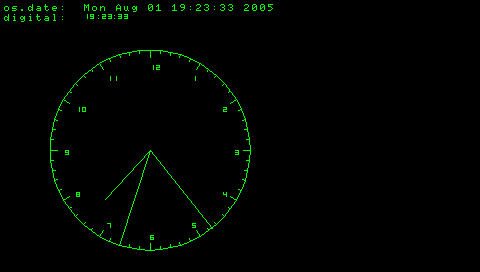
In Lua Player 0.5 you can use drawLine now. A simple test, which tests the bugfix for drawing text to offscreen images, too:
| Code: |
background = createImage(480, 272)
clockOfs = 150
clockWidth = 100
clockTextPosition = 85
clockBigMarkWidth = 7
clockSmallMarkWidth = 3
x0 = clockOfs
y0 = clockOfs - clockWidth
pi = 4*math.atan(1)
color = getColorNumber(0, 255, 0)
for i=0,60 do
x1 = math.sin(pi-i/60*2*pi) * clockWidth + clockOfs
y1 = math.cos(pi-i/60*2*pi) * clockWidth + clockOfs
drawLine(x0, y0, x1, y1, color, background)
xv = (x1 - clockOfs) / clockWidth
yv = (y1 - clockOfs) / clockWidth
if math.mod(i, 5) == 0 then
xt = xv * clockTextPosition + clockOfs
yt = yv * clockTextPosition + clockOfs
value = math.ceil(i / 5)
if value == 0 then
value = 12
end
printDecimal(xt, yt, value, color, background)
xv = xv * (clockWidth - clockBigMarkWidth) + clockOfs
yv = yv * (clockWidth - clockBigMarkWidth) + clockOfs
drawLine(x1, y1, xv, yv, color, background)
else
xv = xv * (clockWidth - clockSmallMarkWidth) + clockOfs
yv = yv * (clockWidth - clockSmallMarkWidth) + clockOfs
drawLine(x1, y1, xv, yv, color, background)
end
x0 = x1
y0 = y1
end
printText(4, 4, "os.date: ", color, background)
printText(4, 14, "digital: ", color, background)
while true do
blitImage(0, 0, background)
time = os.time()
dateString = os.date("%c", time)
printText(84, 4, dateString, color)
dateFields = os.date("*t", time)
printDecimal(84, 14, dateFields.hour, color)
printText(96, 13, ":", getColorNumber(0, 255, 0))
printDecimal(102, 14, dateFields.min, color)
printText(112, 13, ":", getColorNumber(0, 255, 0))
printDecimal(118, 14, dateFields.sec, color)
hour = dateFields.hour
if hour > 12 then
hour = hour - 12
end
hour = hour + dateFields.min / 60 + dateFields.sec / 3600
x = math.sin(pi-hour/12*2*pi) * clockWidth / 3 * 2 + clockOfs
y = math.cos(pi-hour/12*2*pi) * clockWidth / 3 * 2 + clockOfs
drawLine(clockOfs, clockOfs, x, y, color)
min = dateFields.min + dateFields.sec / 60
x = math.sin(pi-min/60*2*pi) * clockWidth + clockOfs
y = math.cos(pi-min/60*2*pi) * clockWidth + clockOfs
drawLine(clockOfs, clockOfs, x, y, color)
x = math.sin(pi-dateFields.sec/60*2*pi) * clockWidth + clockOfs
y = math.cos(pi-dateFields.sec/60*2*pi) * clockWidth + clockOfs
drawLine(clockOfs, clockOfs, x, y, color)
waitVblankStart()
flipScreen()
if not s then
screenshot("ms0:/clock.tga")
s = 1
end
end
|
 |
|
| Back to top |
|
|
dctrvenkman
Joined: 02 Aug 2005
Posts: 4
|
| Posted: Tue Aug 02, 2005 4:40 am Post subject: |
|
|
| have you tried updating your toolchain? |
|
| Back to top |
|
|
Shine
Joined: 03 Dec 2004
Posts: 728
Location: Germany
|
| Posted: Tue Aug 02, 2005 4:48 am Post subject: |
|
|
| dctrvenkman wrote: | | have you tried updating your toolchain? |
I'm using the latest SVN version. Lua Player doesn't work with released versions of the toolchain. |
|
| Back to top |
|
|
Shine
Joined: 03 Dec 2004
Posts: 728
Location: Germany
|
| Posted: Tue Aug 02, 2005 7:42 am Post subject: |
|
|
| I've setup a webpage for Lua Player. I hope the screenshots of Lowser and the upcoming game by VgSlag are ok. Write me a PM, if you like a link to your webpage. |
|
| Back to top |
|
|
|
|
You cannot post new topics in this forum
You cannot reply to topics in this forum
You cannot edit your posts in this forum
You cannot delete your posts in this forum
You cannot vote in polls in this forum
|
Powered by phpBB © 2001, 2005 phpBB Group
|
 FAQ
FAQ Search
 Memberlist
 Usergroups
 Register
 Profile
 Log in to check your private messages
 Log in


