| View previous topic :: View next topic |
| Author |
Message |
Kaan
Joined: 26 Sep 2008
Posts: 3
|
 Posted: Wed Oct 01, 2008 2:34 am Post subject: Posted: Wed Oct 01, 2008 2:34 am Post subject: |
 |
|
that fixed my d-pad problems, thanks! |
|
| Back to top |
|
 |
89ron
Joined: 09 Mar 2008
Posts: 51
|
| Posted: Wed Oct 01, 2008 5:49 am Post subject: |
|
|
| brawler wrote: | | Do you plan in the future to have support for vista x64? Iam sure a lot of user would like to know. |
Maybe after BtSix 1.6 :) |
|
| Back to top |
|
|
rypaul
Joined: 22 Jul 2008
Posts: 39
|
| Posted: Wed Oct 01, 2008 6:08 am Post subject: |
|
|
Hey 89ron this is not a demand or even a request really, I am just asking out of curiosity. How is the multiple controller code coming along or are you taking a break from that to work the single controller bugs out.
I remember the last beta version had a wierd problem with Dual shock controllers whereby sometimes they would constantly vibrate.
Anyways again I would like to say great job on your end.
Now we just need someone to write a program similar to ppjoy that accepts directinput rumble and outputs it to BTSIX then most programs that support rumble would be covered.
Ahh if only I had the patience for programming |
|
| Back to top |
|
|
89ron
Joined: 09 Mar 2008
Posts: 51
|
| Posted: Fri Oct 03, 2008 5:16 am Post subject: |
|
|
| rypaul wrote: | Hey 89ron this is not a demand or even a request really, I am just asking out of curiosity. How is the multiple controller code coming along or are you taking a break from that to work the single controller bugs out.
I remember the last beta version had a wierd problem with Dual shock controllers whereby sometimes they would constantly vibrate.
Anyways again I would like to say great job on your end.
Now we just need someone to write a program similar to ppjoy that accepts directinput rumble and outputs it to BTSIX then most programs that support rumble would be covered.
Ahh if only I had the patience for programming |
Actualy i'm on it but i have some problems with Rumble and Multiplayer code.
For directinput Rumble code, i don't think finish it because i want start BtSix Vista 32&64bit version. |
|
| Back to top |
|
|
rypaul
Joined: 22 Jul 2008
Posts: 39
|
| Posted: Fri Oct 03, 2008 5:34 am Post subject: |
|
|
Well i wish you all the best with the multiplayer code.
I know a bunch of people will be elated to hear about possible Vista 64 support. Do you have help with your coding or are you taking all this on by yourself.
I know this might sound very basic but based on my past experiences please make sure you keep at least two separate copies of your code.
I would feel very bad for you if a hard disk crash were to make you lose all your efforts. |
|
| Back to top |
|
|
eighta
Joined: 04 Oct 2008
Posts: 30
|
| Posted: Sat Oct 04, 2008 3:31 am Post subject: |
|
|
89ron thank you for you development on this driver,
Just yesterday I read about that PS3 Pad, can use with the PC, inmediatly bought a Pad and test this AWESON invention.
Thank you for the driver.
Still i dont get to test this pad via Bluetooth, becasue of time, this night i will try to use it, via BlueTooth,
I have a question, The sensivility of the pad is working? or no yet?
Thank you again |
|
| Back to top |
|
|
rypaul
Joined: 22 Jul 2008
Posts: 39
|
| Posted: Sat Oct 04, 2008 3:45 am Post subject: |
|
|
What exactly do you mean by the 'sensitivity' of the pad.
If you are referring to Motion Sensing then yes it works but there is a special way to set it up in ppjoy. You would have to browse and read the previous pages to see what others recommend to get it to work. I never tried it myself since I figured not many older games would have much use for it. |
|
| Back to top |
|
|
eighta
Joined: 04 Oct 2008
Posts: 30
|
| Posted: Sat Oct 04, 2008 4:15 am Post subject: |
|
|
Yes, about the motion, when I incline de pad, this will generate a movment.
And another thing, sesivility of button, that are 8 bits sensivility, that is too implemented??
Another Question:
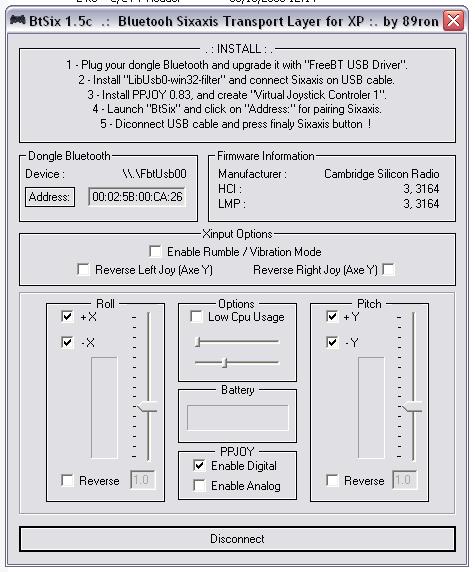
Is mandatory (HCI & LMP must be > 3.00 in "Firmware Information" )
Is someone, know how to see de HCI & LMP version, of my Bluetooth device, please tell me!
Thank you! |
|
| Back to top |
|
|
rypaul
Joined: 22 Jul 2008
Posts: 39
|
| Posted: Sat Oct 04, 2008 4:41 am Post subject: |
|
|
| Well button sensitivity basically works the problem is no games on pc really support it as far as i know (I am open to correction). |
|
| Back to top |
|
|
seam
Joined: 04 Oct 2008
Posts: 8
|
| Posted: Sat Oct 04, 2008 5:43 pm Post subject: gears of war problem |
|
|
| when i use this with gears of war the left stick doesnt work properly. when u press forward he walks backwards. many people have had this problem(i googled it) i upgraded to 1.5b from 1.4 cus i noticed xbox360 support was added, but it still doesnt work right. up is down and down is up.... any ideas? |
|
| Back to top |
|
|
Mr.Brightside
Joined: 29 Sep 2008
Posts: 12
|
| Posted: Sun Oct 05, 2008 3:55 am Post subject: Re: gears of war problem |
|
|
| seam wrote: | | when i use this with gears of war the left stick doesnt work properly. when u press forward he walks backwards. many people have had this problem(i googled it) i upgraded to 1.5b from 1.4 cus i noticed xbox360 support was added, but it still doesnt work right. up is down and down is up.... any ideas? |
remap the up and down commands in ppjoy, not sure but it might work |
|
| Back to top |
|
|
seam
Joined: 04 Oct 2008
Posts: 8
|
| Posted: Sun Oct 05, 2008 4:19 am Post subject: |
|
|
| nothing you do in ppjoy or xpadder fixes this. other people in this thread apparently have used their 6axis with gears of war... how did they get past the inverted left stick problem? |
|
| Back to top |
|
|
rypaul
Joined: 22 Jul 2008
Posts: 39
|
| Posted: Sun Oct 05, 2008 9:16 am Post subject: |
|
|
| My Gears of War worked fine without any special configuration. I dunno maybe it's a bug in the game itself my game is unpatched so i don't know if any updates introduced bugs |
|
| Back to top |
|
|
seam
Joined: 04 Oct 2008
Posts: 8
|
|
| Back to top |
|
|
rypaul
Joined: 22 Jul 2008
Posts: 39
|
| Posted: Sun Oct 05, 2008 3:43 pm Post subject: |
|
|
Seam have you tried my POV mapped to buttons ppjoy config on page 8?
That is the only thing I have done different from most setups. |
|
| Back to top |
|
|
89ron
Joined: 09 Mar 2008
Posts: 51
|
|
| Back to top |
|
|
rypaul
Joined: 22 Jul 2008
Posts: 39
|
| Posted: Mon Oct 06, 2008 12:48 am Post subject: |
|
|
| You want solutions 89ron has the answers. :) |
|
| Back to top |
|
|
pichili.pichili
Joined: 13 Aug 2008
Posts: 9
|
| Posted: Mon Oct 06, 2008 2:48 am Post subject: Tks & Cgrts! |
|
|
[quote="89ron"]BtSix 1.5c
http://bqron.free.fr/PS3/BT/BtSix.1.5c.zip
Dear 89ron, your 1.5C version works perfectly! I really appreciate your efforts... As a positive comment, from my point of view, the only weak item is the missing of multiplayer option over bluetooth with DS3 (at least for two!), but anyway, we'll still waiting!
Last edited by pichili.pichili on Mon Oct 06, 2008 4:31 am; edited 1 time in total |
|
| Back to top |
|
|
eighta
Joined: 04 Oct 2008
Posts: 30
|
| Posted: Mon Oct 06, 2008 4:15 am Post subject: |
|
|
Hi everyone,
if some can help me
I am getting this error

Why this happen to me.
How can i fix this?
Thanks |
|
| Back to top |
|
|
pichili.pichili
Joined: 13 Aug 2008
Posts: 9
|
|
| Back to top |
|
|
eighta
Joined: 04 Oct 2008
Posts: 30
|
| Posted: Mon Oct 06, 2008 5:40 am Post subject: |
|
|
Thank you, that resolve my problem |
|
| Back to top |
|
|
eighta
Joined: 04 Oct 2008
Posts: 30
|
| Posted: Mon Oct 06, 2008 1:22 pm Post subject: |
|
|
I again,
Please help me to configure correctly the DS3 pad.
This is my situation.
1. Install the Microsoft Visual C++ Library
[vcredist_x86.exe]
2. plug my Bluetooth dongle.
3. Update the drivers for the Bluetooth dongle.
4. install the Lib-USB Win32.
5. plug the DS3 pad, but in this moment, windows vista install the pad by default and add the pad to the panel control. Like this:

But when I push the button "Properties", for test the buttons, none of the buttons work.
Later I test one application called:
PLAYSTATION(R)3 SIXAXIS initiator for windows
by Keiichi AOKI (k1@padc.cs.tsukuba.ac.jp), 2006
And later in this moment, the DS3 work.
5. install the PPJoy and create "Virtual Joystick"
And on the control panel, add the second Joystick, but this do not respond to the control actions (pushing the buttons).
In this point I get stuck, because the BtSix open, but, this work with the another Pad (PPJoy).
If someone know the solutions to this problem please, let me know!
Thanks in advance! |
|
| Back to top |
|
|
seam
Joined: 04 Oct 2008
Posts: 8
|
| Posted: Mon Oct 06, 2008 1:40 pm Post subject: |
|
|
man i really appreciate it, but it doesnt work for me. not just in gears of war either. i check the invert option and even in xpadder or anything else for that matter it doesnt change the axis. can anyone else verify the new invert options work? |
|
| Back to top |
|
|
rypaul
Joined: 22 Jul 2008
Posts: 39
|
| Posted: Mon Oct 06, 2008 3:27 pm Post subject: |
|
|
Replying to eighta. After you plug the usb cable into the gamepad you must then open btsix and click address then unplug the gamepad and press the button on the pad to connect.
Ignore the Playstation3 gamepad option that appears in the joystick control panel when you plug in the usb cable btsix does not use it.
Make sure you see btsix responding to the gamepad first then check the ppjoy joystick 1 under the control panel and see if the buttons respond.
Also make sure NOT to run that other PS3 initiator program at any point. |
|
| Back to top |
|
|
rypaul
Joined: 22 Jul 2008
Posts: 39
|
| Posted: Mon Oct 06, 2008 3:31 pm Post subject: |
|
|
Replying to seam.
Could you post a picture or link to a picture of your ppjoy configuration.
Do the analog sticks work correctly in every other application? |
|
| Back to top |
|
|
89ron
Joined: 09 Mar 2008
Posts: 51
|
| Posted: Mon Oct 06, 2008 9:26 pm Post subject: |
|
|
| seam wrote: |
man i really appreciate it, but it doesnt work for me. not just in gears of war either. i check the invert option and even in xpadder or anything else for that matter it doesnt change the axis. can anyone else verify the new invert options work? |
Xpadder doesn't work with Xinput mode, don't use it. |
|
| Back to top |
|
|
eighta
Joined: 04 Oct 2008
Posts: 30
|
| Posted: Mon Oct 06, 2008 11:58 pm Post subject: |
|
|
Alright, this night i will do that rypaul, but let me tell you something,
when i install the PPJoy and Add one Controller, this appears on control panel, with de PlasStation3 Pad that windows install by default,
Later, on the control panel->joystick, neighter of both, work, when i push some button, this no work. this situations is nomal?
Thank you in advance |
|
| Back to top |
|
|
rypaul
Joined: 22 Jul 2008
Posts: 39
|
| Posted: Tue Oct 07, 2008 2:19 am Post subject: |
|
|
Before you check the control panel joystick section you have to make sure you open btsix with the controller disconnected from the usb cable then press the playstation button in the middle of the controller. If you do not see any response from btsix then press disconnect in btsix and try the playstation button on the controller again. If you still do not see anything happening in btsix then either you have not paired the bluetooth receiver with the gamepad properly or the receiver might not be compatible. As i said earlier if i could see a shot of your screen with your BtSix and ppjoy configs maybe i can figure something out.
Also ignore the PlayStation3 Pad you see in the joystick section it is not important. |
|
| Back to top |
|
|
jedikwon
Joined: 14 May 2008
Posts: 6
|
| Posted: Tue Oct 07, 2008 4:18 am Post subject: Re: gears of war problem |
|
|
| seam wrote: | | when i use this with gears of war the left stick doesnt work properly. when u press forward he walks backwards. many people have had this problem(i googled it) i upgraded to 1.5b from 1.4 cus i noticed xbox360 support was added, but it still doesnt work right. up is down and down is up.... any ideas? |
I had the same experience when I played Gears of war with Btsix 1.4 version. I had to reverse Y-axis in the ppjoy config. Now, with 1.5, all problem solved and works just fine. You don't really have to do anything with ppjoy. Just use default setting for ppjoy except set the number of Axies to 5. Then run Btsix 1.5 and play Gears of war. |
|
| Back to top |
|
|
seam
Joined: 04 Oct 2008
Posts: 8
|
| Posted: Tue Oct 07, 2008 5:32 am Post subject: |
|
|
ill try that jedikwon, good to hear someone else using btsix has had this problem, heh.
rypaul: im at work now, but ill post pics when i get home.
EDIT:also, if it helps at all... this is the guide i followed when setting btsix up.
http://boards.ign.com/ps3_lobby/b8269/163284350/p1
maybe thatll help you figure out what i have set wrong |
|
| Back to top |
|
|
|

 FAQ
FAQ Search
 Memberlist
 Usergroups
 Register
 Profile
 Log in to check your private messages
 Log in