| View previous topic :: View next topic |
| Author |
Message |
XploShun
Joined: 21 Aug 2008
Posts: 8
|
 Posted: Sun Aug 31, 2008 5:15 pm Post subject: Posted: Sun Aug 31, 2008 5:15 pm Post subject: |
 |
|
does that mean i have to use BlueTooth to use the controller?
i usually use SKYPE with my friends while playing game
can i just plug the cable instead? if so, do i have to do something else? |
|
| Back to top |
|
 |
XploShun
Joined: 21 Aug 2008
Posts: 8
|
| Posted: Sun Aug 31, 2008 5:34 pm Post subject: |
|
|
it was sooo much easier with the sixaxis setup..
now with DS3.. its too complicated..
wtf.. PPJOY... BTSIX... omg.... |
|
| Back to top |
|
|
XploShun
Joined: 21 Aug 2008
Posts: 8
|
| Posted: Sun Aug 31, 2008 5:35 pm Post subject: |
|
|
what if i dont wanna use the BLUETOOH function?
how can i get it to work? |
|
| Back to top |
|
|
chris5675
Joined: 30 Aug 2008
Posts: 5
|
| Posted: Sun Aug 31, 2008 8:02 pm Post subject: Re: Try this chris5675 |
|
|
| rypaul wrote: | In responce to chris5675 uninstall libusb-win32-filter-bin-0.1.12.1
and try using libusb-win32-filter-bin-0.1.10.1 |
i tried that but its the same thing... |
|
| Back to top |
|
|
vap1d
Joined: 31 Aug 2008
Posts: 1
|
| Posted: Sun Aug 31, 2008 8:07 pm Post subject: |
|
|
Hey all, I just started looking for a new gamepad for windows xp. I had some janky old controller that just died and would like something with more features. Motion sensing is the big one to be exact. I do not own a ps3, but if I could get a ps3 controller running w/ motion sensing working with pc games I'd totally go with it. I was just curious about a few things-
a) I've seen usb drivers in the few google searches I have done, but will these particular drivers work via usb or do I need to do bluetooth?
b) how robust are the drivers and is it hard to get motion sensing going in pc games?
c) I'm not a novice by any means, but at the same time I'd rather not deal with a whole lot of hassles after initial set up. If I got this working I'd likely just leave it plugged in full time as I have an abundance of usb ports so would it be ready to go whenev I wanted to fire up a game that can use it?
I apologize if these q's have been asked here, but I've been soo inundated with diff forums talking about drivers to do this and so many threads I'm still not sure what is what with this, I didn't even realize you could use these controllers on a pc till a few hours ago haha.
Thanks in advance~
Rob |
|
| Back to top |
|
|
jedikwon
Joined: 14 May 2008
Posts: 6
|
| Posted: Sun Aug 31, 2008 8:26 pm Post subject: Re: ppjoy issue |
|
|
| chris5675 wrote: | hi there i seem to have everything working except one thing, it seems PPJOY wont recognise my Dual shock 3... it shows up in game controllers list but no buttons, sticks, register. I can also connect to Btsix bluetooth, address change etc. but nothing registers on the joystick...
vista 32bit
libUSB-win32-filter-bin-0.1.12.1
FreeBT driver
Btsix 1.4a
PPJOY 0.83
Any help would be appreciated!!
 |
if BTsix detects your pad but does not respond, your BT dongle is the problem. get another one. |
|
| Back to top |
|
|
chris5675
Joined: 30 Aug 2008
Posts: 5
|
| Posted: Sun Aug 31, 2008 8:38 pm Post subject: Re: ppjoy issue |
|
|
| Quote: | | if BTsix detects your pad but does not respond, your BT dongle is the problem. get another one. |
I hope thats the problem.. I've got a new one on order. so my current one is the wrong version???
 |
|
| Back to top |
|
|
rypaul
Joined: 22 Jul 2008
Posts: 39
|
| Posted: Mon Sep 01, 2008 9:58 am Post subject: |
|
|
| Yeah i think a version 2.0 bluetooth device is a must. Check the last post on page one |
|
| Back to top |
|
|
XploShun
Joined: 21 Aug 2008
Posts: 8
|
| Posted: Mon Sep 01, 2008 3:51 pm Post subject: |
|
|
| rypaul wrote: | | Yeah i think a version 2.0 bluetooth device is a must. Check the last post on page one |
noo~ so.. theres no driver without the BlueTooth thingy..
sigh..
its not we're gonna play PC games on a 42" LCD TV... y would u want BT with it..
guess i'll trade my DS3 controller for a SIXAXIS... !@#$%^& |
|
| Back to top |
|
|
phoenon
Joined: 22 May 2008
Posts: 23
|
| Posted: Mon Sep 01, 2008 6:22 pm Post subject: |
|
|
| XploShun wrote: | | rypaul wrote: | | Yeah i think a version 2.0 bluetooth device is a must. Check the last post on page one |
noo~ so.. theres no driver without the BlueTooth thingy..
sigh..
its not we're gonna play PC games on a 42" LCD TV... y would u want BT with it..
guess i'll trade my DS3 controller for a SIXAXIS... !@#$%^& |
I think you should get 2 sixaxis for 1 DS3...
But DS3 is working with BTsix 1.4a recheck your configuration. And make sure you are not running an x64 OS.
thx |
|
| Back to top |
|
|
figo1987
Joined: 31 Aug 2008
Posts: 2
|
| Posted: Mon Sep 01, 2008 10:10 pm Post subject: |
|
|
| plz help me !! there's a problem with btsix 0.5.0.5b and DS3.... |
|
| Back to top |
|
|
phoenon
Joined: 22 May 2008
Posts: 23
|
| Posted: Tue Sep 02, 2008 12:01 am Post subject: |
|
|
| figo1987 wrote: | | plz help me !! there's a problem with btsix 0.5.0.5b and DS3.... |
BTSix1.4a Is the only version working for DS3.
DS3 users please just try this version.
0.5.0.5 and others doesn't work for DS3
thx |
|
| Back to top |
|
|
rypaul
Joined: 22 Jul 2008
Posts: 39
|
| Posted: Tue Sep 02, 2008 12:40 pm Post subject: |
|
|
| Yep BTSix 1.4A has worked for my DS3 from the very beginning. No rumble of course. |
|
| Back to top |
|
|
XploShun
Joined: 21 Aug 2008
Posts: 8
|
| Posted: Tue Sep 02, 2008 3:44 pm Post subject: |
|
|
i prefer not to use the BlueTooth function.. because i want to skype while playing games...
pity the simple libusb-win32-filter-bin-0.1.12.1.exe procedure works only on sixaxis.. not ds3.. |
|
| Back to top |
|
|
nicthetool
Joined: 05 Sep 2008
Posts: 2
|
| Posted: Fri Sep 05, 2008 4:07 pm Post subject: bluetooth and vista |
|
|
i have 32 bit system running vista and have sixaxis running fine via cable.
unfortunately i cant change the bluetooth adapters driver to the freebit one.
it automatically installs its own, and tells me that i already have the best driver when i try to change it.
can someone please explain "simply" how to change the driver. id really like to utilise the BT function |
|
| Back to top |
|
|
chris5675
Joined: 30 Aug 2008
Posts: 5
|
| Posted: Fri Sep 05, 2008 8:07 pm Post subject: |
|
|
you have to locate the driver yourself...
open device manager
plug in and locate your bluetooth dongle
right click on it and choose "update driver software"
then click "browse my computer for software"
then click "let me pick from a list of device drivers on my computer"
then click "have disk"
then click "browse" and navigate to your freeBT driver folder
locate the file called... "freebtusb" or sometihng like that, double click and install it, ignore the warning about not being "signed"
then go back to the "have disk" screen and it should be in the list, select it and bingo.
Im using vista 32bit and Ive foiund that I have to reinstall this driver every time I want to use sixaxis, windows keeps defaulting back to the signed drivers for some reason ...that should work anyhow ;) |
|
| Back to top |
|
|
chris5675
Joined: 30 Aug 2008
Posts: 5
|
| Posted: Sat Sep 06, 2008 8:26 am Post subject: |
|
|
| got my DS3 working on bluetooth now, its ideal :D does anyone know of a way to get bluesoleil to use the freeBT driver?? be good to get my headphones and keyboard working at the same time |
|
| Back to top |
|
|
nicthetool
Joined: 05 Sep 2008
Posts: 2
|
| Posted: Sat Sep 06, 2008 10:19 am Post subject: |
|
|
| chris5675 wrote: | you have to locate the driver yourself...
open device manager
plug in and locate your bluetooth dongle
right click on it and choose "update driver software"
then click "browse my computer for software"
then click "let me pick from a list of device drivers on my computer"
then click "have disk"
then click "browse" and navigate to your freeBT driver folder
locate the file called... "freebtusb" or sometihng like that, double click and install it, ignore the warning about not being "signed"
then go back to the "have disk" screen and it should be in the list, select it and bingo.
Im using vista 32bit and Ive foiund that I have to reinstall this driver every time I want to use sixaxis, windows keeps defaulting back to the signed drivers for some reason ...that should work anyhow ;) |
thank you chris, have BT functioning now, was missing the "have disk" step.
now to configure it properly :P |
|
| Back to top |
|
|
salseropg
Joined: 05 Apr 2008
Posts: 6
|
| Posted: Sun Sep 07, 2008 9:13 pm Post subject: 4 sixaxis |
|
|
Hello!
I would like to know if itīs possible use more than 1 sixaxis controller. I have 4 sixaxis controllers: someone can help me? |
|
| Back to top |
|
|
bosoxkid
Joined: 18 Sep 2008
Posts: 3
|
| Posted: Thu Sep 18, 2008 8:17 am Post subject: Problems Using FreeBT Driver |
|
|
Hello,
I am trying to configure my SIXAXIS to work on the PC (running windows XP with sp3) via bluetooth, and I am having a lot of trouble. I have followed the steps on Page 5, but I CANNOT get the FreeBT driver to work with my USB dongle. It is a brand new dongle from Aluratek:
[http://www.aluratek.com/product_info.php?products_id=11&display=All]
When I try to install the FreeBT driver, I get a message saying "The Wizard could not find a better match for your hardware than the software you currently have installed."
How can I get passed this? When I try using BTSix1.4a with the driver I already have, which shows up as "btcusb.sys" in the driver details window, I get a message saying: "No Bluetooth hardware detected, or already in use !"
I've tried uninstalling the device, removing btcusb.sys from the system32/drivers file, and still, I cannot get the old driver installed. It automatically installs when I plug the dongle back in.
Can somebody PLEASE help me? I have been working on this whole process for about two weeks now, and STILL haven't been able to get it to work. Any help would be much appreciated. I am just an old-school gamer who wants to use his PS3 controller for his emulators. Thank you.[/url] |
|
| Back to top |
|
|
Tindytim
Joined: 03 May 2008
Posts: 18
|
| Posted: Mon Sep 22, 2008 2:30 pm Post subject: Re: 4 sixaxis |
|
|
| salseropg wrote: | Hello!
I would like to know if itīs possible use more than 1 sixaxis controller. I have 4 sixaxis controllers: someone can help me? |
Yeah, go back a few pages. 89ron made a version for multiple controllers.
| bosoxkid wrote: | Hello,
I am trying to configure my SIXAXIS to work on the PC (running windows XP with sp3) via bluetooth, and I am having a lot of trouble. I have followed the steps on Page 5, but I CANNOT get the FreeBT driver to work with my USB dongle. It is a brand new dongle from Aluratek:
[http://www.aluratek.com/product_info.php?products_id=11&display=All]
When I try to install the FreeBT driver, I get a message saying "The Wizard could not find a better match for your hardware than the software you currently have installed."
How can I get passed this? When I try using BTSix1.4a with the driver I already have, which shows up as "btcusb.sys" in the driver details window, I get a message saying: "No Bluetooth hardware detected, or already in use !"
I've tried uninstalling the device, removing btcusb.sys from the system32/drivers file, and still, I cannot get the old driver installed. It automatically installs when I plug the dongle back in.
Can somebody PLEASE help me? I have been working on this whole process for about two weeks now, and STILL haven't been able to get it to work. Any help would be much appreciated. I am just an old-school gamer who wants to use his PS3 controller for his emulators. Thank you. |
You wouldn't happen to be using Media Center would you?
Either way, go into Device manager, find the BT device and open it. Click the Driver Tab, then press update driver. From there it should be any different from installing the driver in the Tut on page 5. |
|
| Back to top |
|
|
bosoxkid
Joined: 18 Sep 2008
Posts: 3
|
| Posted: Mon Sep 22, 2008 10:20 pm Post subject: Re: 4 sixaxis |
|
|
| Tindytim wrote: | | salseropg wrote: | Hello!
I would like to know if itīs possible use more than 1 sixaxis controller. I have 4 sixaxis controllers: someone can help me? |
Yeah, go back a few pages. 89ron made a version for multiple controllers.
| bosoxkid wrote: | Hello,
I am trying to configure my SIXAXIS to work on the PC (running windows XP with sp3) via bluetooth, and I am having a lot of trouble. I have followed the steps on Page 5, but I CANNOT get the FreeBT driver to work with my USB dongle. It is a brand new dongle from Aluratek:
[http://www.aluratek.com/product_info.php?products_id=11&display=All]
When I try to install the FreeBT driver, I get a message saying "The Wizard could not find a better match for your hardware than the software you currently have installed."
How can I get passed this? When I try using BTSix1.4a with the driver I already have, which shows up as "btcusb.sys" in the driver details window, I get a message saying: "No Bluetooth hardware detected, or already in use !"
I've tried uninstalling the device, removing btcusb.sys from the system32/drivers file, and still, I cannot get the old driver installed. It automatically installs when I plug the dongle back in.
Can somebody PLEASE help me? I have been working on this whole process for about two weeks now, and STILL haven't been able to get it to work. Any help would be much appreciated. I am just an old-school gamer who wants to use his PS3 controller for his emulators. Thank you. |
You wouldn't happen to be using Media Center would you?
Either way, go into Device manager, find the BT device and open it. Click the Driver Tab, then press update driver. From there it should be any different from installing the driver in the Tut on page 5. |
Hi Tindytim,
Thank you for replying to my post. I do have the Media Center Edition of XP. Will this cause a problem?
I followed those exact steps going to Device Manager, clicking on the driver tab for the bluetooth dongle and going to update the driver. I get this message: "The Wizard could not find a better match for your hardware than the software you currently have installed." Do you know if there is another way of doing this?
Also, thanks for that great tutorial. I don't have it working yet, but it is clear and easy to follow. I just can't get this damn driver to work! |
|
| Back to top |
|
|
Tindytim
Joined: 03 May 2008
Posts: 18
|
| Posted: Tue Sep 23, 2008 5:21 am Post subject: |
|
|
I know there are issues getting this to work with Media Center XP, but I know of a few people that got it working by tinkering around with it. They couldn't pinpoint what they did exactly, and I don't have Media Center installed on this PC, so anything I would say would be a guess.
Have you tried uninstalling the driver (in device manager), and without unplugging it, attempted to install the drivers (also in the device manager)? |
|
| Back to top |
|
|
bosoxkid
Joined: 18 Sep 2008
Posts: 3
|
| Posted: Tue Sep 23, 2008 6:34 am Post subject: |
|
|
| Tindytim wrote: | I know there are issues getting this to work with Media Center XP, but I know of a few people that got it working by tinkering around with it. They couldn't pinpoint what they did exactly, and I don't have Media Center installed on this PC, so anything I would say would be a guess.
Have you tried uninstalling the driver (in device manager), and without unplugging it, attempted to install the drivers (also in the device manager)? |
Yup, I have uninstalled the Bluetooth device through device manager, then it dissapears. Then, I go to Control Panel and go through "Add Hardware" When I do this, it automatically updates the driver through windows and installs. Then at the bottom right corner of the screen, it tells me that the device is installed and ready to use. Do you know what other people have tried when they tinkered with it? |
|
| Back to top |
|
|
salseropg
Joined: 05 Apr 2008
Posts: 6
|
| Posted: Thu Sep 25, 2008 4:05 am Post subject: 4 controllers |
|
|
Hi Tindytim,
Thank you for replying to my post. I didn't find pages where 89ron made a version for multiple controllers. Could you link me where I can find it?
Many thanks |
|
| Back to top |
|
|
knist
Joined: 24 Sep 2008
Posts: 2
|
| Posted: Thu Sep 25, 2008 7:08 am Post subject: Re: 4 controllers |
|
|
| salseropg wrote: | Hi Tindytim,
Thank you for replying to my post. I didn't find pages where 89ron made a version for multiple controllers. Could you link me where I can find it?
Many thanks |
Go to page four in this thread or use this link: http://forums.ps2dev.org/viewtopic.php?p=67762#67762
Not to steal your thunder, Tindytim :) |
|
| Back to top |
|
|
pichili.pichili
Joined: 13 Aug 2008
Posts: 9
|
| Posted: Thu Sep 25, 2008 7:36 am Post subject: I'm going crazy! |
|
|
| 89ron wrote: | BtSix 1.5 coming soon:
For Gamers: - Rumble/Vibration mode. (Beta)
For Dev/Students: - Share data with a Dll. |
Dear 89ron, I really appreciate your effort so far but, do you have something new about BtSix 1.5?? I would like to connect two DS3 via bluetooth, I've been waiting almost three months since your announcement and I feel I'm going crazy!!! Thanks in advance! |
|
| Back to top |
|
|
pablogargano
Joined: 26 Sep 2008
Posts: 2
|
| Posted: Fri Sep 26, 2008 7:18 pm Post subject: Re: bluetooth working |
|
|
| Joel wrote: | with some help, i got the sixaxis to connect to windows using bluetooth.
.......
once this has been connected once, it will re-connect automatically every time after restarting the bluetooth fresh
(also, i did a little experiement just now, i went into the task manager and killed btstackserver while the bluetooth service was stopped, i then restarted the bluetooth, and pressed the PS button on sixiaxis, and hey, it connected!.. i wonder what would happen if i uninstalled the widcomm stuff all together.. perhaps some other time)
so yeah, we need a driver or something to get this working..
also, if you are interested in accelerometer and gyro data, use glovepie, its great. |
Hi Joel, have you managed to make this working?
I explain my situation:
I can connect via Bluetooth using bluesoleil, basically bluesoleil see my 2 sixaxis ps3 controller, but that's all.
I can't use any button and the 4 light in both controller are always flashing when connected.
Any suggestions?
Pablo |
|
| Back to top |
|
|
zoop57
Joined: 27 Sep 2008
Posts: 1
|
| Posted: Sat Sep 27, 2008 12:54 am Post subject: |
|
|
| After using btsix my ps3 wont recognise my sixaxis via bluetooth nor usb, what do i do !? |
|
| Back to top |
|
|
mrspl
Joined: 27 Sep 2008
Posts: 2
|
| Posted: Sat Sep 27, 2008 2:42 am Post subject: |
|
|
| phoenon wrote: | | Tindytim wrote: |
Does it say "Analogue XX Max" an "Analogue XX Min"? If I remember correctly you have to map the max and min to different buttons. The Axis actually treat it as an analog. |
Min and Max is just for axes, you just can set one action, I mean 'analogue XX min' or 'analogue XX max', unless you map 2 buttons for each tigger, one with min and other with max...but this does not seem to work as well as map tiggers as axes...isn't it?
something like that:
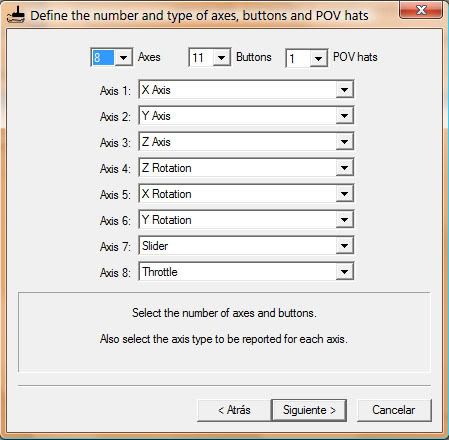
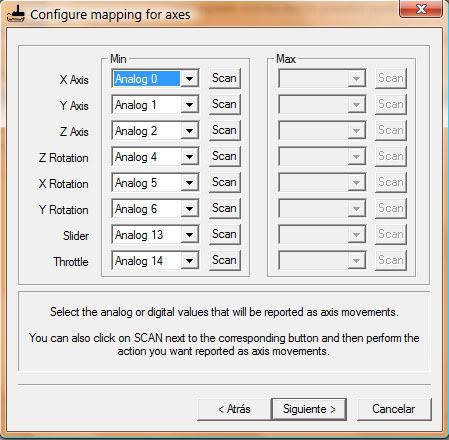
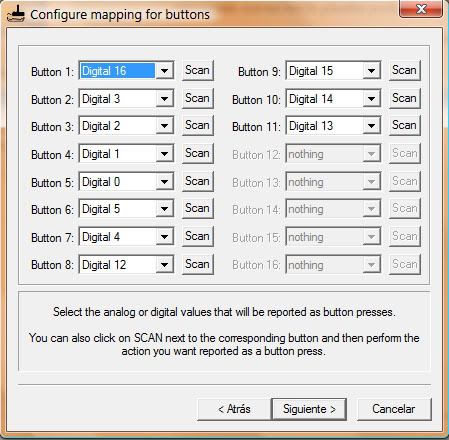
The problem with this configuration is that some games doesn't let you set axes (tiggers) as buttons...
I use JoytoKey or Xpadder for map some butons, axes, or actios as keys, mouse...
any other idea?
thank you |
I still cant get L2 and R2 working.
Is all I have to do to set them to Analog 13 and 14. Do they have to be buttons. ?? Frustrating |
|
| Back to top |
|
|
|

 FAQ
FAQ Search
 Memberlist
 Usergroups
 Register
 Profile
 Log in to check your private messages
 Log in


