| View previous topic :: View next topic |
| Author |
Message |
t2d22009
Joined: 12 Sep 2008
Posts: 2
Location: France
|
 Posted: Fri Sep 12, 2008 6:27 pm Post subject: Posted: Fri Sep 12, 2008 6:27 pm Post subject: |
 |
|
Hi!
Congratulation on your excellent hardwork and dedication to this project!!!
This is awesome.
I own a PSP Slim and I'm looking into making my own modded chatpad.
I was wondering if it would be possible to use the end of such PSP AVS Cable instead of making a SIO from scratch ?

Thank you |
|
| Back to top |
|
 |
jean

Joined: 05 Jan 2008
Posts: 489
|
| Posted: Fri Sep 12, 2008 7:21 pm Post subject: |
|
|
there's a post around with the link o a site where you can buy it already made for cheap...Slim connector is too "slim" itself to DIY...and the cable you are showing is almost certainly not fully connected (i mean: not all the contacts are bounded to a wire and you cannot reach the connector's back because it's probably melted within the coating). Buy it already made or rip it off from some slim remote controller.
[EDIT]
PS: here http://forums.ps2dev.org/viewtopic.php?t=9742 we were discussing connectors related issues. It turned out that here http://pc-mobile.net/pspslim.htm you can buy slim connectors and here http://forums.ps2dev.org/viewtopic.php?t=9742 you can find full pinout description.
Hope it helps! |
|
| Back to top |
|
|
t2d22009
Joined: 12 Sep 2008
Posts: 2
Location: France
|
| Posted: Fri Sep 12, 2008 9:15 pm Post subject: |
|
|
Thank you for the link, I ordered a couple of premade connectors. That will do perfectly.
:) |
|
| Back to top |
|
|
harrz84
Joined: 14 Sep 2008
Posts: 9
|
| Posted: Sun Sep 14, 2008 6:02 pm Post subject: |
|
|
hi all, i'm new to the forum, i'm very interested in this project, I bought the chatpad, and now is disassembled on my desk...
right now to continue the mod i should flash the chip of the chatpad, but I haven't found any clear scheme of programmer for 16f883...
in the archive that jean shares, there is a photo but no scheme to build up one...
Anyone can please post a schematic for pic programmer, with connection for chatpad and rs232?
thanks for help..
ps jean are you italian?
bye |
|
| Back to top |
|
|
jean
Joined: 05 Jan 2008
Posts: 489
|
| Posted: Sun Sep 14, 2008 6:30 pm Post subject: |
|
|
In the package there's noprogrammer scheme, but in the howto, it says clearly that you need a simply JDM programmer like http://www.jdm.homepage.dk/newpics.htm at least, and since some voltage control is involved, you should try programming without GND connected.
PS: yes, i'm italian |
|
| Back to top |
|
|
harrz84
Joined: 14 Sep 2008
Posts: 9
|
| Posted: Sun Sep 14, 2008 6:49 pm Post subject: |
|
|
thanks for fast reply, I saw that link, but to avoid errors in connection between chatpad --> programmer --> rs232 I look for a simpler scheme, without the socket, direct cable...as I see from datasheet of 16f883 the pins of chip have this numbers:
1 v+ 20(vdd)
2 mlcr 1
3 cspclk 27
4 cspdat 28
5 pgm 24
6 gnd 8 and 19 (vss)
if someone can post a scheme adhoc for this project, without passing from generic programmer, all n00b as me appreciated this...lol
thanks
@jean if you could post schematic of your programmer in photo: http://it.geocities.com/giancarlotodone/programmer.jpg
the flat cable in the left is connected to chatpad, and right is connected to rs232, it's simple if I have this scheme to build up... |
|
| Back to top |
|
|
jean
Joined: 05 Jan 2008
Posts: 489
|
| Posted: Sun Sep 14, 2008 8:25 pm Post subject: |
|
|
http://it.geocities.com/giancarlotodone/JDM_chatpad.gif
I simply deleted all unneeded wiring....i made it in a minute and an half, so DON'T rely completely on it...check it against the original one using chatpad_conn.jpg and chatpad_matrixx.pdf, too. I'm not responsible of any possible hardware damage.
jean |
|
| Back to top |
|
|
falconeray
Joined: 16 Sep 2008
Posts: 1
Location: Florida
|
| Posted: Tue Sep 16, 2008 5:53 am Post subject: Programmer |
|
|
| I am a bit new to hardware modding with PIC programmers, and I'm not sure exactly how to make one myself. Instead I am wondering if you could recommend one I could buy online that would work with this project, or somewhere that has very fine details on how to make one. |
|
| Back to top |
|
|
harrz84
Joined: 14 Sep 2008
Posts: 9
|
| Posted: Wed Sep 17, 2008 3:27 am Post subject: |
|
|
hi, I made a programmer with your schematic post before but pgmpic doesn't recognize the programmer and the pic..
so I've changed the scheme..it's a programmer for 16f84, post earlier, now the pc see the programmer, but when i insert the chatpad pgmpic doesn't see no programmer no pic, if i disconnect the chatpad the program turn to see the programmer....
I'm stuck, pls help me, i have also tried to leave disconnected ground on chatpad no change..
help please... |
|
| Back to top |
|
|
jean
Joined: 05 Jan 2008
Posts: 489
|
| Posted: Wed Sep 17, 2008 6:40 pm Post subject: |
|
|
| Will check my wiring again, but i'm almost certain that my up and running programmer is that showed in the picture above. Notice that -as i said in the first pages- this type of programmer could malfunction or not work at all if it's connected to a laptop or to an USB-to-RS232 adapter due to current and synchronicity issues. If you want to go for a way better (and expensive) programmer, you need one capable of programming the PIC16 family, ICSP ready and with voltage control. |
|
| Back to top |
|
|
harrz84
Joined: 14 Sep 2008
Posts: 9
|
| Posted: Wed Sep 17, 2008 9:50 pm Post subject: |
|
|
thanks for reply, i'm not using usb converter directly connected on LPT or COM port, today if i have enought time i'll go to buy items for this schematic...i'll connect on db9

regard on this scheme, the "C1" is 100nF, but where is the positive orientation?
but before everything this programmer working for this project?
thanks |
|
| Back to top |
|
|
jean
Joined: 05 Jan 2008
Posts: 489
|
| Posted: Wed Sep 17, 2008 10:51 pm Post subject: |
|
|
| i don't know if this would work....i cannot test every programmer under the sun, but i think yes... |
|
| Back to top |
|
|
TheCrow103
Joined: 17 Sep 2008
Posts: 4
Location: Germany
|
| Posted: Fri Sep 19, 2008 7:15 am Post subject: |
|
|
First i have to say: Amazing Work Jean!!!!
But 1. Problem i have ;-((
My Backlight is getting Darker and Darker, and i cant get it more brightly!
Anyone an Idea ??
But besides that it`s Fantastic ;-)) |
|
| Back to top |
|
|
jean
Joined: 05 Jan 2008
Posts: 489
|
| Posted: Sat Sep 20, 2008 12:09 am Post subject: |
|
|
What?!? Are you sure you're not talking of the power saving mode?? pressing [people]+[1] [2] [3] [4] [5] [6] [7] [8] [9] [0] you can set how much time you want backlight on, being 9 = always and 0 = never
pressing [people]+[LEFT] or [RIGHT] you can adjust backlight luminosity. If -for instance- you press [People]+[2] you have an average backlight that holds for a short time after a keypress: if you press a key, the light turns on and remains on until you keep pressing keys every now and then....then it smoothly fades down. Is this you are experimenting? If so -like they like to say in MS- "it's not a bug, it's a feature!"
jean |
|
| Back to top |
|
|
TheCrow103
Joined: 17 Sep 2008
Posts: 4
Location: Germany
|
| Posted: Sat Sep 20, 2008 12:29 am Post subject: |
|
|
THX for the reply.
The Power Saving mode worked for the first time,fading an stuff worked.(I think the Powersaving still works but you cant see it ;-( )
But after 3 or 4 Hours of testing the backlight now is so Dark that you only can Imagine that it`s on .
I think the charge pump dosent get or the psp is not giving enough power ;-((
But typing works great.
EDIT:
I connected the Programmer again to the chatpad and i fully light`s up, so the chatpad is working correctly i think.
I checked the output Volt of the PSP and it gives 2.2V.
Maybe it`s not enough ??
Maybe the PSP`s serial Port is broken ?? |
|
| Back to top |
|
|
jean
Joined: 05 Jan 2008
Posts: 489
|
| Posted: Mon Sep 22, 2008 8:42 pm Post subject: |
|
|
| are you going with a slim? i never personally tested the whole project on a slim, but someone told me it's fine....2.2 should be enough...Try reflashing, then check your wiring and soldering points. |
|
| Back to top |
|
|
TheCrow103
Joined: 17 Sep 2008
Posts: 4
Location: Germany
|
| Posted: Tue Sep 23, 2008 12:28 am Post subject: |
|
|
No it`s a Phat PSP.
I Reflashed it already, i cheked the soldering point 3 Times.
When i connect the programmer, the backlight is fully lightning, but when i connect it to the psp it`s dark??? |
|
| Back to top |
|
|
l0rdnic0
Joined: 01 Aug 2008
Posts: 36
Location: NY
|
| Posted: Thu Sep 25, 2008 10:24 am Post subject: |
|
|
Its not voltage. I have built four keyboards and three of them were for a slim. The Slim only puts out 1.6 volts out the SIO... Of the four I built they all worked fine. I would suggest testing with Jeans SIOapp and then do what he suggested by setting the ppl button with the number 4 and then people and the right trigger...
_________________
Inspire someone in a positive way today? |
|
| Back to top |
|
|
TheCrow103
Joined: 17 Sep 2008
Posts: 4
Location: Germany
|
| Posted: Fri Sep 26, 2008 1:37 am Post subject: |
|
|
Tried the ppl button with number 4 and then ppl button and right, but it didnt work.
Jean or l0rdnic0 maybe someone of you can give me your firmware and i try it with them ??
If not, then i have no Backlight :-( |
|
| Back to top |
|
|
LourensK
Joined: 01 Oct 2008
Posts: 3
|
| Posted: Wed Oct 01, 2008 2:10 am Post subject: |
|
|
Hello all,
I am new to this forum, Jean thank you for this nice project !!
I just flashed the ChatPAd and tested on my PSP slim with Jeans Sioapp tester working fine !!
But i am not able to get the Sony OSK to work....
I load provided PiKey as plugin, but i think i have to configure PiKey to load Jeans piKeyOpenKeyboard.prx or sioDriver.prx..
Can someone guide me in the right direction??? |
|
| Back to top |
|
|
angelo
Joined: 29 Aug 2007
Posts: 168
|
| Posted: Wed Oct 01, 2008 4:10 am Post subject: |
|
|
Place those two PRX in:
ms0:/SEPlugins/piKey/InputDrivers/
piKey will load them both as it's designed to do that in the engine!
Good luck!
Angelo |
|
| Back to top |
|
|
LourensK
Joined: 01 Oct 2008
Posts: 3
|
| Posted: Wed Oct 01, 2008 6:14 am Post subject: |
|
|
NoGo...
I installed modified pikey from Jean as mentionend..
Changed in piKeyconfig.txt:
DISABLED PLUGINS = piKeyIR.prx to activate SIO
but:
When i start Internet browser keyboard gets power.. as soon OSK starts power is gone.... |
|
| Back to top |
|
|
LourensK
Joined: 01 Oct 2008
Posts: 3
|
| Posted: Wed Oct 01, 2008 7:39 am Post subject: |
|
|
Got it working now !!!
removed all Inputdrivers from Pikey and copied piKeyOpenKeyboard.prx in there..
Thanks Jean for this fine project !!
Thanks to l0rdnic0 for al your input in this forum
Thanks you Angelo for getting me in the right direction.. |
|
| Back to top |
|
|
}{acker
Joined: 06 Oct 2008
Posts: 2
|
| Posted: Wed Oct 08, 2008 3:24 am Post subject: |
|
|
Yea big thanks to Jean now I get my Chat Pad to work! ^^
Thats awesome!
So a have a little question:
em, maybe I would program a homebrew, that need the Chat Pad. So does I need any other sources for my homebrew to get this to work without pikey??? I mean this homebrew should´t need pikey! And does I need any extra sources, because I dont know are there all your public sources that I need for my homebrew!?
PS: Sorry for my bad English, Im only on school level! =D |
|
| Back to top |
|
|
jean
Joined: 05 Jan 2008
Posts: 489
|
| Posted: Wed Oct 08, 2008 5:21 pm Post subject: |
|
|
| First of all i would like to apologize to anyone relying on me if i'm not on the scene since a while (and i will not be for a little, too) due to health reasons added to my natural being very busy. I still read or write something every now and then, but i have to admit i'm not working on PSP stuff at all these days. Then, let me ask Hacker: of course you can avoid using pikey since the protocol is very simple at the moment (punctualization: too much simple, there's no protocol at all, only ascii chars...) you can start off your sio knowledge reading the sio app's source i posted. BUT i would NOT suggest to avoid using pikey, since the protocol could become a lot harder to implement, and if you'll use pikey you will have not to worry about that; notice that using pikey in an homebrew does not mean you have to use sony osk and keypress emulation....you can simply use it as a driver. |
|
| Back to top |
|
|
}{acker
Joined: 06 Oct 2008
Posts: 2
|
| Posted: Thu Oct 09, 2008 4:04 am Post subject: |
|
|
Ok cool thx for reply Jean! ^^ Now I understand all, and can start with some little projects! =D
_________________
PS: Sorry for my bad English, Im only on school level! =D |
|
| Back to top |
|
|
gr8npwrfl

Joined: 28 Aug 2008
Posts: 12
Location: Southern California
|
| Posted: Sat Oct 11, 2008 12:03 pm Post subject: Feel Better |
|
|
Hope you feel much better soon Jean
Take care
_________________
_____________________________
Ignorance is not fatal, it is curable |
|
| Back to top |
|
|
Arioch_76
Joined: 12 Nov 2008
Posts: 1
|
| Posted: Wed Nov 12, 2008 9:12 am Post subject: |
|
|
thanks a lot , I have my chatpad for PSP , I have just a little problem cause my keyborad is AZERTY , try to change keymap in pikey but nothing happen ...
I think I must modify prx for this but I'm not a coder ....
Then the chatpad work correctly , here some pic of my work (rather your work Jean and L0rdnic0 ^^)
and this is just a quote of my topics on Acidmods:
| Quote: |
Hi all , I try to follow the tut for plug a chatpad (360 keyboard) on PSP , Test are good , I have just a problem my keyboard is AZERTY and the jean openkeyboard is QWERTY ....
I think it's just a keymapping to do , but I try edit the keymap of pikey and no result , maybe it's the prx I must modify ???
anyway the keyboard work , and the rest is no important for now , I have a AT90USBkey and this is the most important thing for me... |
The Prog

All in the board

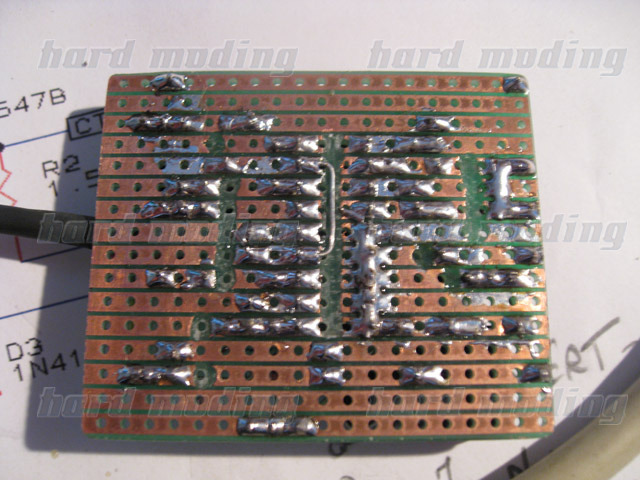
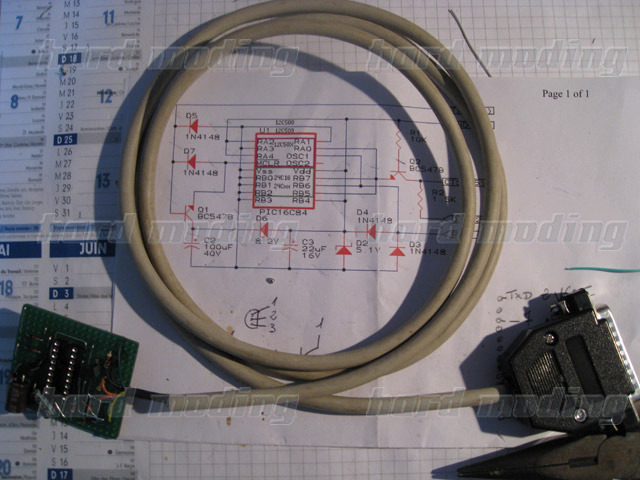
Chatpad before flash
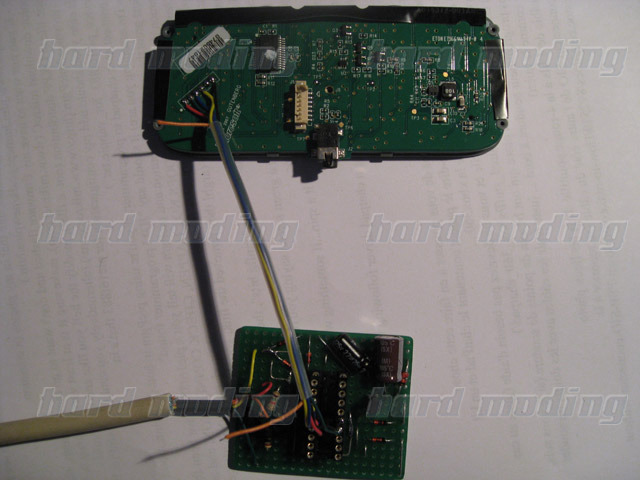
Chatpad with PSP RS232

And the final (sorry for the bad video quality , I try to make one with best quality screen :
VIDEO
Thanks to Jean , L0rdnic0 , and dev of pikey
bye |
|
| Back to top |
|
|
pegasus2000
Joined: 12 Jul 2006
Posts: 160
|
| Posted: Thu Nov 13, 2008 4:29 am Post subject: |
|
|
| Jean, any news for me ? |
|
| Back to top |
|
|
HellReborn

Joined: 01 Nov 2008
Posts: 12
Location: in a tree
|
| Posted: Mon Nov 24, 2008 2:28 pm Post subject: |
|
|
figured i might as well Bump this thread. my chatpad came in today and i was going to start to work on making it work for the psp. i downloaded everything from page 5 and having trouble where i should start. i was reading and it said that i needed an sio connector. could i get the most recent tutorial on this because it would be awesome if i could start this soon. thanks for your guys help. =)
ps. is it possible to make it work with out making or finding the connector? i have the psp volume control thing that plugs into the headphones jack of the psp. thanks again. |
|
| Back to top |
|
|
|

 FAQ
FAQ Search
 Memberlist
 Usergroups
 Register
 Profile
 Log in to check your private messages
 Log in


