| View previous topic :: View next topic |
| Author |
Message |
shdwknt
Joined: 15 Jan 2009
Posts: 1
|
 Posted: Thu Jan 15, 2009 10:55 am Post subject: Posted: Thu Jan 15, 2009 10:55 am Post subject: |
 |
|
Great work.. anyway to get this ported to a pocket pc - maybe a watered down version just up, down, left, right, x, triangle, o, square and the top 2 triggers l1 / r 1
I would love to be able to use this for emulators on my windows mobile 6.1 device..
_________________
http://www.rickstoyroom.com |
|
| Back to top |
|
 |
Grayson
Joined: 09 Dec 2008
Posts: 7
|
| Posted: Sun Jan 18, 2009 3:49 am Post subject: |
|
|
89Ron - I've been using the 0.5.0.5b beta driver to play 2-player emulation for a while now, and is just works great! I really appreciate your work, and I would like to make a donation to you for the use of your software. Do you have a way that I can send you a PayPal payment?
If there was a 0.5.0.5c driver that worked exactly like 0.5.0.5b but supported four controllers instead of just two, it would be like heaven on earth. I've got four non-DualShock Sixaxis controllers and I don't care about rumble at all! |
|
| Back to top |
|
|
E-M@iLinAtoR
Joined: 25 Nov 2008
Posts: 17
|
| Posted: Sun Jan 18, 2009 4:17 am Post subject: |
|
|
| Grayson wrote: | 89Ron - I've been using the 0.5.0.5b beta driver to play 2-player emulation for a while now, and is just works great! I really appreciate your work, and I would like to make a donation to you for the use of your software. Do you have a way that I can send you a PayPal payment?
If there was a 0.5.0.5c driver that worked exactly like 0.5.0.5b but supported four controllers instead of just two, it would be like heaven on earth. I've got four non-DualShock Sixaxis controllers and I don't care about rumble at all! |
Actually your version should work with 4, just create 4 Virtual Joysticks with PPJoy. What happens when u try connecting the third/fourth? |
|
| Back to top |
|
|
Grayson
Joined: 09 Dec 2008
Posts: 7
|
| Posted: Sun Jan 18, 2009 4:39 am Post subject: |
|
|
| Yeah, the BTSix program makes it look like four should work. There are four controllers in the drop-down box to select from, and it makes you create those four PPJoy virtual controllers. However, after you use the PS buttons to assign controllers 1 and 2 (which works perfectly) and then use the PS button on the third controller, the third controller just blinks its LEDs and never connects to BTSix. Many people have connected two Sixaxis controllers to 0.5.0.5b, but though a few have tried, nobody has ever been able to connect a third controller. |
|
| Back to top |
|
|
E-M@iLinAtoR
Joined: 25 Nov 2008
Posts: 17
|
| Posted: Sun Jan 18, 2009 5:23 am Post subject: |
|
|
Doh!
But just to be sure: it's not just the other bug with the LEDs not working, right? I guess you already tried it, but maybe the keys work anyway (if checked in windows game controller properties)? |
|
| Back to top |
|
|
Grayson
Joined: 09 Dec 2008
Posts: 7
|
| Posted: Sun Jan 18, 2009 9:30 am Post subject: |
|
|
Good question - I'll check after dinner. I do know that if I disconnect one of the assigned controllers (i.e., hold the PS button down on controller 1 for 10 seconds, thereby shutting it off), and then press the PS button on another controller, it attaches as controller 3 and the #3 LED lights up. Then, if I press the PS button on the controller I shut off, all I get is blinking LEDs. I'll report back when I see if this is just an LED issue though.
EDIT: Time to report back. Well, this doesn't appear to be an LED bug. I can use any of my controllers as controller 1 and controller 2, but when I attempt to connect a third controller with the 0.5.0.5b version, it never connects. I guess the interesting thing is that I am able to connect two controllers as controller 3 and controller 4...but only after shutting off controllers 1 and 2 by holding down the PS button for 10 seconds. The 0.5.0.5b version seems to be a nanometer from perfection :-) |
|
| Back to top |
|
|
Zaza
Joined: 27 Jul 2008
Posts: 22
|
| Posted: Sun Jan 18, 2009 4:58 pm Post subject: |
|
|
| I'm still unable to edit my buttons in PPJOY. Anybody have any ideas? |
|
| Back to top |
|
|
Grayson
Joined: 09 Dec 2008
Posts: 7
|
| Posted: Mon Jan 19, 2009 1:38 am Post subject: |
|
|
| Zaza - based on your past posts it looks like you had figured out how to map your buttons in PPJoy, but your square wasn't working. I can pretty much guarantee that your square wasn't working since you had it mapped to Digital 0. Map it to Digital 16 (i.e., trade it with the PS button) and you'll be good to go. |
|
| Back to top |
|
|
Zaza
Joined: 27 Jul 2008
Posts: 22
|
| Posted: Mon Jan 19, 2009 3:00 pm Post subject: |
|
|
| It hasn't been mapped to Digital 0, I've been using the configuration posted twilek posted on page 15. Plus I have changed it to another button at one point and it didn't change at all. :( |
|
| Back to top |
|
|
Grayson
Joined: 09 Dec 2008
Posts: 7
|
| Posted: Tue Jan 20, 2009 10:42 am Post subject: |
|
|
| Try the settings Tindytim posted on page 5, except swap "Digital 0" for "Digital 16". That's what I use. Also, after you change your mapping in PPJoy, don't forget to set your mapping in whatever game you're playing. |
|
| Back to top |
|
|
DomX
Joined: 17 Jul 2008
Posts: 14
|
| Posted: Tue Jan 20, 2009 6:24 pm Post subject: |
|
|
| Is there any alternative to PPJOY that works on 64-bit? |
|
| Back to top |
|
|
Cyc
Joined: 22 Jan 2009
Posts: 1
|
| Posted: Thu Jan 22, 2009 4:24 am Post subject: |
|
|
in before, didn't read the whole topic so there could be an answer to my problem hidden in here, asking again tho...
I'm using my Sixaxis with FFXI, BtSix version 1.5c, it used to work fine till I had to format my hdd yesterday, this was my configuration:
Axes: 7 Buttons: 13 Pov Hats: 1
Axis 1: X Axis
Axis 2: Y Axis
Axis 3: Z Axis
Axis 4: Slider
Axis 5: Z Rotation
Axis 6: X Rotation
Axis 7: Y Rotation
Button 1: Digital 16
Button 2: Digital 3
Button 3: Digital 2
Button 4: Digital 1
Button 5: Digital 0
Button 6: Digital 7
Button 7: Digital 6
Button 8: Digital 5
Button 9: Digital 4
Button 10: Digital 12
Button 11: Digital 15
Button 12: Digital 14
Button 13: Digital 13
Pov Hat 1
Directional Pov
North: Digital 11
East: Digital 10
West: Digital 8
South: Digital 9
after I reinstalled the whole set of programs, and set PPJoy to the same config, it does recognize everything well in PPJoy, but the Gamepad Config of FFXI doesn't read the D-Pad as an input
tried to set axis/buttons/hats in any possible way, but I still can't get it to work... o, FFXI also has "Enable Slider" and "Enable Hat Switches" options, I assumed those had to be active for the joypad to work, then I read on Windower forums that slider option could cause the D-Pad not to work and I tried to deactivate it, didn't help, actually I tried every combo of those 2 options but it still doesn't recognize the D-Pad
EDIT: might it be that the previous version of Vista 32bit was basic Ultimate, while this one has SP1 installed? ijdk
Last edited by Cyc on Thu Jan 22, 2009 8:33 am; edited 1 time in total |
|
| Back to top |
|
|
mohbana
Joined: 08 Jun 2008
Posts: 13
|
| Posted: Thu Jan 22, 2009 8:32 am Post subject: |
|
|
| DomX wrote: | | Is there any alternative to PPJOY that works on 64-bit? |
+1 |
|
| Back to top |
|
|
mactrix
Joined: 24 Jan 2009
Posts: 1
|
| Posted: Sat Jan 24, 2009 1:33 am Post subject: |
|
|
Hi dudes,
I've readed the entire post here and my first problem was my bluetooth dongle that wasn't compatible with btfree. I've bought another and everything appears to be fine.
Afterwards i've attempted to make the motion sense and right analog stick works too but I've had a weird problem.
That's the deal: When I try to make 6 axis with PPJoy, the last one (Z Rotation) gets bugged. If I put Z Rotation as analog 0 or 6 that's the same, this axis doesn't works.
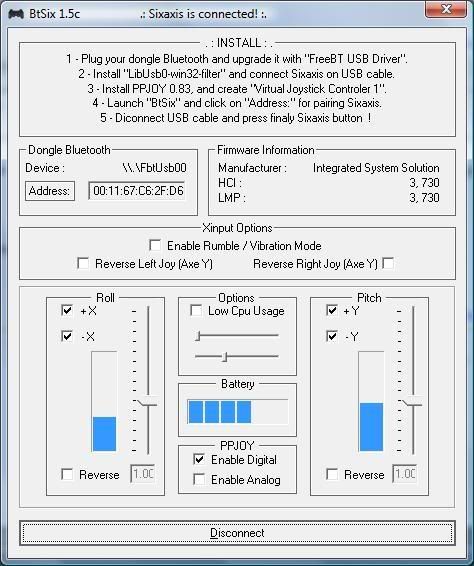
link: http://img.photobucket.com/albums/v300/marcelo_vt/doom3/ds3%20btsix/ssa1.jpg
DS3 Paired successfully.
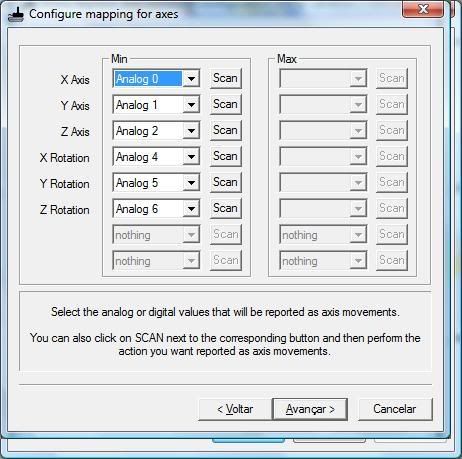
link: http://img.photobucket.com/albums/v300/marcelo_vt/doom3/ds3%20btsix/ssa3.jpg
Here is my configuration.
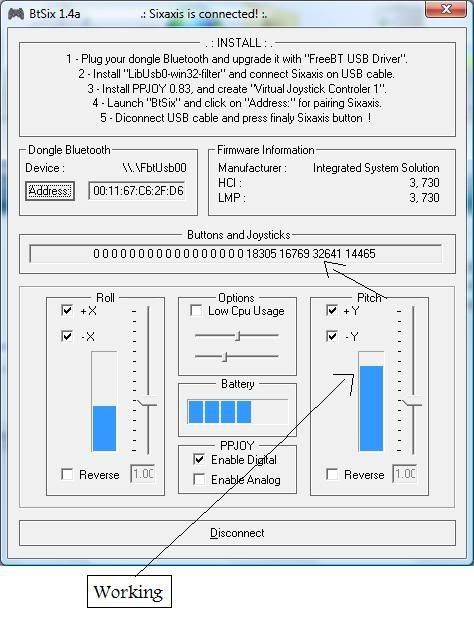
link: http://img.photobucket.com/albums/v300/marcelo_vt/doom3/ds3%20btsix/ssa4.jpg
I've tested with btsix1.4a too because it shows coordinates of axis, as you see it's working fine here.
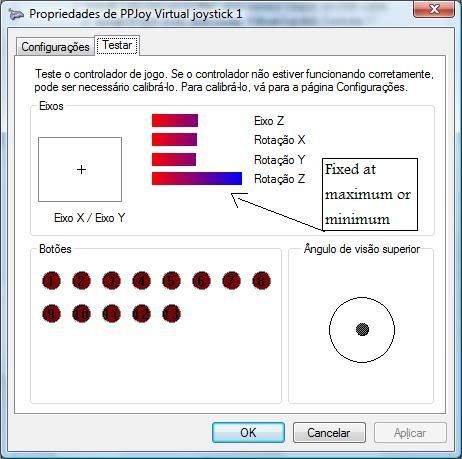
link: http://img.photobucket.com/albums/v300/marcelo_vt/doom3/ds3%20btsix/ssa2.jpg
Now here is the problem, Z Rotation is always at maximum, only if I move joystick to the mininum it goes directly to minimum too, otherwise goes to maximum, no sensitivity.
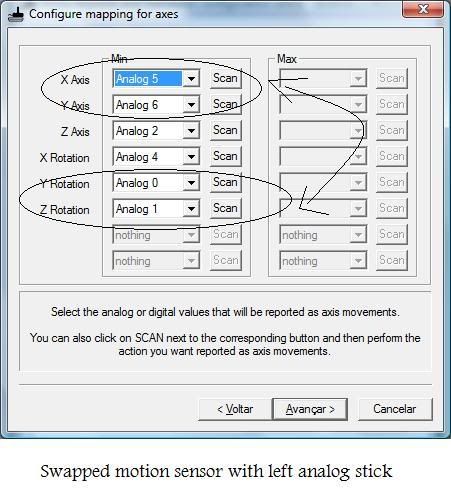
link: http://img.photobucket.com/albums/v300/marcelo_vt/doom3/ds3%20btsix/ssa5.jpg
Now i've swapped the mapping to be sure.
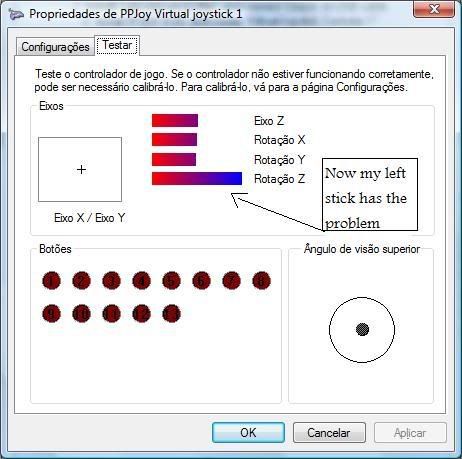
link: http://img.photobucket.com/albums/v300/marcelo_vt/doom3/ds3%20btsix/ssa6.jpg
As you see the problem now goes to Analog 0(Left analog stick), keeping the problem in sixty axis (Z Rotation).
Anyone has any idea? First I tought the my new BT Dongle was not fully compatible too, but on btsix 1.4a shows correctly all movements.
Thanks in advance! |
|
| Back to top |
|
|
Zaza
Joined: 27 Jul 2008
Posts: 22
|
| Posted: Sun Jan 25, 2009 4:41 am Post subject: |
|
|
Figured everything out. I even made my config work perfectly under the default Xbox settings, ie behave like an Xbox controller (tested in GTA4 and GRiD).


With that any Xbox controller enabled game should work perfectly. (ie X=A, Square=X, Triangle=Y, Circle=B)
Also in my testing I found which buttons in PPJOY correspond with buttons on an Xbox controller. Here's what I found:
Button 1= Nothing (PS button)
Button 2= Y
Button 3= X
Button 4= A
Button 5= B
Button 6= Right Bumper
Button 7= Right Trigger
Button 8= Left Bumper
Button 9= Left Trigger
Button 10= Start
Button 11= Back
Button 12= Right Analog Stick Button
Button 13= Left Analog Stick Button
Thanks everyone (especially 89ron) for all their help! |
|
| Back to top |
|
|
tfs66
Joined: 01 Feb 2009
Posts: 22
|
| Posted: Sun Feb 01, 2009 12:54 am Post subject: |
|
|
Hi everyone, how about to try this software? :)
http://www.winds3.com/en/index.htm
no need to install ppjoy,
no need to run btsix,
no need to run joy2key,
everything is ready!
Can play all games on Windows! |
|
| Back to top |
|
|
tfs66
Joined: 01 Feb 2009
Posts: 22
|
| Posted: Sun Feb 01, 2009 1:32 am Post subject: |
|
|

 |
|
| Back to top |
|
|
tfs66
Joined: 01 Feb 2009
Posts: 22
|
| Posted: Sun Feb 01, 2009 1:36 am Post subject: |
|
|

 |
|
| Back to top |
|
|
tfs66
Joined: 01 Feb 2009
Posts: 22
|
| Posted: Sun Feb 01, 2009 1:50 am Post subject: |
|
|

 |
|
| Back to top |
|
|
E-M@iLinAtoR
Joined: 25 Nov 2008
Posts: 17
|
| Posted: Sun Feb 01, 2009 2:46 am Post subject: |
|
|
O.O WTFOMG
Thanks tfs66 for that useful post. Did u try it yet?
I guess it doesn't run on 64bit tho?
I'll give it a shot this week, thanks again. |
|
| Back to top |
|
|
Zaza
Joined: 27 Jul 2008
Posts: 22
|
| Posted: Sun Feb 01, 2009 4:07 pm Post subject: |
|
|
| Anybody tested this out yet? |
|
| Back to top |
|
|
salseropg
Joined: 05 Apr 2008
Posts: 6
|
| Posted: Mon Feb 02, 2009 12:06 am Post subject: Virus????? |
|
|
Hello!...
I tried to install Winds3 under Windows xp 32bit and AVG said me that program contain a virus...... Otherwise Nod32 didnīt find virus....
What is the truth?????
Someone installed it? |
|
| Back to top |
|
|
E-M@iLinAtoR
Joined: 25 Nov 2008
Posts: 17
|
| Posted: Mon Feb 02, 2009 12:15 am Post subject: |
|
|
@salseropg
sometimes antivirus accidentally detects some exe packers as viruses. Imo just ignore it. |
|
| Back to top |
|
|
Zaza
Joined: 27 Jul 2008
Posts: 22
|
| Posted: Mon Feb 02, 2009 4:06 am Post subject: |
|
|
E-M@iLinAtoR - Have you tried it?
To be honest I kind of feel uncertain about this. I did sweep it with Spy Sweeper (with anti-virus) and it came up with nothing. Still . . . |
|
| Back to top |
|
|
E-M@iLinAtoR
Joined: 25 Nov 2008
Posts: 17
|
| Posted: Mon Feb 02, 2009 8:29 am Post subject: |
|
|
| On the download page there is the Softpedia 100% Clean Logo but if searched on www.Softpedia.com it doesn't find anything, weird. Contact the customer support via email, if some1 answers and doesn't tell u suspicious stuff, give it a shot imo. |
|
| Back to top |
|
|
Zaza
Joined: 27 Jul 2008
Posts: 22
|
| Posted: Mon Feb 02, 2009 9:19 am Post subject: |
|
|
| I also searched it on a website advertised on their homepage and found nothing. The advertisements seem to be lower resolution as well. I think I'll wait this one out. |
|
| Back to top |
|
|
tfs66
Joined: 01 Feb 2009
Posts: 22
|
| Posted: Tue Feb 03, 2009 1:11 am Post subject: |
|
|
| E-M@iLinAtoR wrote: | @salseropg
sometimes antivirus accidentally detects some exe packers as viruses. Imo just ignore it. |
E-M@iLinAtoR is right, some dll files have been packed.
There is no problem with most antivirus software.
Frankly speaking, I'm one of the team members of The Force Studio :)
Last edited by tfs66 on Tue Feb 03, 2009 1:20 am; edited 1 time in total |
|
| Back to top |
|
|
tfs66
Joined: 01 Feb 2009
Posts: 22
|
| Posted: Tue Feb 03, 2009 1:17 am Post subject: |
|
|
| E-M@iLinAtoR wrote: | | On the download page there is the Softpedia 100% Clean Logo but if searched on www.Softpedia.com it doesn't find anything, weird. Contact the customer support via email, if some1 answers and doesn't tell u suspicious stuff, give it a shot imo. |
I made a mistake, to early to open the site link, L told me the website uses an old template, two days ago still under testing, sorry for giving someone misunderstanding. But actually some kinds of such certification is undergoing, not carry out yet. Now we make the website clean. |
|
| Back to top |
|
|
tfs66
Joined: 01 Feb 2009
Posts: 22
|
| Posted: Tue Feb 03, 2009 1:27 am Post subject: |
|
|
| E-M@iLinAtoR wrote: | O.O WTFOMG
Thanks tfs66 for that useful post. Did u try it yet?
I guess it doesn't run on 64bit tho?
I'll give it a shot this week, thanks again. |
64bit version is possible to be made, but as I know, without Microsoft's WHQL certification, it is impossible to distribute a driver under 64bit Windows.And WHQL needs time and money... |
|
| Back to top |
|
|
tfs66
Joined: 01 Feb 2009
Posts: 22
|
| Posted: Tue Feb 03, 2009 1:35 am Post subject: |
|
|
| Zaza wrote: | E-M@iLinAtoR - Have you tried it?
To be honest I kind of feel uncertain about this. I did sweep it with Spy Sweeper (with anti-virus) and it came up with nothing. Still . . . |
Hi Zaza, you are a good tester:) We will make WinDS3 better, now I'm considering the virtual X360 controller driver, is there anyone insterest in it? |
|
| Back to top |
|
|
|

 FAQ
FAQ Search
 Memberlist
 Usergroups
 Register
 Profile
 Log in to check your private messages
 Log in


