| View previous topic :: View next topic |
| Author |
Message |
sIRwa2
Joined: 20 May 2007
Posts: 6
|
 Posted: Tue Sep 30, 2008 1:06 am Post subject: Sony Playstation 3 BD remote interface for windows Posted: Tue Sep 30, 2008 1:06 am Post subject: Sony Playstation 3 BD remote interface for windows |
 |
|
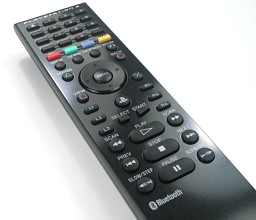
For all that own a playstation3 BD remote or like to use and excellent remote that has a better connectivity that RF or IR, cheetah05, from Media Portal Forum wrote an excellent app for Windows Vista/XP !
PS3 Remote Application - v1.0 BETA
It Acts like a normal keyboard / HID-input runs in the system tray and also features sms like text input trough the numeric keys :o , so you can use it on all your favorite applications that use keyboard shortcuts, like media players media centers and so on.
I'd say: check it out and let us know what you think.
| Quote: | 1. To pair you need to go through the standard Microsoft device, so that you see it in the Devices section.
2. Select the device and click properties
3. Make the controller discoverable again by pressing [Start & Enter Keys] on the remote (together).
4. Click the services tab.
5. Wait till it has found the services and then make sure you check the HID service and click ok as seen below:
It will now be registered as a HID device and will appear under "Game Controllers".
Connect the remote with the computer by pressing the "Playstation" button in the middle of the remote. (Assuming you have already paired the remote as specified above.
|
|
|
| Back to top |
|
 |
Arwin
Joined: 12 Jul 2005
Posts: 426
|
| Posted: Thu Oct 02, 2008 11:56 pm Post subject: |
|
|
| So does this mean that there's a significant difference in the way this remote works over BlueTooth and the PS3 controller? It sure seems like it. |
|
| Back to top |
|
|
sIRwa2
Joined: 20 May 2007
Posts: 6
|
| Posted: Fri Oct 03, 2008 5:07 pm Post subject: |
|
|
| i don't really know for sure, the tools used for the controller don't work for the remote. and I think visa versa. so yes I think do but again, I didn't write it. |
|
| Back to top |
|
|
|

 FAQ
FAQ Search
 Memberlist
 Usergroups
 Register
 Profile
 Log in to check your private messages
 Log in


