| View previous topic :: View next topic |
| Author |
Message |
gandalf the grey
Joined: 12 Apr 2005
Posts: 34
|
 Posted: Sat Sep 03, 2005 6:52 am Post subject: Snake 2 released Posted: Sat Sep 03, 2005 6:52 am Post subject: Snake 2 released |
 |
|
Thought I@d change the topic so that more people would find out about the new release of snake, download here:
http://www.frank-buss.de/tmp/snake.zip
___________________________________________________________
Well thought I might post this so people can try out the new level until Shines comes out with the new version(hopefully with level select) This time it is desert and the snake is now blue and collects apples and scorpions instead of flies.
To use you will need Snake in lua format and replace all the images in the folder with these:

Right-Click save as[/url]
_________________
Fly you fools...
Last edited by gandalf the grey on Mon Sep 05, 2005 6:13 pm; edited 1 time in total |
|
| Back to top |
|
 |
DiabloTerrorGF
Joined: 15 Jul 2005
Posts: 64
|
| Posted: Sat Sep 03, 2005 8:57 pm Post subject: |
|
|
| Your bored waiting for the new update, yes? And the background pic is nice too. |
|
| Back to top |
|
|
gandalf the grey
Joined: 12 Apr 2005
Posts: 34
|
| Posted: Sat Sep 03, 2005 10:46 pm Post subject: |
|
|
| DiabloTerrorGF wrote: | | Your bored waiting for the new update, yes? And the background pic is nice too. |
Yeah, I sent the new artwork over to shine a few days ago and still nothing :p
I think he said he would try to get it done over the weekend :)
_________________
Fly you fools... |
|
| Back to top |
|
|
Shine
Joined: 03 Dec 2004
Posts: 728
Location: Germany
|
| Posted: Sun Sep 04, 2005 4:02 am Post subject: |
|
|
You can download the new snake game for Lua Player at http://www.frank-buss.de/tmp/snake.zip
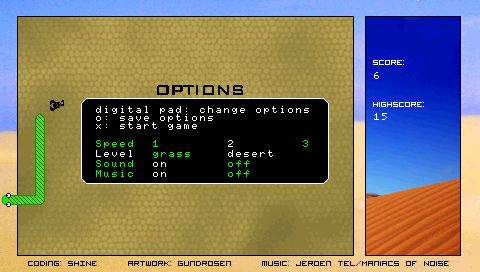
Place the snake directory in the Applications folder, if you are using Lowser, or copy all files to the main directory, where EBOOT.PBP is, and rename index.lua to script.lua. Will be included in the next release of Lua Player, this is a preview. Instead of using an extra screen for the options, I've used a black overlay on top of the current background, so you can select the level and see it immediatly in the background.
@Gandalf: Would be nice, if you could create a small image for the options overlay (250x88 pixels, but you can use alpha values, but only full opaque or full transparent). I think text should be written by the program, because then it can be localized later more easyly. |
|
| Back to top |
|
|
gandalf the grey
Joined: 12 Apr 2005
Posts: 34
|
| Posted: Sun Sep 04, 2005 4:18 am Post subject: |
|
|
| Shine wrote: | You can download the new snake game for Lua Player at http://www.frank-buss.de/tmp/snake.zip
Place the snake directory in the Applications folder, if you are using Lowser, or copy all files to the main directory, where EBOOT.PBP is, and rename index.lua to script.lua. Will be included in the next release of Lua Player, this is a preview. Instead of using an extra screen for the options, I've used a black overlay on top of the current background, so you can select the level and see it immediatly in the background.
@Gandalf: Would be nice, if you could create a small image for the options overlay (250x88 pixels, but you can use alpha values, but only full opaque or full transparent). I think text should be written by the program, because then it can be localized later more easyly. |
Should the image just say "options" ?
anyway, thanks for this super cool new version, I really like it :)
But I'm not really sure about having the flies in the grass level, I had some trouble seeing them. I'll test it out a little more and get back to you.
The best thing to do might be replacing the apples with flies in the desert level and having only apples in the grass level :)
BTW, do you think you can make a seperate EBOOT out of this too ;)
_________________
Fly you fools... |
|
| Back to top |
|
|
Shine
Joined: 03 Dec 2004
Posts: 728
Location: Germany
|
| Posted: Sun Sep 04, 2005 4:24 am Post subject: |
|
|
| gandalf the grey wrote: | | Should the image just say "options" ? |
Yes, a headline would be nice. Then the image can be larger, if you like, 250x88 pixels is the current size only.
| gandalf the grey wrote: |
But I'm not really sure about having the flies in the grass level, I had some trouble seeing them. |
You are right, the contrast is not very good. And the color of the sand in the desert level around the borders looks too bright on my PSP (but not on my computer LCD). Perhaps we need a color management profile for Photoshop for PSP :-) |
|
| Back to top |
|
|
gandalf the grey
Joined: 12 Apr 2005
Posts: 34
|
| Posted: Sun Sep 04, 2005 4:32 am Post subject: |
|
|
| Shine wrote: | | gandalf the grey wrote: | | Should the image just say "options" ? |
Yes, a headline would be nice. Then the image can be larger, if you like, 250x88 pixels is the current size only.
| gandalf the grey wrote: |
But I'm not really sure about having the flies in the grass level, I had some trouble seeing them. |
You are right, the contrast is not very good. And the color of the sand in the desert level around the borders looks too bright on my PSP (but not on my computer LCD). Perhaps we need a color management profile for Photoshop for PSP :-) |
Here is a options menu background:

Was that kinda what you wanted? It is a little bigger than 250x88(but only to fit the options text over the box.
_________________
Fly you fools... |
|
| Back to top |
|
|
Shine
Joined: 03 Dec 2004
Posts: 728
Location: Germany
|
| Posted: Sun Sep 04, 2005 4:54 am Post subject: |
|
|
| gandalf the grey wrote: |
Here is a options menu background:
|
Thanks, I've updated the game, now it looks professional :-)
 |
|
| Back to top |
|
|
gandalf the grey
Joined: 12 Apr 2005
Posts: 34
|
| Posted: Sun Sep 04, 2005 5:22 am Post subject: |
|
|
| Shine wrote: | | gandalf the grey wrote: |
Here is a options menu background:
|
Thanks, I've updated the game, now it looks professional :-)
|
Looks good :D
_________________
Fly you fools... |
|
| Back to top |
|
|
|

 FAQ
FAQ Search
 Memberlist
 Usergroups
 Register
 Profile
 Log in to check your private messages
 Log in


