| View previous topic :: View next topic |
| Author |
Message |
dsn

Joined: 09 Nov 2005
Posts: 47
Location: Indianapolis, Indiana, USA
|
 Posted: Tue Mar 14, 2006 8:22 am Post subject: Serial cable for dummies :-) Posted: Tue Mar 14, 2006 8:22 am Post subject: Serial cable for dummies :-) |
 |
|
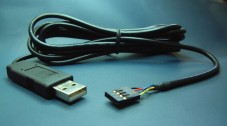
I have a question about building a serial cable for the PSP. I'm a little reluctant to ask this because I'm a total idiot when it comes to hardware, but here goes. I was looking for parts to build a PSP serial cable based on this: http://nil.rpc1.org/psp/remote.html
While looking for parts, I ran across this: http://www.sparkfun.com/commerce/product_info.php?products_id=449
Would this thing work if I wired up the header to the PSP remote port? |
|
| Back to top |
|
 |
Drakonite
Site Admin

Joined: 17 Jan 2004
Posts: 989
|
| Posted: Tue Mar 14, 2006 10:23 am Post subject: |
|
|
It seems to essentially run the same purpose as the max circuit, but I haven't looked into it too much so don't quote me :P
_________________
Shoot Pixels Not People!
Makeshift Development |
|
| Back to top |
|
|
HaQue
Joined: 25 Nov 2005
Posts: 91
Location: Adelaide, Australia
|
| Posted: Tue Mar 14, 2006 11:47 am Post subject: |
|
|
That device will be fine for PC to PSP serial comms, just power it at 2.5V DC. Nice find.
_________________
www.smartwave-wireless.com |
|
| Back to top |
|
|
dsn
Joined: 09 Nov 2005
Posts: 47
Location: Indianapolis, Indiana, USA
|
| Posted: Tue Mar 14, 2006 12:08 pm Post subject: |
|
|
| It's on order; I'll let everyone know how it works. |
|
| Back to top |
|
|
chrismulhearn
Joined: 22 Feb 2006
Posts: 80
|
| Posted: Wed Mar 15, 2006 3:03 am Post subject: |
|
|
| *Make sure* you power it at 2.5V! |
|
| Back to top |
|
|
dsn
Joined: 09 Nov 2005
Posts: 47
Location: Indianapolis, Indiana, USA
|
| Posted: Wed Mar 15, 2006 3:05 am Post subject: |
|
|
| I was planning on powering it from pin 5 (the yellow wire). |
|
| Back to top |
|
|
Art
Joined: 09 Nov 2005
Posts: 647
|
| Posted: Sat Mar 18, 2006 12:06 am Post subject: |
|
|
Yes, pls let us know how you go.
That could be biult into the D9 backshell,
and made invisible so it looks like you got an ordinary cable. |
|
| Back to top |
|
|
dsn
Joined: 09 Nov 2005
Posts: 47
Location: Indianapolis, Indiana, USA
|
| Posted: Sat Mar 18, 2006 5:05 pm Post subject: |
|
|
This thing works great! I tested it with the SIO sample in the SDK. The greeting appeared on my terminal and the PSP responded as I typed. I cut off the controller from a PSP remote cable and wired it like so:
Vcc - yellow
Gnd - blue
Tx - gray
Rx - orange
To answer your next question: yes, I realize that I just wasted a Friday evening playing with serial cables. |
|
| Back to top |
|
|
alain91
Joined: 01 Mar 2006
Posts: 13
|
| Posted: Tue Mar 21, 2006 4:22 pm Post subject: Serial |
|
|
Great DSN :)
Did you had to lower current from the pc or did you build it straight from the transceiver to the psp remote cable ?
Alain |
|
| Back to top |
|
|
dsn
Joined: 09 Nov 2005
Posts: 47
Location: Indianapolis, Indiana, USA
|
| Posted: Wed Mar 22, 2006 1:41 am Post subject: |
|
|
| Nope, all I did was solder the remote cable directly to the transceiver. |
|
| Back to top |
|
|
ooPo
Site Admin
Joined: 17 Jan 2004
Posts: 2032
Location: Canada
|
|
| Back to top |
|
|
sneeze
Joined: 03 Mar 2006
Posts: 15
|
| Posted: Wed Mar 22, 2006 4:23 am Post subject: |
|
|
This one should also work (it's been mentioned somewhere else in this forum, but I thought it could be nice to collect the info in one place)
http://www.ftdichip.com/Products/EvaluationKits/MM232R.htm
dsn: Do you know what lowest voltage the sparkfun adapter can handle? Could not find any info on that at their page (I'm considering it for the 1.7V PS2 serial port) |
|
| Back to top |
|
|
dsn
Joined: 09 Nov 2005
Posts: 47
Location: Indianapolis, Indiana, USA
|
| Posted: Wed Mar 22, 2006 4:30 am Post subject: |
|
|
| I don't know how low it can go, but I'm sure the guys at Spark Fun would be willing to answer any questions you have: support@sparkfun.com |
|
| Back to top |
|
|
ooPo
Site Admin
Joined: 17 Jan 2004
Posts: 2032
Location: Canada
|
| Posted: Wed Mar 22, 2006 4:39 am Post subject: |
|
|
From that ftdichip site:

http://www.ftdichip.com/Products/EvaluationKits/TTL-232R.htm
From the datasheet:
| Quote: | Integrated Level Converter on UART Interface and Control Signals - VCCIO pin supply can be from 1.8V to 5V. Connecting the VCCIO pin to 1.8V, 2.8V, or 3.3V allows the device to directly interface to 1.8V, 2.8V or 3.3V and other logic families without the need for external level converter I.C. devices.
5V / 3.3V / 2.8V / 1.8V Logic Interface - The FT232R provides true CMOS Drive Outputs and TTL level Inputs. |
All for $20USD. Snazzy. |
|
| Back to top |
|
|
jimparis
Joined: 10 Jun 2005
Posts: 1179
Location: Boston
|
| Posted: Wed Mar 22, 2006 8:10 am Post subject: |
|
|
| Looks nice, except they don't give you access to the VCCIO pin externally, so you can't actually select anything other than the default 5V (they say to contact them if you want a 3.3V version). |
|
| Back to top |
|
|
ooPo
Site Admin
Joined: 17 Jan 2004
Posts: 2032
Location: Canada
|
| Posted: Wed Mar 22, 2006 9:03 am Post subject: |
|
|
Curses! Foiled again!
Looks like the MM232R is definately the best choice from that manufacturer. |
|
| Back to top |
|
|
Art
Joined: 09 Nov 2005
Posts: 647
|
| Posted: Tue Apr 11, 2006 2:42 pm Post subject: |
|
|
| Quote: |
Vcc - yellow
Gnd - blue |
Is there a secret to keeping power from these pins alive?
I find that the PSP cuts power in a matter of seconds if the
headphone remote is not connected.
Art. |
|
| Back to top |
|
|
white rabbit
Joined: 06 Jul 2005
Posts: 60
|
| Posted: Tue Apr 11, 2006 5:56 pm Post subject: |
|
|
| Yeah, you have to connect the headphones... or rather put something in the jack. No idea if you can override that in code. |
|
| Back to top |
|
|
Art
Joined: 09 Nov 2005
Posts: 647
|
| Posted: Tue Apr 11, 2006 8:03 pm Post subject: |
|
|
I know that, of course I had the headphone plug in the jack if I was trying to
power anything from the blue and yellow wires.
I mean I have disconnected the headphone remote (circuit) from the other
end of the cable to reuse the cable, but the PSP only provides power on
those lines for a few seconds. |
|
| Back to top |
|
|
dsn
Joined: 09 Nov 2005
Posts: 47
Location: Indianapolis, Indiana, USA
|
| Posted: Tue Apr 11, 2006 9:05 pm Post subject: |
|
|
| This is all conjecture, but I think the HPRM driver is responsible for the power cycling; calling pspDebugSioInit unloads the HPRM driver. Are you testing this with actual code, or have you not gotten that far? |
|
| Back to top |
|
|
TyRaNiD
Joined: 18 Jan 2004
Posts: 918
|
| Posted: Wed Apr 12, 2006 2:06 am Post subject: |
|
|
| Pretty much right, the power for the remote is under software control. In the HPRM driver if it doesn't get a suitable reponse in around 3 secs or so it disables the power until the next time you replug the cable in. As mentioned if you call pspDebugSioInit it will enable the power permanently. |
|
| Back to top |
|
|
Art
Joined: 09 Nov 2005
Posts: 647
|
| Posted: Wed Apr 12, 2006 12:20 pm Post subject: |
|
|
Damn, I was trying to power an FM transmitter with it, but if I have
to run homebrew to use it I also have to write an MP3 player.
The FM transmitter sux anyway, it's not worth the hassle. |
|
| Back to top |
|
|
cory1492
Joined: 10 Dec 2004
Posts: 216
|
| Posted: Wed May 10, 2006 7:46 am Post subject: |
|
|
| Excellent stuff DSN and thank you. You saved me alot of fiddling with components I dont have to get the max chips I do have working with it. Grabbed this and one of their serial cables for around 20 shipped to Canada to play with PSPlink (unfortunately the best I am able to send to the psp is at 9600, but receiving from the psp can go full speed). |
|
| Back to top |
|
|
kasikeeper
Joined: 29 Nov 2007
Posts: 36
|
| Posted: Fri May 09, 2008 6:02 am Post subject: |
|
|
Hi,
I was trying to build myself a serial cable with the suggested rs232 to ttl converter under
http://www.sparkfun.com/commerce/product_info.php?products_id=449
I made sure the wiring is correct. When I connect the serial cable to my psp and the usb cable is also connected then the psp crashes. If usb is not connected then no crash occurs. I figured out that when the serial cable is inserted even touching USB GND with the USB GND plug crashes the PSP. What the hell can this be?
Ok, so I tried to connect with only the serial cable connected as i don't need the usb now anyway. I compiled the sio sample of the pspsdk and copied it into my fw1.5 folder. when i start the application the screen remains black and nothing happens if i try to connect with a terminal program... :-(
Has anyone seen this strange behavior or can you give advise?
Thanks,
Kai |
|
| Back to top |
|
|
Art
Joined: 09 Nov 2005
Posts: 647
|
| Posted: Fri May 09, 2008 8:28 am Post subject: |
|
|
I know that a real MAX232 circuit works fine,
although I don't use the LEDs.

Except you have to power it from the PC end of the serial port.
I can't see how the circuit you linked to works,
but I would assume it is essentially the same thing with the lower voltage version of the MAX232.
_________________
If not actually, then potentially. |
|
| Back to top |
|
|
kasikeeper
Joined: 29 Nov 2007
Posts: 36
|
| Posted: Sat May 10, 2008 6:55 pm Post subject: |
|
|
Thanks for the schematics, but I want to get my sparkfun converter up and running since I paid for it already.
I got the cable running - sort of. I compiled the sio sample given in the pspsdk and the module connects with my terminal program. However, I always only receive the value 1280 when I press a button. (i made sure the connection is at 4800baud 8n1 as stated in the readme)
When trying to send something back to the pc terminal from the sio sample (i added the string send command) i do not receive anything.
Can someone tell me what the normal behavior of the sio sample should be like. A screenshot would be nice. |
|
| Back to top |
|
|
kasikeeper
Joined: 29 Nov 2007
Posts: 36
|
| Posted: Thu May 15, 2008 5:20 am Post subject: |
|
|
| No help on this one? Please !!! I can receive chars but nothing goes back to the terminal, what could that be? |
|
| Back to top |
|
|
Art
Joined: 09 Nov 2005
Posts: 647
|
| Posted: Thu May 15, 2008 5:34 pm Post subject: |
|
|
Have you given the serial echo program in LUAplayer Lowser a go?
Not that I'd use it for any mre than testing, but I know that works
by echoing typed characters, and it does keep up with a Human typing on a keyboard.
I linked to the MAX232 circuit to comapre.
The circuit you have might be another Maxim IC with the same pinout.
_________________
If not actually, then potentially. |
|
| Back to top |
|
|
jean

Joined: 05 Jan 2008
Posts: 489
|
| Posted: Thu May 15, 2008 8:42 pm Post subject: |
|
|
| Don't tink it matters in this case, but keep in mind that SIO sample in SDK does work or not depending on your luck, 'cause if it coexists with another expensive thread it looses data or detects garbage. Long ago I wrote a "SIO driver" to properly manage all kind of serial devices and a small serial console, too....if this whole software thing does not function, then it's an hardware issue!! |
|
| Back to top |
|
|
kasikeeper
Joined: 29 Nov 2007
Posts: 36
|
| Posted: Fri May 16, 2008 6:49 am Post subject: |
|
|
I checked the serial sample which comes with the Luaplayer distribution. Basically I see the same results. The displayed characters do not match the entered character code. E.g. a 305 is displayed when I press the A key. The returned values however are consistent throughout the tests and they are even equal between the sio sample and the lua sample.
One thing I noticed. The TX and RX LED's do not turn on when running the samples. Is that normal behavior as the board is only powered at 2.5V? |
|
| Back to top |
|
|
|

 FAQ
FAQ Search
 Memberlist
 Usergroups
 Register
 Profile
 Log in to check your private messages
 Log in