| View previous topic :: View next topic |
| Author |
Message |
Tindytim
Joined: 03 May 2008
Posts: 18
|
 Posted: Thu Aug 07, 2008 2:27 am Post subject: Posted: Thu Aug 07, 2008 2:27 am Post subject: |
 |
|
| Alex_live wrote: | hey, guys....I solved my problem and now my sixaxis works
but i have another problem
Whenever I play fifa 08 and Overlord: Rising Hell (on these 2 games i've seen....it might be a problem in other games as well) the square (digital 0) does not respond....you think you have any sollutions, please?
Thanks :) |
Swap Digital 0 and Digital 16 (Or with what ever is in your last button placing) in PPJoy. |
|
| Back to top |
|
 |
Alex_live
Joined: 29 Jul 2008
Posts: 5
|
| Posted: Thu Aug 07, 2008 7:05 am Post subject: |
|
|
thanks..... that's what i had seen in rypaul's config in ppJoy as well and it works....on Overlord
but since i changed the buttons...fifa 08 and euro 2008 don't see the controller anymore
probably i'm already getting on your nerves :))....but does anyone have a sollution :)
thanks |
|
| Back to top |
|
|
rypaul
Joined: 22 Jul 2008
Posts: 39
|
| Posted: Thu Aug 07, 2008 1:59 pm Post subject: Game Controllers |
|
|
| Make sure in the Game Controllers Advanced menu Virtual Joystick 1 is the preferred device. Apart from that I am not sure why it would work for some games and not others I usually find it either works or not at all |
|
| Back to top |
|
|
sman26
Joined: 13 Jun 2008
Posts: 7
|
| Posted: Fri Aug 08, 2008 4:25 am Post subject: Sixaxis and Stella emulator |
|
|
I'm having trouble mapping keys on the SIXAXIS on the Stella (Atari 2600) emulator. When I go to map a key and hit map in Stella, a key is chosen immediately because I believe it is grabbing a key from the movement of the controller since it has pitch and roll movement build in. I thought I disabled it on the controller but again in Stella it grabs a key immediately before I can put in the button I want for each function.
Anyone ran into this and might be able to give some advice?
Thanks. |
|
| Back to top |
|
|
Alex_live
Joined: 29 Jul 2008
Posts: 5
|
| Posted: Fri Aug 08, 2008 7:19 am Post subject: Re: Game Controllers |
|
|
| rypaul wrote: | | Make sure in the Game Controllers Advanced menu Virtual Joystick 1 is the preferred device. Apart from that I am not sure why it would work for some games and not others I usually find it either works or not at all |
it wasn't....but it still does not fix the problem....but it's okay, i don't care that much....it works on the other games
but if you happen to find a solution i'd be even more greatful :)
Thanks a lot for the help ;) |
|
| Back to top |
|
|
phoenon
Joined: 22 May 2008
Posts: 23
|
| Posted: Fri Aug 08, 2008 5:01 pm Post subject: Re: Game Controllers |
|
|
| Alex_live wrote: | | rypaul wrote: | | Make sure in the Game Controllers Advanced menu Virtual Joystick 1 is the preferred device. Apart from that I am not sure why it would work for some games and not others I usually find it either works or not at all |
it wasn't....but it still does not fix the problem....but it's okay, i don't care that much....it works on the other games
but if you happen to find a solution i'd be even more greatful :)
Thanks a lot for the help ;) |
That's because some games doesn't recognice Virtual Joys, you should use an key emulator or something try with xpadder |
|
| Back to top |
|
|
waste
Joined: 11 Aug 2008
Posts: 1
|
| Posted: Mon Aug 11, 2008 7:08 am Post subject: |
|
|
| ntran89 wrote: | | One more question, installing freeBT and the like completely destroyed functionality of my "bluetooth stack", how do i transfer files to my phone/vice versa now? |
does anyone have any comments or workarounds for this? I am hesitant to try any of these if I will loose any phone functionality.
Thanks |
|
| Back to top |
|
|
DomX
Joined: 17 Jul 2008
Posts: 14
|
| Posted: Mon Aug 11, 2008 10:59 pm Post subject: |
|
|
What do we need ppjoy64 for? First we should get it working via USB.
Btw, x64 drivers have been posted a few pages back, but I haven't managed to get the controller working. |
|
| Back to top |
|
|
mohbana
Joined: 08 Jun 2008
Posts: 13
|
| Posted: Tue Aug 12, 2008 2:04 am Post subject: |
|
|
| DomX wrote: |
What do we need ppjoy64 for? First we should get it working via USB.
Btw, x64 drivers have been posted a few pages back, but I haven't managed to get the controller working. |
me neither, I think it's a must to have ppjoy64 though. |
|
| Back to top |
|
|
Alex_live
Joined: 29 Jul 2008
Posts: 5
|
| Posted: Tue Aug 12, 2008 5:37 pm Post subject: Re: Game Controllers |
|
|
| phoenon wrote: | | Alex_live wrote: | | rypaul wrote: | | Make sure in the Game Controllers Advanced menu Virtual Joystick 1 is the preferred device. Apart from that I am not sure why it would work for some games and not others I usually find it either works or not at all |
it wasn't....but it still does not fix the problem....but it's okay, i don't care that much....it works on the other games
but if you happen to find a solution i'd be even more greatful :)
Thanks a lot for the help ;) |
That's because some games doesn't recognice Virtual Joys, you should use an key emulator or something try with xpadder |
I tried xpadder but the only thing that it does is configure the controller buttons and axes....it does not fix anything in the game. |
|
| Back to top |
|
|
DomX
Joined: 17 Jul 2008
Posts: 14
|
| Posted: Tue Aug 12, 2008 6:58 pm Post subject: |
|
|
| mohbana wrote: | | DomX wrote: |
What do we need ppjoy64 for? First we should get it working via USB.
Btw, x64 drivers have been posted a few pages back, but I haven't managed to get the controller working. |
me neither, I think it's a must to have ppjoy64 though. |
I don't think so, the instructions on the first page don't mention ppjoy.
I guess it's only used for BT connection? |
|
| Back to top |
|
|
pichili.pichili
Joined: 13 Aug 2008
Posts: 9
|
| Posted: Wed Aug 13, 2008 4:03 am Post subject: PPJoy and Pro Evolution Soccer 5 |
|
|
| Hey guys, I got a problem after installation of PPJoy... everytime I´ve tried to open PES5, an error appears and windows close the program, after that ask me to send a report of the problem... I´m sure that it is because of PPJoy since, if i uninstall it, problem does not appears and PES5 launches without problems... Does anybody know what could be happening?? Thanks in advance! |
|
| Back to top |
|
|
pichili.pichili
Joined: 13 Aug 2008
Posts: 9
|
| Posted: Sat Aug 16, 2008 5:24 am Post subject: Two DS3 |
|
|
| phoenon wrote: | | Schum4ch3 wrote: | | Hi all,i can't make 2 wireless controllers to work together(i have 3 wireless controllers)..i even tried with 2 bluetooth dongles giving each controller a different mac address..is anybody able to use 2 controllers by bluetooth? |
Yes you can, you just need 1BT dongle...
You should download the last BTSix, and create 4 virtual joysticks in PPJoy. Then you just have to do pairing in each virtual device on BTSix,(see the picture).
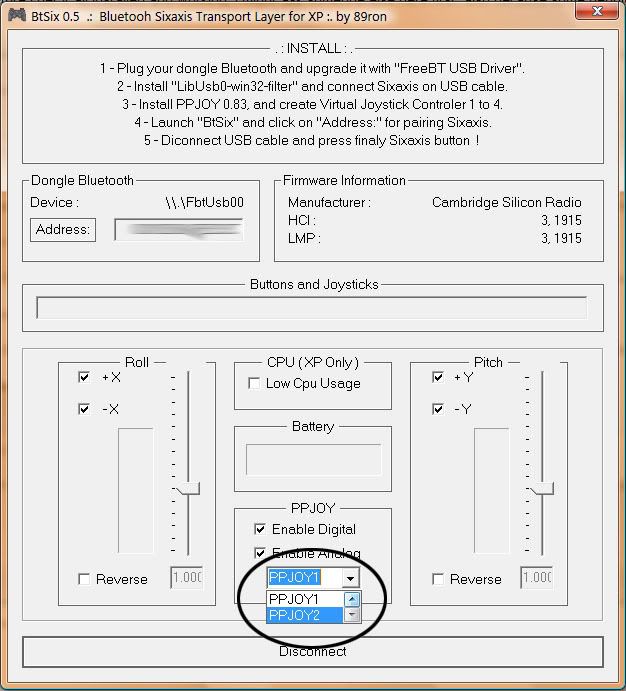
------->>>Qestion
It's DualShock 3 working? A friend reported to me it doesn't. when connected it just keep vibrating, nothing else....any other report abaut DualShock 3??
------->>>Question 2
It's really working when mapping buttons as analogue? I feel they're just digital to
<<<<<------------
thank you |
Dear Phoenon, could you please tell me (step by step) how to get PPJOY1 & PPJOY2 working at the same time?? I cannot make it! I plugged both controllers in different usb ports but, once i pressed address button, joystick number one starts to rumble and i cannot see DS3 numer two!!! Could you please give me a hand?? |
|
| Back to top |
|
|
protman
Joined: 16 Aug 2008
Posts: 2
|
| Posted: Sat Aug 16, 2008 3:17 pm Post subject: |
|
|
I've been working a bit to max out the number of buttons/axis I can use at once with the hopes I can also implement one or more of the pressure sensitive buttons into my setup; using puredata to perform some a/v experiments with game controllers.
So far it seems like even though ppjoy maxes out at 8 variable/axis/analog, the combination of btsix, ppjoy, and windows forces one to also have all the axis and variable controllers configured in the correct order, too.
I've been working pretty hard to get it all worked out, but I just can not seem to get it working with the following using any combination of btsix and ppjoy config.
I want either:
all four analog axis
two motion axis (minus gyro)
all buttons digital
one analog/variable button (can it also send digital?)
all four analog axis
two motion axis (minus gyro)
all buttons digital except L2 R2 which may be considered axis
so far I've gotten:
all four analog axis
two motion axis (minus gyro)
all buttons digital
but trying any other combo winds up having certain axis disabled/non-functional according to the diagnoistics in control panel>game contollers.
It also seems to matter the order of the control numbers.
ex: analog4 before analog3, or else something falls out of place, and jumbles the order of operation for the rest.
Additionally.. is there anything besides ppjoy we may use to manage the configuration? I don't need it to function as a game controller so much as I want to be able to use as much of the input data as I can. If I could get every digital and analog to register, it would be a great tool for some of the projects I am working on.
thx
jjh |
|
| Back to top |
|
|
phoenon
Joined: 22 May 2008
Posts: 23
|
| Posted: Sat Aug 16, 2008 7:44 pm Post subject: Re: Two DS3 |
|
|
| pichili.pichili wrote: |
Dear Phoenon, could you please tell me (step by step) how to get PPJOY1 & PPJOY2 working at the same time?? I cannot make it! I plugged both controllers in different usb ports but, once i pressed address button, joystick number one starts to rumble and i cannot see DS3 numer two!!! Could you please give me a hand?? |
Your problem is just with DS3, by now is not supported by BtSix. 89ron announced a new version with support. Just wait for it's release. I think 1.4 version worked for DS3, but that version doesn't support multiples sixaxis, I guess.
| protman wrote: | Additionally.. is there anything besides ppjoy we may use to manage the configuration? I don't need it to function as a game controller so much as I want to be able to use as much of the input data as I can. If I could get every digital and analog to register, it would be a great tool for some of the projects I am working on.
|
I recommend Xpadder, you can map buttons as keys, or mouse and lot of options. Great for games without support for virtual joys. |
|
| Back to top |
|
|
gear323
Joined: 19 Aug 2008
Posts: 2
|
| Posted: Tue Aug 19, 2008 3:50 am Post subject: Can't get Dual Shock to work |
|
|
First off I want to thank you for getting this working! There are other wireless controllers that you can buy for the PC but I don’t want to have another (2) devices cluttering up the house. It is really nice to be able to pull my PS3 gamepad off of the charger and then connect it to my PC and use it wirelessly.
I am using the below configuration
BtSix.0.5.0.5b
Driver from BtSix.1.4a
fbt-a3-20041206
PPJoy
libusb-win32-filter-bin-0.1.10.1.exe
JoyToKey.exe
I have it set up so I can use the PS3gamepad as a mouse with joytokey and have many of the buttons configured. I have the buttons set so I can scroll up and down on web pages using the L and R buttons, left click, right click, press ESC, Enter, and have buttons configured so that I can go forward and back on web pages. JoytoKey also lets you configure the analog deadzone so that I don’t get mouse drift if the PS3 analog stick does not go exactly back to center.
So all of the above is working great! The issue I am having is with my SiXAXIS Dual Shock gamepad. Whenever I connect it, it just rumbles for awhile and then eventually locks up my computer and I need to reboot it. I own one regular SIXAXIS and one SIXAXIS Dual Shock so I was not able to try two controllers without using the Dual Shock gamepad. I tried using the Dual Shock as the only gamepad and had the same results, rumble and then lockup.
I borrowed a SIXAXIS gamepad from a friend and then was able to successfully get both pads working at the same time so it looks like Dual Shock pads have an issue. Is there anyway for me to turn off the dual shock feature?
Does anyone know if BITSIX is still being worked on anymore? It looks like there have not been any posts from the developer in awhile. I'm trying to decide if I should go buy another SIXAXIS pad or wait for this issue to be resolved.
Was I supposed to use the driver from 1.4a? BtSix.0.5.0.5b didn't seem to come with a driver so that is why I installed the driver from 1.4a
I am having some issues wtih some emulators and some buttons not working correctly, SQUARE, START, and Select seem to be the butons that give me the biggest issues. I have printed out the config for PPJOY that rypaul suggests as NORMAL config and will give it a try tonight when i get home from work.
Thanks!
Last edited by gear323 on Tue Aug 19, 2008 12:09 pm; edited 1 time in total |
|
| Back to top |
|
|
phoenon
Joined: 22 May 2008
Posts: 23
|
| Posted: Tue Aug 19, 2008 5:07 am Post subject: |
|
|
| 89ron wrote: | BtSix 1.5 coming soon:
For Gamers: - Rumble/Vibration mode. (Beta)
For Dev/Students: - Share data with a Dll. |
This message is from june. I think it's just a question of time, keep in mind we're in summer, perhaps our coder has taken a break. By my side I think there is no reasson to worry abaut. We all must be patient...
thx |
|
| Back to top |
|
|
gear323
Joined: 19 Aug 2008
Posts: 2
|
| Posted: Tue Aug 19, 2008 12:13 pm Post subject: Re: Can't get Dual Shock to work |
|
|
| gear323 wrote: | First off I want to thank you for getting this working!
I am having some issues wtih some emulators and some buttons not working correctly, SQUARE, START, and Select seem to be the butons that give me the biggest issues. I have printed out the config for PPJOY that rypaul suggests as NORMAL config and will give it a try tonight when i get home from work.
Thanks! |
Just wanted to post a little update. I tried the rypaul settings and it worked perfectly for me.
Also sometimes when two controllers are connected, the controllers will both automatically disconnect and then my computer becomes unusable and I need to reboot. I think the CPU gets spiked at 100% but i have not been able to get to task manager to check it since the computer is almost completly hung at that point. |
|
| Back to top |
|
|
heretic11111
Joined: 19 Aug 2008
Posts: 1
|
| Posted: Tue Aug 19, 2008 7:47 pm Post subject: Re: Can't get Dual Shock to work |
|
|
| gear323 wrote: |
I am using the below configuration
BtSix.0.5.0.5b
Driver from BtSix.1.4a
fbt-a3-20041206
PPJoy
libusb-win32-filter-bin-0.1.10.1.exe
|
do you have a sixaxis with or without dualshock 3?
cause i have exactly the same configuration but everytime my sixaxis connects it rumbles and doesn't stop
when i use BtSix 1.4a there is no problem at all |
|
| Back to top |
|
|
protman
Joined: 16 Aug 2008
Posts: 2
|
|
| Back to top |
|
|
cheriff
Regular
Joined: 23 Jun 2004
Posts: 262
Location: Sydney.au
|
| Posted: Thu Aug 21, 2008 9:14 am Post subject: |
|
|
From what I've read, this acts as a BT keyboard, so in theory* should just work with various OS' existing stacks.
* Although the gap between theory and reality is often larger in practice than it is in theory :)
_________________
Damn, I need a decent signature! |
|
| Back to top |
|
|
XploShun
Joined: 21 Aug 2008
Posts: 8
|
| Posted: Thu Aug 21, 2008 8:56 pm Post subject: |
|
|
Hi! I need some help here!
I've borrowed a sixaxis game pad from a frd and it worked on my pc!
Did a few search on the net, and the majority of ppl says the dualshock 3 will also work.
so ive bought the dual shock 3 BUT it doesnt work!!! :-(
Im using the normal window xp sp2.
can any1 help me?
ive tried the cmd procedure and all but it doesnt work still.
it says OK in the gamepad properties.. but none of the buttons work..
HELP HELP!! i dont want to swap my ds3 for a sixaxis with my frd! |
|
| Back to top |
|
|
phoenon
Joined: 22 May 2008
Posts: 23
|
| Posted: Fri Aug 22, 2008 12:23 am Post subject: |
|
|
| XploShun wrote: | Hi! I need some help here!
I've borrowed a sixaxis game pad from a frd and it worked on my pc!
Did a few search on the net, and the majority of ppl says the dualshock 3 will also work.
so ive bought the dual shock 3 BUT it doesnt work!!! :-(
Im using the normal window xp sp2.
can any1 help me?
ive tried the cmd procedure and all but it doesnt work still.
it says OK in the gamepad properties.. but none of the buttons work..
HELP HELP!! i dont want to swap my ds3 for a sixaxis with my frd! |
If you are using only 1 DS3, test BtSix 1.4a |
|
| Back to top |
|
|
mohbana
Joined: 08 Jun 2008
Posts: 13
|
| Posted: Fri Aug 22, 2008 10:58 am Post subject: |
|
|
| please help us in getting the 64bit drivers working. |
|
| Back to top |
|
|
XploShun
Joined: 21 Aug 2008
Posts: 8
|
| Posted: Fri Aug 22, 2008 7:31 pm Post subject: |
|
|
| phoenon wrote: | | XploShun wrote: | Hi! I need some help here!
I've borrowed a sixaxis game pad from a frd and it worked on my pc!
Did a few search on the net, and the majority of ppl says the dualshock 3 will also work.
so ive bought the dual shock 3 BUT it doesnt work!!! :-(
Im using the normal window xp sp2.
can any1 help me?
ive tried the cmd procedure and all but it doesnt work still.
it says OK in the gamepad properties.. but none of the buttons work..
HELP HELP!! i dont want to swap my ds3 for a sixaxis with my frd! |
If you are using only 1 DS3, test BtSix 1.4a |
Yeh, I only using 1..
BtSix 1.4a?? a new driver?!?! I'll try google it b4 asking u guys for the url!
THX!
edit:
wait a sec..
it says.. its for Window Vista... does it to work!?
edit2:
it didnt work!!
now the ps3 controller doesnt even show up in my control panel |
|
| Back to top |
|
|
XploShun
Joined: 21 Aug 2008
Posts: 8
|
| Posted: Mon Aug 25, 2008 8:03 pm Post subject: |
|
|
can any1 help me?
my ds3 game pad doesnt work on my pc..
tested the sixaxis gamepad and it worked b4.. |
|
| Back to top |
|
|
Tindytim
Joined: 03 May 2008
Posts: 18
|
|
| Back to top |
|
|
chris5675
Joined: 30 Aug 2008
Posts: 5
|
| Posted: Sat Aug 30, 2008 1:11 am Post subject: ppjoy issue |
|
|
hi there i seem to have everything working except one thing, it seems PPJOY wont recognise my Dual shock 3... it shows up in game controllers list but no buttons, sticks, register. I can also connect to Btsix bluetooth, address change etc. but nothing registers on the joystick...
vista 32bit
libUSB-win32-filter-bin-0.1.12.1
FreeBT driver
Btsix 1.4a
PPJOY 0.83
Any help would be appreciated!!

Last edited by chris5675 on Sun Aug 31, 2008 7:29 am; edited 3 times in total |
|
| Back to top |
|
|
figo1987
Joined: 31 Aug 2008
Posts: 2
|
| Posted: Sun Aug 31, 2008 2:49 am Post subject: |
|
|
| hi, i've used btsix 0.5.0.5b and there is one problem when i connect dual shok 3 it's begins to vibrate without stopping. this is not the case in the version 5.0.4 but in that version the joystick not connect. sorry for my bad english :) tnks |
|
| Back to top |
|
|
rypaul
Joined: 22 Jul 2008
Posts: 39
|
| Posted: Sun Aug 31, 2008 1:12 pm Post subject: Try this chris5675 |
|
|
In responce to chris5675 uninstall libusb-win32-filter-bin-0.1.12.1
and try using libusb-win32-filter-bin-0.1.10.1 |
|
| Back to top |
|
|
|

 FAQ
FAQ Search
 Memberlist
 Usergroups
 Register
 Profile
 Log in to check your private messages
 Log in


