 |
forums.ps2dev.org
Homebrew PS2, PSP & PS3 Development Discussions
|
| View previous topic :: View next topic |
| Author |
Message |
MDave
Joined: 09 May 2005
Posts: 84
|
 Posted: Tue Jun 19, 2007 5:39 am Post subject: Using a sprite for rendertarget ? Posted: Tue Jun 19, 2007 5:39 am Post subject: Using a sprite for rendertarget ? |
 |
|
Is this possible? I'm having problems messing around with the sdk samples, rendertarget, and changing it so the torus is drawn on a sprite instead of the spinning cube. Reason why is because of a little trick I have in mind for rendering scenes at a higher resolution, then using a full screen sprite using sceGuTexFilter(GU_LINEAR,GU_LINEAR) to filter that image so it'll be smoothed (almost like anti-aliasing) when put on a screen with a lower resolution.
The best I've done so far is render the sprite, but nothing showing up on it.
Perhaps I don't even have to use a sprite for this idea?
I'm new to coding so please forgive me and my ideas if they aren't sound :P
PS: Anyone know how Namco achieved that smoothing effect in Tekken: Dark Resurrection? The effect is only visible during fights, since it looks turned off in the cinematics before and after a fight. |
|
| Back to top |
|
 |
Raphael

Joined: 17 Jan 2006
Posts: 646
Location: Germany
|
| Posted: Tue Jun 19, 2007 7:01 am Post subject: |
|
|
I played with the same idea some time ago. The only problem with it is the 512x512 texture (and therefore drawbuffer) limitation of the GU.
So the best you can get is a 512x512 -> 480x272 smoothing, which doesn't look too promising to be honest. Also, with this you will much more easily hit the fillrate limit, as the 512x512 fullscreen texture rendering stresses the GU a lot (especially because the texture isn't swizzled).
Regarding Tekken's smoothing effect, I'd guess it is the effect of some feedback buffer. But I fear you'll have to ask Namco to get a definite answer.
_________________
<Don't push the river, it flows.>
http://wordpress.fx-world.org - my devblog
http://wiki.fx-world.org - VFPU documentation wiki
Alexander Berl |
|
| Back to top |
|
|
MDave
Joined: 09 May 2005
Posts: 84
|
| Posted: Tue Jun 19, 2007 7:35 am Post subject: |
|
|
Ahh I had a feeling there could be some fillrate problems with this technique.
After looking carefully at tekken again, I noticed something strange. When I took a screenshot using SCEP-Cheatmaster's plugin, the screenshot shown no smoothing effect! I also thought it was strange for them to take the smoothing effect off in the ingame cinematics too. Then it struck me. The ingame fights look like it runs at 60 frames per second, the cinematics run at 30 frames per second. I changed the cpu speeds down a few notches using the said plugin, to lower the frame rate of the ingame fights. I noticed something strange, it moves the screen a pixel up and left on one frame, and down and right on the next frame. The HUD isn't effected though. They must be using the screen's low refresh rate to achieve this effect! Looks like the scene must be rendering at the same speed as the screen's refresh rate to do this effect though. Very clever namco, very clever, using one of the disadvantages of the psp's screen to their advantage. :P
I'll see if I can reproduce the same effect :) |
|
| Back to top |
|
|
Raphael
Joined: 17 Jan 2006
Posts: 646
Location: Germany
|
| Posted: Tue Jun 19, 2007 8:58 am Post subject: |
|
|
But that would only give a diagonal smoothing in one axis, no? Care to check if the direction is alternated through the frames?
Still a nice finding there. Clever idea on namco's side.
_________________
<Don't push the river, it flows.>
http://wordpress.fx-world.org - my devblog
http://wiki.fx-world.org - VFPU documentation wiki
Alexander Berl |
|
| Back to top |
|
|
danzel
Joined: 04 Nov 2005
Posts: 182
|
| Posted: Tue Jun 19, 2007 9:50 am Post subject: |
|
|
| That is a very cool find! :-) |
|
| Back to top |
|
|
MDave
Joined: 09 May 2005
Posts: 84
|
| Posted: Wed Jun 20, 2007 12:33 am Post subject: |
|
|
Here is some GIF's I've made to show the effect, Raphael. It looks to me it goes in in just the diagonal axis.
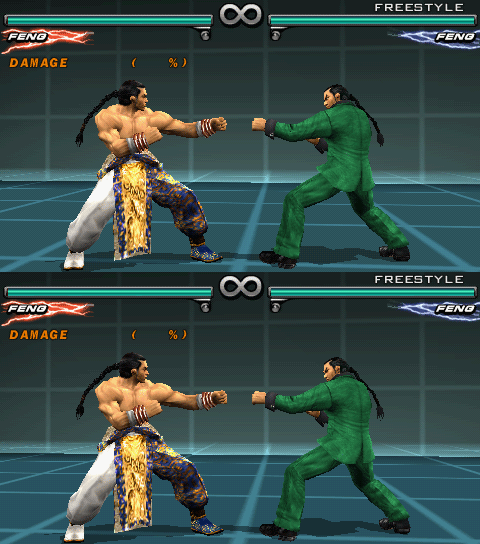
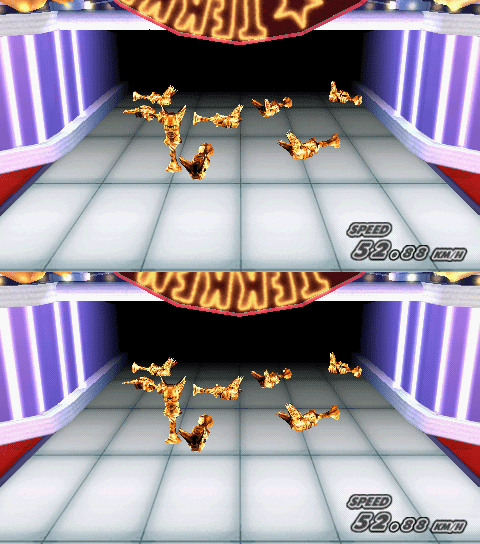
On the psp screen though, you don't notice the juddering effect :) |
|
| Back to top |
|
|
rapso
Joined: 28 Mar 2005
Posts: 147
|
| Posted: Wed Jun 20, 2007 1:00 am Post subject: |
|
|
I've implemented the same in my engine, but it was flickering a way to much with sharp textures, so I've disabled it.
btw. u dont need to render to 512*512, just render to 512*280, but set it as 512*512 texture and just use texturecoordinates of 480*280 while drawing on the screen.
One idea I had last night, in the yapspd are some swizzling of the framebuffer depending on some mask on the VRam-address, maybe we can set this flags for drawing to render swizzled into the textures and use them as swizzled then, thsi would give a nice boost on post-effects... currently it's very hard for me to stay on 60hz with bloom enabled. average renderingtime is 19ms (not overclocked yet). |
|
| Back to top |
|
|
Raphael
Joined: 17 Jan 2006
Posts: 646
Location: Germany
|
| Posted: Wed Jun 20, 2007 1:19 am Post subject: |
|
|
| rapso wrote: |
btw. u dont need to render to 512*512, just render to 512*280, but set it as 512*512 texture and just use texturecoordinates of 480*280 while drawing on the screen.
|
You don't get the point. The point was to create supersampling antialiasing by rendering the screen bigger than it is on screen, then using the PSP's bilinear texture filter to the sampling.
| Quote: | | One idea I had last night, in the yapspd are some swizzling of the framebuffer depending on some mask on the VRam-address, maybe we can set this flags for drawing to render swizzled into the textures and use them as swizzled then |
Won't work, because those alias addresses are just effective for reading. Writing to those addresses will be the same as drawing to standard VRAM address.
_________________
<Don't push the river, it flows.>
http://wordpress.fx-world.org - my devblog
http://wiki.fx-world.org - VFPU documentation wiki
Alexander Berl |
|
| Back to top |
|
|
rapso
Joined: 28 Mar 2005
Posts: 147
|
| Posted: Wed Jun 20, 2007 1:30 am Post subject: |
|
|
| Raphael wrote: | | rapso wrote: |
btw. u dont need to render to 512*512, just render to 512*280, but set it as 512*512 texture and just use texturecoordinates of 480*280 while drawing on the screen.
|
You don't get the point. The point was to create supersampling antialiasing by rendering the screen bigger than it is on screen, then using the PSP's bilinear texture filter to the sampling.
|
512*512 down to 480*280 could produce even worse effects than simple aliasing does, you'd need to sample it down to 256.
| Quote: |
Won't work, because those alias addresses are just effective for reading. Writing to those addresses will be the same as drawing to standard VRAM address. |
has anyone testet that for the gu? |
|
| Back to top |
|
|
Raphael
Joined: 17 Jan 2006
Posts: 646
Location: Germany
|
| Posted: Wed Jun 20, 2007 2:09 am Post subject: |
|
|
| rapso wrote: | 512*512 down to 480*280 could produce even worse effects than simple aliasing does, you'd need to sample it down to 256.
|
But antialiasing is not available on PSP, so the idea was to use super-sampling, which in turn is restricted to 512x512 -> 480x272 on PSP which I said is not worth the effort because it looks bad and stresses the fillrate. So that was out of question already.
Please read more thoroughly next time.
| Quote: |
has anyone testet that for the gu? |
That was in regards to GU.
_________________
<Don't push the river, it flows.>
http://wordpress.fx-world.org - my devblog
http://wiki.fx-world.org - VFPU documentation wiki
Alexander Berl |
|
| Back to top |
|
|
rapso
Joined: 28 Mar 2005
Posts: 147
|
| Posted: Wed Jun 20, 2007 2:17 am Post subject: |
|
|
| Raphael wrote: | | rapso wrote: | 512*512 down to 480*280 could produce even worse effects than simple aliasing does, you'd need to sample it down to 256.
|
But antialiasing is not available on PSP, so the idea was to use super-sampling, which in turn is restricted to 512x512 -> 480x272 on PSP which I said is not worth the effort because it looks bad and stresses the fillrate. |
I wonder why some games on xbox360 and ps3 use 2xAA like you could have it on psp for 480*256, if it's so bad looking. |
|
| Back to top |
|
|
Raphael
Joined: 17 Jan 2006
Posts: 646
Location: Germany
|
| Posted: Wed Jun 20, 2007 3:44 am Post subject: |
|
|
| rapso wrote: | | I wonder why some games on xbox360 and ps3 use 2xAA like you could have it on psp for 480*256, if it's so bad looking. |
XBox360 and PS3 are far more powerful and are not restricted to 512x512 rendertargets to do their supersampling. Now what are trying to achieve with your comments? I don't get it.
| Quote: | | 512*512 down to 480*280 could produce even worse effects than simple aliasing does |
You said yourself it looks bad!
_________________
<Don't push the river, it flows.>
http://wordpress.fx-world.org - my devblog
http://wiki.fx-world.org - VFPU documentation wiki
Alexander Berl |
|
| Back to top |
|
|
rapso
Joined: 28 Mar 2005
Posts: 147
|
| Posted: Wed Jun 20, 2007 5:42 pm Post subject: |
|
|
| Raphael wrote: | | rapso wrote: | | I wonder why some games on xbox360 and ps3 use 2xAA like you could have it on psp for 480*256, if it's so bad looking. |
XBox360 and PS3 are far more powerful and are not restricted to 512x512 rendertargets to do their supersampling. |
xbox360 has not enough EDRam to support more than 2x on 720p, so they do exactly the same as you can do on psp, render with twice the height and sample it down.
512*512 -> 512(480)*256
| Quote: | | Now what are trying to achieve with your comments? I don't get it. |
I just wonder why you think that it's bad to do something that is already done since the days of 3dfx (render twice the pixelcount and sample it down). it's not always 4AA nor 16AA, but still an improvement.
| Quote: |
| Quote: | | 512*512 down to 480*280 could produce even worse effects than simple aliasing does |
You said yourself it looks bad! |
dont mix things up, 480*256 != 480*280(272) |
|
| Back to top |
|
|
Raphael
Joined: 17 Jan 2006
Posts: 646
Location: Germany
|
| Posted: Wed Jun 20, 2007 10:34 pm Post subject: |
|
|
| rapso wrote: | xbox360 has not enough EDRam to support more than 2x on 720p, so they do exactly the same as you can do on psp, render with twice the height and sample it down.
512*512 -> 512(480)*256 |
But it has enough power that it doesn't hit performance to do it! That's the difference!
| Quote: |
I just wonder why you think that it's bad to do something that is already done since the days of 3dfx (render twice the pixelcount and sample it down). it's not always 4AA nor 16AA, but still an improvement. |
I didn't say it's generally bad! I said it doesn't look good enough on PSP and comes at a huge cost so that it isn't worth the effort! Read what I say!
| Quote: |
dont mix things up, 480*256 != 480*280(272) |
The difference isn't too big and also, having black bars like a 16:9 movie on a 4:3 screen isn't what I'd want to do on a PSP screen. If you think it's good to do, then hell do it.
Here are two screenshots so everyone can decide on his own. Just take into account the fillrate you have to spend for this.
Screen without supersampling:

The same screen with supersampling:

_________________
<Don't push the river, it flows.>
http://wordpress.fx-world.org - my devblog
http://wiki.fx-world.org - VFPU documentation wiki
Alexander Berl |
|
| Back to top |
|
|
rapso
Joined: 28 Mar 2005
Posts: 147
|
| Posted: Wed Jun 20, 2007 11:26 pm Post subject: |
|
|
| Raphael wrote: | | rapso wrote: | xbox360 has not enough EDRam to support more than 2x on 720p, so they do exactly the same as you can do on psp, render with twice the height and sample it down.
512*512 -> 512(480)*256 |
But it has enough power that it doesn't hit performance to do it! That's the difference! |
there is no lunch for free... it always hits performance, even with all the optimization they have for it.
| Quote: | | Quote: |
I just wonder why you think that it's bad to do something that is already done since the days of 3dfx (render twice the pixelcount and sample it down). it's not always 4AA nor 16AA, but still an improvement. |
I didn't say it's generally bad! I said it doesn't look good enough on PSP and comes at a huge cost so that it isn't worth the effort! Read what I say! |
and I just said that it was the same case in the 3dfx days and it was used... so maybe you could read what I say aswell instead of just looking for offense.
| Quote: | | Quote: |
dont mix things up, 480*256 != 480*280(272) |
The difference isn't too big and also, having black bars like a 16:9 movie on a 4:3 screen isn't what I'd want to do on a PSP screen. |
so just add some gui.
| Quote: |
Here are two screenshots so everyone can decide on his own. Just take into account the fillrate you have to spend for this.
... |
thx, looks really nice, especially on the top-right edge. |
|
| Back to top |
|
|
Brunni
Joined: 08 Oct 2005
Posts: 186
|
| Posted: Thu Jun 21, 2007 2:21 am Post subject: |
|
|
| Raphael wrote: | I played with the same idea some time ago. The only problem with it is the 512x512 texture (and therefore drawbuffer) limitation of the GU.
So the best you can get is a 512x512 -> 480x272 smoothing, which doesn't look too promising to be honest. Also, with this you will much more easily hit the fillrate limit, as the 512x512 fullscreen texture rendering stresses the GU a lot (especially because the texture isn't swizzled).
Regarding Tekken's smoothing effect, I'd guess it is the effect of some feedback buffer. But I fear you'll have to ask Namco to get a definite answer. |
The method used by Namco seems very odd but excellent:
1) changing the dithering matrix every frame (?)
2) change some ??? setting one frame of two, the flickering giving the impression of a pseudo edge antialiasing. Maybe something with the matrix too, but my knowledge about 3D is zero, so I can't say.
_________________
Sorry for my bad english
 Oldschool library for PSP - PC version released Oldschool library for PSP - PC version released |
|
| Back to top |
|
|
MDave
Joined: 09 May 2005
Posts: 84
|
| Posted: Thu Jun 21, 2007 2:44 am Post subject: |
|
|
| Raphael wrote: | | rapso wrote: | xbox360 has not enough EDRam to support more than 2x on 720p, so they do exactly the same as you can do on psp, render with twice the height and sample it down.
512*512 -> 512(480)*256 |
But it has enough power that it doesn't hit performance to do it! That's the difference!
| Quote: |
I just wonder why you think that it's bad to do something that is already done since the days of 3dfx (render twice the pixelcount and sample it down). it's not always 4AA nor 16AA, but still an improvement. |
I didn't say it's generally bad! I said it doesn't look good enough on PSP and comes at a huge cost so that it isn't worth the effort! Read what I say!
| Quote: |
dont mix things up, 480*256 != 480*280(272) |
The difference isn't too big and also, having black bars like a 16:9 movie on a 4:3 screen isn't what I'd want to do on a PSP screen. If you think it's good to do, then hell do it.
Here are two screenshots so everyone can decide on his own. Just take into account the fillrate you have to spend for this.
Screen without supersampling:
The same screen with supersampling:
|
Ahh excellent! Just the effect I was aiming for before! Can you provide the source so I can see how you done it? Is that using a full screen sprite too?
I know its not wise to use the technique in heavy 3d apps, but I had it in mind for simpler ones. :)
Having trouble mimicking namco's technique too. :P |
|
| Back to top |
|
|
Raphael
Joined: 17 Jan 2006
Posts: 646
Location: Germany
|
| Posted: Thu Jun 21, 2007 3:16 am Post subject: |
|
|
Unfortunately I don't have the source around any more, as the screenshot is rather old (was way before my NeoFlash Summer 2006 contest entry).
However, it is very easy to achieve. Only thing you have to do is setup your displaybuffer to be 512x512 (rather than 480x272):
| Code: |
sceGuDispBuffer(512, 512, gu_backbuffer, FRAME_BUFFER_WIDTH);
|
If you don't do this, your rendertarget screen will get cut at 480x272 no matter how you setup the scissoring.
Then you can set your rendertarget to a 512x512 texture at any time, render your scene there and afterwards render that scaled down on screen as 2D Sprite.
Set rendertarget:
| Code: |
sceGuDrawBufferList( psm, tbp, 512 );
sceGuOffset(2048 - (512/2), 2048 - (512/2));
sceGuViewport(2048, 2048, 512, 512);
sceGuScissor(0, 0, 512, 512);
|
The downscale blit should be straightforward.
Regarding the Tekken screens. Brunni seems to be right about the dither matrix. It changes on consecutive frames. Also the displacement looks more like a subtle change to the projection matrix than a real 1 pixel diagonal displacement.
However, the intermediate blended frame (as it possibly might appear on PSP with the slow LCD) looks perfect.
The dithering is barely noticeable anymore (I always wondered how Tekken achieved this and I was breaking my head over how they might have chosen the dither matrix) and the pseudo-antialiasing looks very good (though it doesn't affect all edges obviously).
Also very clever is the fact that the 2D overlays aren't affected to keep them sharp and readable (though that may not have been planned).
I blended each two frames together on a 50-50% basis, so it assumes that the LCD is really refreshing at about 30Hz and the game runs at 60Fps.


_________________
<Don't push the river, it flows.>
http://wordpress.fx-world.org - my devblog
http://wiki.fx-world.org - VFPU documentation wiki
Alexander Berl |
|
| Back to top |
|
|
MDave
Joined: 09 May 2005
Posts: 84
|
| Posted: Thu Jun 21, 2007 5:46 am Post subject: |
|
|
| Thank you very much for the example :) |
|
| Back to top |
|
|
Raphael
Joined: 17 Jan 2006
Posts: 646
Location: Germany
|
| Posted: Thu Jun 21, 2007 8:02 am Post subject: |
|
|
I tested namcos nice pseudo-antialiasing through adjusting the perspectives FOV per frame (+0.5f). And it works a charm!
The antialiasing is not perfect, but the FOV change finds nearly all edges (it's basically just drawing the scene again just a little smaller so that all outlines are only drawn every second frame). The scene needs to run at exactly 60fps, but doesn't cost any additional performance.
I'm pretty sure with some fiddling it could look even better.
Also, the two different dither matrices also work very good. It's nearly as if there wasn't any dithering at all.
Here are two screenshots, the first without the pseudo antialiasing/dither mix, the second with:


_________________
<Don't push the river, it flows.>
http://wordpress.fx-world.org - my devblog
http://wiki.fx-world.org - VFPU documentation wiki
Alexander Berl |
|
| Back to top |
|
|
danzel
Joined: 04 Nov 2005
Posts: 182
|
| Posted: Thu Jun 21, 2007 12:40 pm Post subject: |
|
|
Seriously awesome :-)
Make the bad attributes into good :D |
|
| Back to top |
|
|
Brunni
Joined: 08 Oct 2005
Posts: 186
|
| Posted: Thu Jun 21, 2007 10:03 pm Post subject: |
|
|
Awe-so-me!
It's very intresting, could you post the code you used to do this please? :)
_________________
Sorry for my bad english
Oldschool library for PSP - PC version released |
|
| Back to top |
|
|
Raphael
Joined: 17 Jan 2006
Posts: 646
Location: Germany
|
| Posted: Fri Jun 22, 2007 6:24 am Post subject: |
|
|
It's very easy: Just have a framecounter increasing every frame, then each frame also setup your projection matrix like that:
| Code: |
sceGumMatrixMode(GU_PROJECTION);
sceGumLoadIdentity();
sceGumPerspective( fov + (frame&1)*0.5f, 16.0f/9.0f, 1.0f, 1000.0f );
|
For the dithering, its basically the same:
| Code: |
int DitherMatrix[2][16] = { { 0, 8, 0, 8,
8, 0, 8, 0,
0, 8, 0, 8,
8, 0, 8, 0 },
{ 8, 8, 8, 8,
0, 8, 0, 8,
8, 8, 8, 8,
0, 8, 0, 8 } };
// every frame
sceGuSetDither(DitherMatrix[(frame&1)]);
|
As said, with some fiddling on these numbers (especially the FOV change) you can easily adjust the level of smoothness, but don't make it too large, because then you will see shadows on the borders of your screen rather than antialiasing.
Also, I'd be glad if someone would find some better dithering matrices maybe and share them :)
_________________
<Don't push the river, it flows.>
http://wordpress.fx-world.org - my devblog
http://wiki.fx-world.org - VFPU documentation wiki
Alexander Berl |
|
| Back to top |
|
|
anmabagima
Joined: 01 Oct 2009
Posts: 96
|
| Posted: Thu Feb 11, 2010 5:28 pm Post subject: |
|
|
Hi,
thanks to all for the different approaches and ideas how to achive anti aliasing.
However, I've tried Raphael's idea to change the FOV. This looks great if the objects are close to the virtual camera/viewport. If they are more far away they starts to get more blured than "anti aliased"...This is very hard for the eyes and you may ask for glasses ;)
As I'm uncertain how to implement the second approach - meaning shifting the render result by 1 bixel top left and buttom right on the screen, could someone provide a code example ?
thanks.
Regards |
|
| Back to top |
|
|
|
|
You cannot post new topics in this forum
You cannot reply to topics in this forum
You cannot edit your posts in this forum
You cannot delete your posts in this forum
You cannot vote in polls in this forum
|
Powered by phpBB © 2001, 2005 phpBB Group
|
 FAQ
FAQ Search
 Memberlist
 Usergroups
 Register
 Profile
 Log in to check your private messages
 Log in


