
Ubuntu and VIA EPIA EN12000EG
Update 21/09/08
Since I wrote this post 5 months ago I havn't been experiencing any issues with the EN12000EG when using it at 1200 MHz. However, 22 days ago I rebooted my EN12000EG and by mistake I forgot to set the CPU frequency to 1200 MHz, I didn't realise this until about a week ago when I saw that the Gnome CPU Scaling Monitor was reporting the CPU frequency as 400 MHz (ondemand governor). For this period of 22 days I've been using the server as I normally would, which 5 months ago would freeze the system within a week when using CPU scaling.
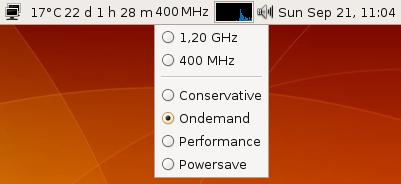
My best guess to why this is happening is probably a change in the Linux kernel which either fixed or got around this issue. The kernel I'm currently using is Linux 2.6.24-21-generic i686 GNU/Linux on Ubuntu 8.04 with all updates installed.
You might also want to check the lastest comments, as Sam33 is reporting freezes on Debian Etchnhalf, which he suspects are related to the PATA driver.
Original Post
Little over a month ago I bought and built myself a Mini-ITX computer to use as a headless print/file/media/etc. server. For the motherboard I got a VIA EPIA EN12000EG with a 1200 MHz CPU, because it was passively cooled. I put it inside a Morex 3688 chassis without using the chassis fan. After using it for a while, the system would "randomly" freeze completely. This would typically happend when I "stressed" system, eg. transfering files, printing and using VNC at the same time. There was no rise in CPU temperature when this happend, so I didn't think it was because the motherboard wasn't properly cooled without any fans running.
The longest uptime I had until this point was about 6 days, but the computer would often just freeze after a few days use.
So I thought it might be an I/O problem and I therefor updated the 1.07 BIOS to version 1.09, but the only thing I could tell changed was the CPU temperature was now reported as being around 20 °C instead around 45 °C previously with the 1.07 BIOS. Since this didn't resolve the system freezes either, I then tried to update to Ubuntu 8.04 beta, hoping the issue might have been resolved in the new version, however the system would still freeze on me.
I had a problem with evolution-data-server using 90% of the CPU in Ubuntu 8.04, this is a known bug. I resolved it by just uninstalling evolution-data-server, as I don't use Evolution.
sudo apt-get remove evolution-data-server
I had earlier found this "EN12000EG Freeze" thread at the VIA forums (registration required), where alot of different solutions had been suggested, I tried some of the easy ones like changing the BIOS settings, but that still didn't resolve the problem. So I thought I'd try disabling CPU frequency scaling as suggested by rararasputin and this solution has worked for me so far.
First I disabled powernowd by in System -> Administration -> Services. However the cpu scaling software cpufreq is active and uses the On demand CPU scaling governor by default. There are few different ways to change this to the Performance governor, which will keep the CPU at 1200 Mhz. One way is to use the cpufreq-selector in a console like shown below
sudo cpufreq-selector -g performance
Another option, if you are using the Gnome CPU Frequency Scaling Monitor Applet, is that you can select the governor you wish to use using this applet. But first you need to enable user CPU scaling by the following command and answering yes to setting the suid for cpufreq-selector.
dpkg-reconfigure gnome-applets
Now you can left-click on the applet and choose Performance.
A thing to note is that this setting reverts to the default On demand when you reboot your system. I read that you can make it permanent by changing the policy_ac key to Performance in apps -> gnome-power-manager -> cpufreq using gconf-editor, however this doesn't seem to work for me. Maybe because I use the force=acpi kernel option in /boot/grub/menu.lst and this somehow overrides the setting. If any one knows of a simple solution, please let me know :-)
As you can see from the partial screenshot below, my VIA EN12000EG based server ran for over 11 days before Ubuntu insisted that I reboot due to an update. In the 11 days I had tried to stress the system several times, for instance transfering files while updating Ubuntu over VNC and playing internet radio. Which would often freeze the system earlier, but after disabling cpu scaling, I've been unable to freeze the system.
My conclusion is that the VIA EN12000EG hardware has buggy CPU scaling support.
As a side note, I couldn't get s-video output working with any other driver than the binary CN700 Unichrome Pro Driver. Otherwise everything else worked out of the box with both Ubuntu 7.10 and 8.04.
Update:
rararasputin posted his Openchrome xorg.conf with s-video support in the comments. Download formatted here.


April 23rd, 2008 - 23:03
I have S-Video working with the openchrome drivers. These are the relevant sections of my xorg.conf. Hope they still do work, as I did not have a tv connected for a longer time.
Also, I did not invent this config myself, but I don’t know the source anymore.
Section “ServerLayout”
Identifier “SLTvOut”
Screen 0 “scrTv” 0 0
InputDevice “Mouse0″ “CorePointer”
InputDevice “Keyboard0″ “CoreKeyboard”
EndSection
Section “Screen”
Identifier “scrTv”
Device “VideocardViaTv”
Monitor “MonitorTv”
DefaultDepth 24
SubSection “Display”
Viewport 0 0
Depth 24
# Modes “720×576″
Modes “720x576Noscale”
EndSubSection
SubSection “Display”
Depth 16
Modes “720×576″
# Modes “720x576Noscale”
EndSubSection
EndSection
Section “Device”
Identifier “VideocardViaTv”
Driver “openchrome”
VendorName “Via”
BoardName “CN700″
Option “PciRetry” “true”
# VideoRam 32768
Option “ActiveDevice” “TV,CRT”
# Option “UseBIOS” “true”
Option “TVType” “PAL”
Option “TVDeflicker” “1″
Option “TVOutput” “S-Video”
# Option “TVOutput” “Composite”
# Option “TVOutput” “RGB”
# Option “TVVScan” “over”
# Option “TVVScan” “under”
# Option “TVDotCrawl”
# Option “DisableVQ” “true”
# Option “NoDDCValue”
# Option “HQVManualSwitch”
# Option “NoHQVVFilter”
# Option “CaptureOverScanOff”
# Option “Cap0Deinterlace” “Bob”
# Option “Cap0Deinterlace” “Weave”
# Option “Cap1Deinterlace” “Bob”
# Option “Cap1Deinterlace” “Weave”
# Option “Cap0FieldSwap”
# Option “NoCap0HFilter”
# Option “NoCap1HFilter”
# EnableAGPDMA:
# “To all people hit by the lock up, grey screen, and actually anything
# that is fixed by turning AGPDMA off, it seems there is possibly a
# regression in the via_agp module included in recent kernels ( >= 2.6.22
# or something like that). It has not yet been properly tracked down.
# Keep in mind that turning AGPDMA off is only a workaround that will hide
# a bug somewhere else. Keep in mind it’ll need to be turned on again when
# the actual bug is fixed.
Option “EnableAGPDMA” “false”
# Option “AccelMethod” “EXA”
# Option “ExaScratchSize” “8192″
# Option “MaxDRIMem” “16384″
# Option “MigrationHeuristic” “greedy”
BusID “PCI:1:0:0″
EndSection
Section “Monitor”
Identifier “MonitorTv”
VendorName “”
ModelName “TV-PAL”
HorizSync 24.0 – 80.0
VertRefresh 50.0 – 75.0
Option “nodpms”
Option “noddc”
# Set for 4:3 display
DisplaySize 300 225
# Set for 16:9 display
# DisplaySize 400 225
#Refresh Rate 60Hz
ModeLine “720×480″ 26.7 720 736 808 896 480 481 484 497
ModeLine “720×576″ 32.7 720 744 816 912 576 577 580 597
ModeLine “848×480″ 31.5 848 864 952 1056 480 481 484 497
ModeLine “856×480″ 31.7 856 872 960 1064 480 481 484 497
ModeLine “1024×512″ 41.3 1024 1056 1160 1296 512 513 516 531
ModeLine “1280×768″ 80.1 1280 1344 1480 1680 768 769 772 795
ModeLine “1440×1050″ 126.2 1440 1536 1688 1936 1050 1051 1054 1087
#Refresh Rate 75Hz
# ModeLine “720×480″ 34.9 720 752 824 928 480 481 484 502
# ModeLine “720×576″ 42.6 720 760 832 944 576 577 580 602
# ModeLine “848×480″ 41.0 848 880 968 1088 480 481 484 502
# ModeLine “856×480″ 41.3 856 888 976 1096 480 481 484 502
# ModeLine “1024×512″ 53.3 1024 1072 1176 1328 512 513 516 535
# ModeLine “1280×768″ 103.0 1280 1360 1496 1712 768 769 772 802
# ModeLine “1440×1050″ 160.0 1440 1536 1696 1952 1050 1051 1054 1096
#Refresh Rate 85Hz
# ModeLine “1280×768″ 118.5 1280 1368 1504 1728 768 769 772 807
# ModeLine “1440×1050″ 184.5 1440 1544 1704 1968 1050 1051 1054 1103
# ModeLine “848×480″ 47.4 848 888 976 1104 480 481 484 505
EndSection
April 23rd, 2008 - 23:03
Oh, all the nice formatting is gone in my previous comment :/
April 24th, 2008 - 06:51
Thanks for sharing. I’ve updated my post with a link to the xorg.conf formatted properly.
April 27th, 2008 - 17:42
my amd64 box would also freeze with cpu scaling, especially when kernel governor would try to increase the frequency from 50% to 100% .
that was around 2.6.22 or 2.6.21 i guess. perhaps this problem has been long fixed.
June 11th, 2008 - 08:57
I’m using 7.10 and 8.04 on various EPIA m10000 and EPIA C7 1000mhz. There being used as servers, and will randomly lock up or give very strange results when using and bash session.
On investigating it appears that the clock is ‘stuck’ or ‘looping’. The time stays within a narrow (prehaps) 3 second band and never moves beyond, unless I reboot. /var/log/syslog shows two consequative entires where time moves backward. Is is possible this was happening on your setup? I got other installations of Ubuntu on non VIA platforms that don’t exhibit this problem.
June 11th, 2008 - 18:44
Tony: I havn’t experienced any such problems. Since I’ve kept my VIA EN12000EG on 1200 MHz all the time, the system has been running flawlessly.
August 17th, 2008 - 09:42
My disk is a Samsung Spinpoint HM250JI, which is a 250 GB SATA disk.
As for the kernel I just update whenever a new kernel for Ubuntu is available and I havn’t had any problems with any Ubuntu 8.04 kernels, my current kernel: Linux 2.6.24-20-generic i686 GNU/Linux.
List of modules: http://lukasz.dk/files/en12000eg_modules.txt
Since I wrote the post I’ve had an uptime of over 21 days at one point until I rebooted due to a kernel update :-)
September 24th, 2008 - 17:12
Hi Lukasz,
I’m glad to hear that frequency scaling is running for you too ! I’m running it for about two weeks now without freeze. I started test about frequency scaling to reduce the system temperature.
I would like to give you the heat reduction, but global weather conditions (in France) have changed significantly and the comparison is difficult.
Sam.
PS: Regarding my previous investigation regarding the PATA driver, after a week I gave up and installed a lightweight Ubuntu 8.04…