Datel Memory Plus 64 MB
Recently I stumbled upon some interesting information regarding Datel's new PS2 memory card Memory Plus 64 MB at PS2 Save Tools. What caught my eye were the instructions for this memory card, as they state that you can load an PS2 ELF of the memory card or a USB Pendrive, without the need to load CD/DVD software.
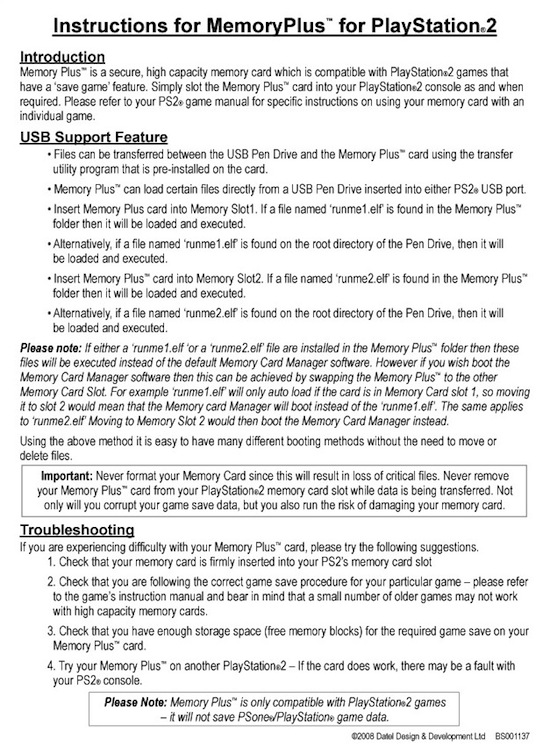
Since this memory card could be used for launching PS2Link directly of the memory card itself or an USB Pendrive and thereby enabling PS2 programming on an unmodified PS2 console, I went ahead and bought one from the Codejunkies webshop (also available from Play-Asia).
I was unfortunate to get a memory card where built-in software was not installed, but after sending an email to Codejunkies, I returned the card to them and some days later I got it back and this time the built-in software did boot when the memory card was inserted to either PS2 memory card slot.
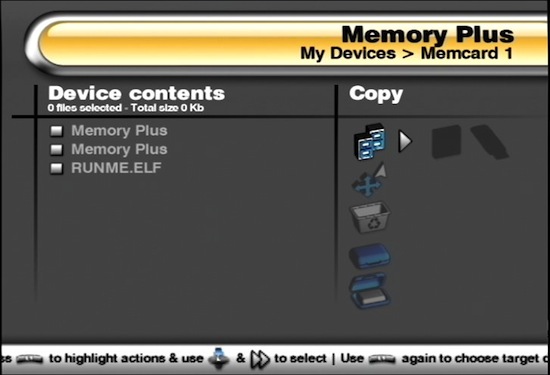
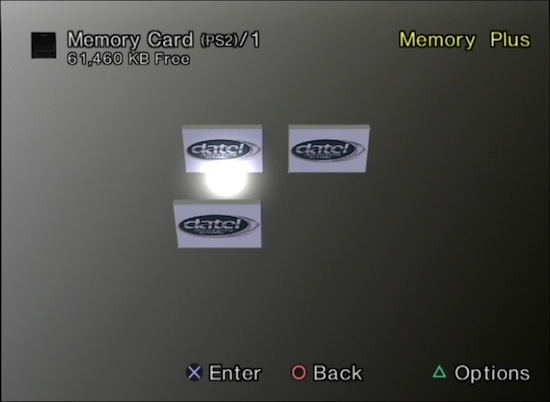
The built-in memory card manager takes about 25 seconds load, for the entire period there is a black screen. Below are some screenshots of the memory manager and how it shows up the PS2 memory card browser.
I was hoping I could just insert an USB pendrive to one of the PS2 USB ports, with PS2Link named RUNME1.ELF and it would boot, however none of my 4 USB pendrives were recognized by the built in memory manager. I tried FAT 12/16/32 file systems, also FAT32 W95 LBA, but none of them seemed to work. One of the pendrives I tried was the 16 MB Pendrive from Datel's own Max Drive product, which is recognized in the Max Drive memory manager, which looks very similar.
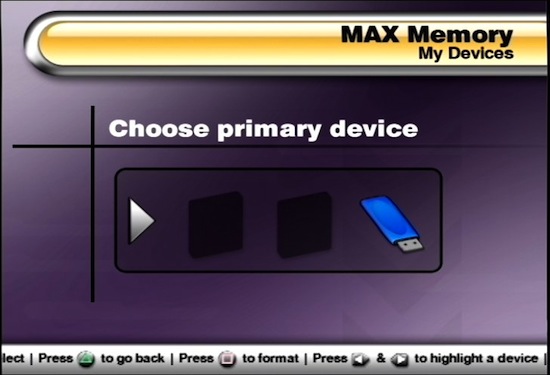
Since the memory manager wasn't helping me get PS2Link launched, I had to figure out some other way of getting it onto the memory card and so the "hacking" begins :-)
For transfering data to the memory card of my chipped PS2 I used ps2netfs.irx from PS2SDK. This IRX provides an interface to file systems on the PS2 over the network. I used fsclient as the client (part of ps2client package), combined with PS2Link/ps2client. Before you can access the memory cards with ps2netfs, you need to load the memory card IOP modules SIO2MAN and MCMAN from the BIOS. The following 3 commands below load ps2netfs with memory card support.
ps2client -t 1 execiop rom0:SIO2MAN
ps2client -t 1 execiop rom0:MCMAN
ps2client -t 1 execiop host:ps2netfs.irx
Once this was done, I could now browse the Memory Plus memory card.
fsclient dir mc0:[Contents of mc0:]drwxrwxrwx 6 04-08-2008 17:01:30 . drw-rw-rw- 0 04-08-2008 16:53:54 .. -r-xr-xr-x 14 04-08-2008 16:53:57 BEEXEC-SYSTEM -r-xr-xr-x 14 04-08-2008 16:55:26 BAEXEC-SYSTEM drwxrwxrwx 6 04-22-2008 02:29:47 BESLES-00000 MP
The BEEXEC-SYSTEM and BAEXEC-SYSTEM directories contain the same files, to support respectively European (E) and American (A) PS2 models.
fsclient dir "mc0:BEEXEC-SYSTEM"[Contents of mc0:BEEXEC-SYSTEM]drwxrwxrwx 0 04-08-2008 16:53:57 . drwxrwxrwx 0 04-08-2008 16:53:57 .. -rwxrwxrwx 1344000 04-08-2008 16:54:00 osd110.elf -rwxrwxrwx 1344000 04-08-2008 16:54:06 osd120.elf -rwxrwxrwx 1344000 04-08-2008 16:54:11 osd130.elf -rwxrwxrwx 1344000 04-08-2008 16:54:17 osd140.elf -rwxrwxrwx 1344000 04-08-2008 16:54:23 osd150.elf -rwxrwxrwx 1344000 04-08-2008 16:54:29 osd160.elf -rwxrwxrwx 1344000 04-08-2008 16:54:35 osd170.elf -rwxrwxrwx 1344000 04-08-2008 16:54:41 osd180.elf -rwxrwxrwx 1344000 04-08-2008 16:54:47 osd190.elf -rwxrwxrwx 1344000 04-08-2008 16:54:54 osdmain.elf -rwxrwxrwx 964 04-08-2008 16:55:13 icon.sys -rwxrwxrwx 33688 04-08-2008 16:55:19 mcp.ico
These directories are what make booting an ELF of the memory card possible in the first place. Sony included support for updating the OSD (the software which starts when you power on your PS2 without any game in it) of the PS2 in the PS2 BIOS. The OSD looks for a osd1xx.elf on the memory, what ELF filename exactly depends on your PS2 model, hence thats why all the osd1xx.elf files are identical.
The reason this "exploit" hasn't been discovered earlier is because the OSD ELF's on the memory must be encrypted with MagicGate or the OSD won't load the ELF's. So it's not really an exploit, just a feature protected by encryption. Even though the Memory Plus is a 64 MB memory card, which will be the main the selling point for the memory card, the more interesting part is the fact that Datel have managed to encrypt inject their own code into already encrypted ELF's for this GateCrasher based memory card.
Anyway, returning to the original task of getting PS2Link to boot of the memory card. While listing the contents of the "BESLES-00000 MP", I realised that this is the directory in which the RUNME1.ELF and RUNME2.ELF should be put, as it already contained a RUNME.ELF.
fsclient dir "mc0:BESLES-00000 MP"[Contents of mc0:BESLES-00000 MP]drwxrwxrwx 0 04-08-2008 16:56:54 . drwxrwxrwx 0 04-08-2008 16:56:54 .. -rwxrwxrwx 763200 04-08-2008 16:56:56 RUNME.ELF -rwxrwxrwx 964 04-08-2008 16:57:09 icon.sys -rwxrwxrwx 33688 04-08-2008 16:57:15 mcp.ico
First thing I did was make a copy of RUNME.ELF (should I accidently overwrite it) with the following command.
fsclient copyfrom "mc0:BESLES-00000 MP/RUNME.ELF" mplus-manager.elf
As you might have already guessed from the command above, the RUNME.ELF is the built-in memory card manager of the Memory Plus card. I tried to load the mplus-manager.elf (filename of RUNME.ELF copy) using PS2Link and it runs just fine.
This means that the files in the BEEXEC-SYSTEM and BAEXEC-SYSTEM directories are really just launcher files for the ELF files in the "BESLES-00000 MP" directory. What this also means is that the memory card manager can be replaced by a free one with more features (like support for my pendrives, which work with usb_mass).
I'm would be very interested in hearing from any one who might have a different version of the memory card manager (filesize of mine is 763200 bytes), as another version might have proper USB pendrive support.
I copied PS2LINK.ELF using the following fsclient command
fsclient copyto PS2LINK.ELF "mc0:BESLES-00000 MP/RUNME1.ELF"
I then rebooted my PS2 with the memory card inserted into the first slot and waited more than 25 seconds and nothing happend. So I decided to try something a bit simpler than PS2Link and tried my very own simple Torus demo from The Third Creation and it did boot ;-)
So the fun of debugging begins. The unknown factors in finding the bug(s) which caused PS2Link not to boot are, how is the ELF loaded by the encrypted launcher on the memory card and how is the method different from how ELF's are normally loaded?
I suspected the issue might be with the arguments passed to PS2Link, as PS2Link uses these to figure out from which device it was booted. So I made a small PS2SDK application which prints the arguments to the screen using scr_printf(). However it turned out that this simple application did not boot of the memory either. In fact, the first line of code in main never got executed (changing BGCOLOR). This could only mean that the issue was within the crt0.s (C runtime entry point) code, so I commented all the code related to argument handling, as the launcher code probably passes garbage arguments to the ELF when it loads it and this case is not handled by crt0.s, which causes the PS2 to hang/crash. After doing this, my simple application did boot of the memory card. I made some quick changes to PS2Link to make it support the altered crt0.s and hardcoded the boot path inside the PS2Link source. And PS2Link booted of the Memory Plus card.
A precompiled version of the PS2Link 1.51 ELF which boots of the Memory Plus memory card is avaliable here.
A real patch should be made for crt0.s, so it would support the arguments passed by the Memory Plus loader without breaking any existing code. This task will require more time than I spent on getting PS2Link running. I will submit a patch for crt0.s once I get the time to develop it, unless some one beats me to it *hint hint* :-) This crt0.s patch is required to make any PS2SDK based applications boot of the memory card.
Once crt0.s is patched, making the required changes to PS2Link should be easy, if the Memory Plus card can be uniquely identified based upon the arguments passed to main().
Update:
Based upon the comment by PS2onCrack, I tried to format my Pendrives yet again to FAT32 and it turns out that one of my 4 pendrives is actually detected by the Memory Plus manager. In order to format it properly under Ubuntu I had to do the following: First find where its mounted with the df command (my pendrive partition mounts at /dev/sdb1). Then umount the partition.
sudo umount /dev/sdb1
Then use fdisk, to change system id of the partition to "W95 FAT32"
sudo fdisk /dev/sdb
Note that I use /dev/sdb (the device) and not /dev/sdb1 (the partition). With fdisk I used the t option (Change system id), then b for "W95 FAT32", and finally w to writing the changes. I then formatted the partition to FAT32.
sudo mkfs.vfat -F 32 /dev/sdb1
Now my Noname 512 MB pendrive works with the Memory Plus manager. The following pendrives did not work: 1 GB Kingston DataTraveler, Datel Max Drive 16 MB and 256 MB MyCom MP3 Player.
I also realized that patching crt0.s in PS2SDK and making the necessary changes to PS2Link to make it boot of the Memory Plus card is not the best solution, as this will only fix all ELFs compiled against the updated PS2SDK and not all ELFs already available.
So instead I made a small Memory Plus ELF loader, which boots of the memory card and then tries to load an ELF correctly, which should work with most, if not all ELFs.
Download
- MPLUS-LOADER.ELF
- mplus-loader-src.zip (source)
- PS2LINK151.ELF (PS2Link 1.51 compiled from Subversion)
To make it work, rename MPLUS-LOADER.ELF to either RUNME1.ELF or RUNME2.ELF and put in on the Memory Plus card, as described in the Memory Plus instructions.
Then take the ELF you wish to run (you can test with PS2LINK151.ELF) and rename it EXECUTE1.ELF (if you want to boot it when the Memory Plus card is inserted into memory card port 1, otherwise EXECUTE2.ELF for port 2) and put it either on the Memory Plus card or your USB pendrive.
Now boot the Memory Plus card in port 1, this will now load the Memory Plus ELF loader (RUNME1.ELF), which will then load the EXECUTE1.ELF of either the Memory Plus card or the USB pendrive. If the ELF does not exist, the Memory Plus manager will be booted.
Update 2:
I've updated the Memory Plus Loader, so now more ELFs should boot. Tested with uLaunchELF v4.12 and SMS 2.8 (Rev. 1). Also I've added a seperate Memory Plus Loader ELF which patches the Memory Plus manager to NTSC mode before starting it. To make it work you just need to add RUNME1.ELF (or RUNME2.ELF) and not have EXECUTE1.ELF (or EXECUTE2.ELF) present, then the Memory Plus manager will be booted in NTSC mode.
Download
Update 3:
The Memory Plus Loader has been updated to stop the CD/DVD drive for spinning. It's now also possible to initialize the CD/DVD drive. The solution was found by ffgriever for the Free McBoot/FreeVast project. There are some people reporting that this does not work with all consoles, however it works with my PAL console :-)
Download


April 25th, 2008 - 04:16
I too had the exact same experience with Codejunkies sending me a blank 64MB card, returned it only to find out the runme.elf is in PAL format only.
The 2 folders are for the different consoles for both PAL & NTSC regions to auto boot the runme.elf. Your console will only use 1 of the files from only 1 of the folders to boot, but which one is the fun part of figuring out, so the others can be deleted and give more space back.
I have made a bootable CD of the runme.elf and ran it off a modchip with NTSC mode to run it, as my region is NTSC.
I believe this is a Memento copy-cat that Datel studied and havent figured out how to run it in NTSC format yet.
I couldnt get anything to boot using the runme1 & 2 filenames on either USB or even from the MC in the BESLES-00000 MP folder. Im guessing most of the .elfs i tried wont run due to the modules they load.
I did copy all the files easy enough with uLaunchelf to a USB stick. I deleted all and copied them back with uLaunchelf and it still works ok.
Also only FAT32 fromatted USB devices are supported, not FAT. I have a MaxDrive 16MB and it dont work, as it wont format to anything but FAT.
I dont know if any of that is useful, but i figured i’d share what i experienced with the Memory Plus 64MB.
April 26th, 2008 - 19:25
About the update : Cool man! When I first read about your post reporting that the ELFs must be recomplied to run from the Mplus64 I was a bit frustrated, since I planned to buy one of those. Yes, having to compile everything could be a problem if the ELF sources weren’t available or outdated, and not very practical. Good news about your loader then!
April 26th, 2008 - 22:38
Thanks a lot for the loader, this has given me the ability to run elfs from the pendrive now. Now i just need to figure out how to patch the Memory Plus manager for NTSC and im all set. ….hint..hint :)
Oh, and just so you know, the Kingston USB is pretty much incompatible with the PS2, at least from of what ive read about that brand.
Im using a Lexar 128MB jumpdrive, incase you were wondering. :) These were reported as being the most compatible with many apps for the ps2. Also SanDisk brand is a good choice too.
April 27th, 2008 - 04:19
hey i was wondering if you could use your loader to load something like uLaunch? I would love to be able to do something like that…. I know its kind of silly of me to care, because i have a phat ps2 that can use the independence exploit, but I also have a ps2 that is unable to read discs and at all… so by being able to load stuff from the memcard /usb without a chip or exploit cd would just be lots of fun. I did just purchase the mem+ from codejunkies (they better send me the ntsc version) also you might find this tutorial on how to install Linux on your PS2 useful using the cogswap.
http://myvex.com/ps2linux.htm
happy trails.
mesurf
April 27th, 2008 - 05:07
I tried uLaunchelf and it doesnt work from the RUNME.ELF or from the MPLUS-LOADER.ELF, just a black screen. I also tried a bunch of other homebrew apps and they also dont seem to want to run with either. :(
Apps i tried:
uLaunchelf
Ps2OS
HD Loader
Pgen
SNES Station
SMS Media Player
It was able to boot HDLoader, but hung at the splash screen. PS2OS also loaded, but hung at the module loading screen. At least i got a little further with the MPLUS-LOADER.ELF than i did with just the RUNME.ELF.
I will try a different set of ‘simplier’ apps tomorow.
April 27th, 2008 - 08:20
ok, i couldnt sleep thinking about this and so i kept at it. I got ulaunchelf to finally load off a USB stick using the MemPlus card and heres how i got it to work:
I renamed MPLUS-LOADER.ELF to RUNME.ELF & replaced the one in the BESLES-00000 MP folder with that one.
Save a copy of the original RUNME.ELF as you can boot it with uLaunchELF.
Next i renamed an ELF Loader from a few years ago (cant remember who wrote the app)
to EXECUTE1.ELF and placed this on the USB stick along with ULAUNCHELF.ELF . I used the latest version 4.12
Next i created a BOOT.XML file ( mass:ULAUNCHELF.ELF ) MC and USB are the only supported paths.
i then created a BOOT folder and put the following in it:
BOOT.XML
icon.sys
sys_boot.ico
I then put the BOOT folder on the Mplus card’s root.
Heres the structure:
Mplus MC:
BAEXEC-SYSTEM/
*/osdmain.elf
*/icon.sys
*/mcp.ico
BESLES-00000 MP/
*/RUNME.ELF
*/icon.sys
*/mcp.ico
BOOT/
*/BOOT.XML
*icon.sys
*/sys_boot.ico
USB stick:
EXECUTE1.ELF
ULAUNCHELF.ELF
RUNME.ELF {original}
You can put other .elfs on the usb stick and run them with ulaunchelf. Ive put all the files i used into a winrar file you can download here.
http://jnabk.selfip.com/LOADER.rar
April 27th, 2008 - 08:31
I couldnt edit the above post, but the .XML didnt show up as i wrote it, but i’ve included it in the rar so you can see it correct format.
Also i forgot to mention the boot process takes about 25-30 secs to load up, but works great, thanks to your Mplus-Loader! :) This didnt work for me with the original RUNME.ELF
And the file structure for the Mplus card is as i showed it above, i deleted all the other files as they arent needed, at least for me they arent. The only file i needed in the BAEXEC-SYSTEM is the osdmain.elf and this works in ALL my NTSC consoles. Figured i’d mention that if you wanted to get some of the space back, but backup the files, just incase!
April 27th, 2008 - 08:35
Check the second update on the original post, uLaunchELF now boots.
April 27th, 2008 - 08:53
i just noticed your Update 2, but im just too tired to try it now. I’ll check it out tomorrow.
April 27th, 2008 - 17:20
Sweet! Your new loaders both work flawless! i have the original RUNME.ELF back in the BESLES-00000 MP folder with the new loader as RUNME1 and on the USB stick i have the NTSC pather as RUNME2, uLaunchelf as EXECUTE1.
Much easier than all that crap i did…..lol….you should be making these and selling them, not Datel.
You are AWESOME!
April 27th, 2008 - 17:32
Oh yea, did i mention THANK YOU!! THANK YOU!! THANK YOU!!
April 27th, 2008 - 18:14
hey Lukasz did you even know about this thread?
http://www.psx-scene.com/forum.....k%20screen
any chance we can port the memplus 64 to a reg 64 meg card? I have about 10 or so of off brand 64 meg cards i bought off ebay a while back for about $10 a piece shipped and would like to make them more interesting!!
April 27th, 2008 - 19:20
I’ve seen the Free Vast thread at PSX-Scene.
Reverse engineering PS2 security features is of no real interest to me. That said, it would be impressive if they can pull it off, however I won’t be the one doing it :-)
I’m really only interested in the Datel Memory Plus card because it makes it possible to load a development tool like PS2Link without modifying your PS2 hardware.
The main reason I made the loader for Memory Plus card was to fix/improve the features of the built-in software, so people getting started with PS2 programming could overcome the limitations of the card quickly.
I of course realize the card and loader can be used for other PS2 software as well, however it’s not there my interest lies :-)
April 27th, 2008 - 23:41
I made a tutorial using your loaders to help others who wish to better themself in the PS2 community using the Memory Plus card, hope you dont mind me linking back here to your blog for the files.
Memory Plus 64 Guide
April 28th, 2008 - 07:07
I don’t mind you linking to the files, you can also just mirror them if you prefer.
You might want to include a link to the source in your guide, since some one reading it might want to add features to the loaders, and knowing it’s possible is always nice :-)
April 28th, 2008 - 07:24
if datel doesn’t have the files can i just put the loader on the card and it will work?
April 28th, 2008 - 07:33
zin0099:
As I mention in the post, the BEEXEC-SYSTEM and BAEXEC-SYSTEM directories are required in order to for the memory card to boot. The “BESLES-00000 MP” directory contains the the Datel memory manager, which you can replace.
My loader just loads ELF’s that the built-in ELF is unable to load, and is pretty useless without the Memory Plus and the pre-installed files.
So the short answer is no, however I think you can copy the files from another Memory Plus card using the PS2 browser, if you know some one who owns one and you were also unlucky and got a blank card.
April 28th, 2008 - 07:43
Ive updated the guide to include the source files and also added mirror downloads. This way there are 2 sources to download the files from.
Thanks again for fixing the issues for this card to work properly.
April 28th, 2008 - 18:40
question if wrong correct me but if my memplus didn’t recieve the files would you be willing to email to me if not thats ok
April 28th, 2008 - 18:51
It has already been dumped by someone in the PSX-Scene “Free Vast”-thread.
April 28th, 2008 - 18:56
i been to the free vast thread before whats the file name
April 29th, 2008 - 04:49
You should be asking for those files in the Free Vast thread at psx-scene, not here. This is about improving the MPlus software for those who wish to learn/expand on PS2 Programming with using this MC and that has already been accomplished.
May 11th, 2008 - 18:25
lukasz…. did you notice that when you load programs like Ulaunch and other home brew the DVDROM is disabled? In fact if you have this programs issue commands to the DVDROM then it will freeze the PS2.
Has this also been your experience?
it seems Datel really want the DVDROM to be shutdown even on pressed discs.
May 11th, 2008 - 21:56
Actually, it did annoy me a bit that the drive kept spinning if a disc was inserted, after Memory Plus manager was launched. So I tried to see if it was possible to stop it.
Unfortunately the drive is in an unresponsive state, you can’t initialize it and wait to become ready, as this never happens, so the PS2 just “hangs” waiting for the drive to become ready. None of the calls to drive (when initialized without waiting for it to become ready) appear to return correct values, except for the state, which is reported as busy, but this could just be a default value.
Normally you can stop the drive by resetting the IOP, which hosts CD/DVD driver, however this does not appear to be the case, as I already do this in my loader and so does PS2Link, but the drive keeps spinning the disc even after the IOP is reset.
The question is if this is intentional by Datel, considering the other “problems” with the card :-)
It is still possible there is some way to reset the drive from this unresponsive state, however it might require detailed knowledge of how the CD/DVD driver works. Knowledge I don’t currently have, so in order for me to find a way to reset the drive, I would have to experiment by trial and error, which is a time consuming process.
I will probably try to find a solution at some point, however at the moment I have other commitments taking up my time, and this won’t change for atleast another 3-4 months. So you shouldn’t count on me providing a solution, unless someone can provide me with some detailed information which can lead to a possible solution, then I wouldn’t mind spending a little time testing :-)
May 14th, 2008 - 07:37
yes this annoys me too plus my
emulators don’t run
homebrew does
bios dumper works
hd loader works but some games don’t
usb advance loads but won’t reconize a mass drive
mybe memor32 was better and i hear firmware 1.3 will be out
by the end of march but don’t quote me
May 15th, 2008 - 09:44
free vast just got very exciting… seems we didn’t need to buy this card and can now use regular mem cards and even use memento….
May 16th, 2008 - 03:56
yes my point too cuss i will use freevast on memplus
May 16th, 2008 - 17:49
can u use your MPlus-Loader as a replacement for the original manager from datel, but without the gui, so what I mean is replace the runme.elf with you MPlus loader to load runme1.elf( which would have to be named execute1.elf) cause your loader is a lot smaller than the datel 1, and I’m hoping I can use it with the freevast on a 8mb mc one day..
May 17th, 2008 - 07:06
i will use freevast sounds like tomorrow check it out he’s releasing the beta yes datel you suck
May 19th, 2008 - 10:23
Yes I have used his loader on the freevast software and it works. It will even boot if your MC is in either slot if you put an excecute1.elf and execute2.elf in the same folder the the runme.elf file goes as noted above.
May 19th, 2008 - 15:58
yeah don’t need a datel card to do it! sorry datel but you had it coming!
June 1st, 2008 - 16:10
Lukasz can you implement IGR or in game reset into your runme elf loader?
June 1st, 2008 - 17:10
mesurf: As I’ve already pointed out, I’ve only made the Memory Plus loader to overcome the difficulties using the memory card as a development tool, so patching games and such is of no real interest to me :-)
June 2nd, 2008 - 06:05
True… but reseting the console while sitting in your easy chair would be nice… I too, rarely play games on the console more of a hobby. This is why IGR would be nice to reboot the box and test another version of an ELF and such without having to push the reboot button on the console…
thanks
June 3rd, 2008 - 21:38
ffgriever updated again, and the #3 file wasn’t working for mee, so I had to resort back to #2, works like a charm.. :)!:D
June 4th, 2008 - 04:16
PALGamer… where is the update you speak of?
June 23rd, 2008 - 08:55
lukasz the free vast thread has a fixed dvdrom driver called ESR you should check it out!!! peace
July 3rd, 2008 - 10:52
Hi lukasz and all,
I have an NTSC-J PS2 unit (SCPH-30000); it won’t boot the Datel card. Is there a way like adding or renaming some folders in the card to allow it to boot the memory manager?
thanks.
November 6th, 2009 - 02:46
Have anyone tested to see if this works on NTSC-J PS2′s?
If so, then it would be a really useful alternative for Unmodded NTSC-J PS2s.
Currently I only know that Swap Magic 3.6 Plus can boot into the uLaunch.elf and run homebrew, but if this also confirmed to work and is compatible with NTSC-J consoles, I’d buy one very soon.
February 28th, 2010 - 16:21
Not that it has anything to do with your great work but:
How would i go about to (chmod) a file on a memorycard?
I have searched for a long time now and….
Keep up the good work :)
Regards.